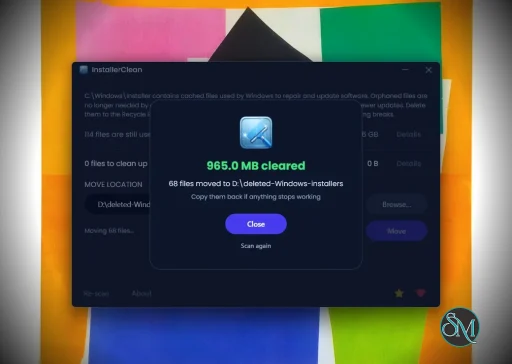
InstallerClean is a small Windows tool that helps detect and remove leftover files, folders, and registry entries created by installed software. It is built for users who want to keep their system clean without manually digging through directories.
InstallerClean is a focused utility designed to clean up files and traces that remain after uninstalling programs. While many uninstallers remove the main application, leftover data often stays behind. InstallerClean aims to fix that with a simple and lightweight approach.
The application is typically portable, meaning it can run without installation and does not add extra load to your system.
Download InstallerClean v1.7.0 - Software Mirrors |
|---|
Download InstallerClean v1.7.0 Download InstallerClean v1.7.0 Download InstallerClean v1.7.0 |
InstallerClean v1.7.0 Release Notes:DownloadsThree flavours on the Assets list below: .
Or via Scoop: VirusTotal
Avast and AVG flag the slim with their shared generic ML classifier (Win64:Evo-gen), the same flag as on v1.6.0's slim. Setup and portable are clean across every engine. What's newI'm sorry for releasing v1.7.0 so soon after v1.6.0. @djibe was kind enough to file InstallerClean's first ever issue, but it came in an hour after v1.6.0 shipped. Unfortunate timing but thanks (very much) to djibe, this release should fix it. The fix: pending-reboot detection has been rewritten. The "Windows is waiting to restart" banner could fire on machines with no actual Windows update pending, blocking Move and Delete for users who weren't actually waiting for a reboot. The previous detection cast too wide a net (four broad registry signals, only one of which had any documented relationship to Windows Installer cache safety). The new gate is narrower and only fires on three Microsoft-documented Windows Installer signals:
The banner copy and CLI message are now reason-specific so it's clearer what's actually firing, and 21 new unit tests pin the behaviour against simulated registry and mutex state. If you upgraded from v1.6.0 and weren't seeing the banner, nothing changes for you. Closes #12. Full per-area detail: CHANGELOG.md. Verify your download (SHA-256)Hashes are also published as .sha256 sidecar files alongside each binary on this release. To verify in PowerShell: |
Key Features of InstallerClean
Leftover File Detection
InstallerClean scans your system for files and folders that remain after uninstalling applications. This helps free up disk space and reduce clutter.Registry Cleanup
It can identify unused or orphaned registry entries related to removed programs, helping maintain system organization.Simple Interface
The tool is designed to be straightforward. Users can scan and clean with minimal steps, making it accessible even for non technical users.Portable Usage
InstallerClean often runs as a portable application, so you can use it on multiple systems without installation.Fast Scanning
The scanning process is quick and does not heavily impact system performance.
User Experience
InstallerClean is easy to use, with a minimal interface that focuses on functionality. It does not overwhelm users with advanced settings, which makes it suitable for quick maintenance tasks.
However, advanced users may find it lacks deeper customization compared to more comprehensive system cleanup tools.
Performance and Compatibility
The software performs efficiently and works on most Windows systems. It is lightweight and does not consume significant resources during scanning or cleaning.
Because it targets leftover files specifically, it complements rather than replaces full system maintenance tools.
Pros
Lightweight and fast
Simple and easy to use
Helps remove leftover files and registry entries
Portable and convenient
Cons
Limited advanced features
Not as comprehensive as full system cleaners
Requires careful review before deleting files
InstallerClean is ideal for users who frequently install and uninstall software and want to keep their system tidy. It is also useful for those who prefer simple tools over complex system utilities.
InstallerClean delivers a focused solution for removing leftover files after uninstallations. While it is not a full system optimizer, its simplicity and efficiency make it a valuable addition to basic PC maintenance tools.
Post a Comment/Report Broken Link: