Multica is an open-source platform designed to manage and orchestrate AI agents within development workflows. Instead of running a single AI assistant, it allows multiple agents to collaborate, execute tasks, and share knowledge across projects.
It essentially acts like a control center where:
AI agents are assigned tasks
Progress is tracked in real time
Outputs and skills are reused across workflows
Multica currently supports Claude Code, Codex, OpenClaw, and OpenCode out of the box. The daemon auto-detects whichever CLIs you have installed. Since it’s open source, you can also add your own backends.
Download Multica v0.2.19 CLI - Software Mirrors |
|---|
Download Multica v0.2.19 CLI Download Multica v0.2.19 CLI Download Multica v0.2.19 CLI Download Multica v0.2.19 CLI Download Multica v0.2.19 CLI Download Multica v0.2.19 CLI Download Multica v0.2.19 CLI Download Multica v0.2.19 CLI Download Multica v0.2.19 CLI Download Multica v0.2.19 CLI Download Multica v0.2.19 CLI Download Multica v0.2.19 CLI Download Multica v0.2.19 CLI Download Multica v0.2.19 CLI Download Multica v0.2.19 CLI Download Multica v0.2.19 CLI Download Multica v0.2.19 CLI Download Multica v0.2.19 CLI Download Multica v0.2.19 CLI Download Multica v0.2.19 CLI Download Multica v0.2.19 CLI Download Multica v0.2.19 CLI Download Multica v0.2.19 CLI Download Multica v0.2.19 CLI Download Multica v0.2.19 CLI Download Multica v0.2.19 CLI Download Multica v0.2.19 CLI Download Multica v0.2.19 CLI Download Multica v0.2.19 CLI |
Multica v0.2.19 Release Notes:Changelog
|
Key Features
1. AI Agents as Teammates
Multica treats AI agents like real contributors. You can assign tasks, monitor progress, and manage their work similar to human developers.
2. Multi-Agent Orchestration
Instead of relying on a single AI model, Multica coordinates multiple agents working together on complex tasks, improving efficiency and scalability.
3. Skill Reuse and Compounding
One of its most innovative features is skill accumulation. Agents can reuse previously learned solutions, reducing redundancy and improving performance over time.
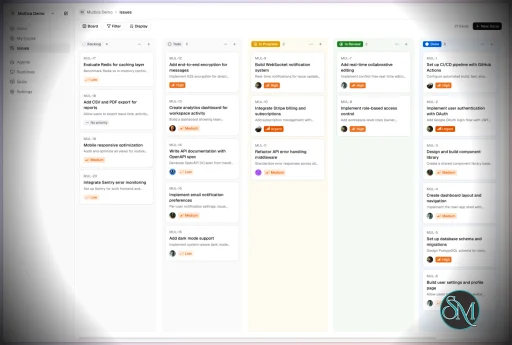
4. Real-Time Workflow Tracking
You get a unified dashboard where you can:
Track task progress
Monitor agent activity
Identify blockers and results
This makes it suitable for structured development environments.
5. CLI and Web Interface
Multica provides both:
A command-line interface for developers
A web UI for managing workflows and agents
It supports local and cloud-based environments, offering flexibility in deployment.
6. Open Source and Flexible
Being open source, Multica allows:
Full customization
Self-hosting
Integration with different AI models and tools
This makes it appealing for teams that want control over their AI infrastructure.
Performance and Use Cases
Multica is designed for advanced workflows rather than casual use. It performs best in environments where multiple AI agents are needed to collaborate.
Typical use cases include:
AI-assisted software development
Automation pipelines
Multi-step research and analysis
DevOps and engineering workflows
Its ability to coordinate agents makes it especially useful for complex tasks that go beyond simple prompts.
Quick Install
curl -fsSL https://raw.githubusercontent.com/multica-ai/multica/main/scripts/install.sh | bashInstalls the Multica CLI on macOS and Linux. Works with Homebrew or downloads the binary directly.
Windows (PowerShell):
irm https://raw.githubusercontent.com/multica-ai/multica/main/scripts/install.ps1 | iexThen configure, authenticate, and start the daemon in one command:
multica setup # Connect to Multica Cloud, log in, start daemonSelf-hosting? Add
--with-serverto deploy a full Multica server on your machine:curl -fsSL https://raw.githubusercontent.com/multica-ai/multica/main/scripts/install.sh | bash -s -- --with-server multica setup self-hostRequires Docker. See the Self-Hosting Guide for details.
Getting Started
1. Set up and start the daemon
multica setup # Configure, authenticate, and start the daemonThe daemon runs in the background and auto-detects agent CLIs (claude, codex, openclaw, opencode) on your PATH.
2. Verify your runtime
Open your workspace in the Multica web app. Navigate to Settings → Runtimes — you should see your machine listed as an active Runtime.
What is a Runtime? A Runtime is a compute environment that can execute agent tasks. It can be your local machine (via the daemon) or a cloud instance. Each runtime reports which agent CLIs are available, so Multica knows where to route work.
3. Create an agent
Go to Settings → Agents and click New Agent. Pick the runtime you just connected and choose a provider (Claude Code, Codex, OpenClaw, or OpenCode). Give your agent a name — this is how it will appear on the board, in comments, and in assignments.
4. Assign your first task
Create an issue from the board (or via multica issue create), then assign it to your new agent. The agent will automatically pick up the task, execute it on your runtime, and report progress — just like a human teammate.
User Experience
The concept behind Multica is powerful, but it comes with complexity.
Requires understanding of AI agents and workflows
Setup may involve configuring runtimes and integrations
More suited for developers than beginners
However, once configured, it provides a highly structured and scalable system.
Pros and Cons
Pros
Open source and highly customizable
Supports multi-agent collaboration
Reusable skill system improves efficiency
Real-time workflow tracking
Flexible deployment options
Cons
Still early-stage and evolving
Setup complexity is high
Requires technical knowledge
Not suitable for simple AI tasks
Who Should Use Multica
Multica is ideal for:
Developers working with AI agents
Teams building automated workflows
Companies experimenting with agent-based systems
Advanced users exploring AI orchestration
It is not designed for casual users who just need a simple chatbot.
Final Verdict
Multica represents the next step in AI tooling, moving from single assistants to collaborative AI systems. While still evolving, it introduces a powerful concept that could shape how teams use AI in development.
Multica is a promising platform for advanced users who want to build scalable, multi-agent AI workflows with full control and flexibility.
If you are exploring multi-agent AI systems or building automated development workflows, Multica is an emerging tool worth paying attention to. It introduces a new way to treat AI agents not just as tools, but as collaborative team members working alongside developers.
Post a Comment/Report Broken Link: