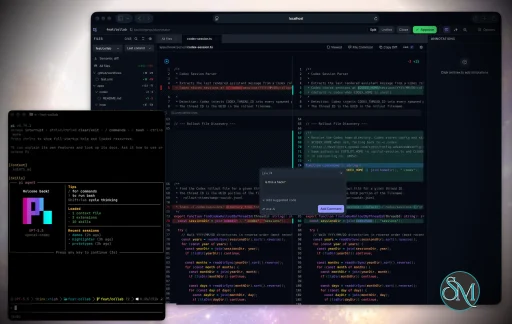
Plannotator is an open-source platform designed to review and validate plans and code generated by AI coding agents.
The platform provides a centralized interface where developers can:
Review AI-generated plans
Annotate proposed actions
Approve or reject tasks
Inspect code changes
Provide structured feedback
Improve agent outputs
Maintain human oversight
Rather than replacing developers, Plannotator aims to keep humans involved in critical decision-making during AI-assisted development.
As AI coding agents become increasingly capable, developers face a growing challenge: ensuring that AI-generated plans and code changes align with project requirements before they are executed. Plannotator addresses this problem by acting as a review layer between developers and AI coding agents.
Instead of generating code itself, Plannotator focuses on making AI-driven development more transparent and controllable. It allows teams to review, annotate, approve, reject, and refine agent-generated plans and code changes before they affect a project.
Download Plannotator v0.27.12 - Software Mirrors |
|---|
Plannotator v0.27.12 for Windowsplannotator-paste-win32-arm64.exe | 90.2 MB plannotator-paste-win32-x64.exe | 93.92 MB |
Plannotator v0.27.12 for macOSplannotator-darwin-arm64 | 114.33 MB plannotator-darwin-x64 | 119.38 MB |
Plannotator v0.27.12 for Linuxplannotator-linux-arm64 | 142.73 MB plannotator-linux-x64 | 143.61 MB |
Plannotator v0.27.12 for Other |
Plannotator v0.27.12 Release Notes:Follow @plannotator on X for updatesMissed recent releases?
What's New in v0.27.12The largest release of the 0.27 line: seven pull requests, two of them from community contributors, one a first-time contribution. The headline is a rebuilt decision header across every review surface, alongside a new hover card for code symbols and a set of community fixes. Every change went through independent adversarial review, and the release was gated by a 26-agent QA sweep before tagging.One decision control across every surfaceThe header buttons for finishing a review grew organically over the years and ended up inconsistent: annotate showed different buttons than code review, approve sat next to send feedback where a stray click could pick the wrong one, and some finishing actions only existed as keyboard shortcuts. This release replaces all of it with a single adaptive control. Every annotate surface and both code review destinations now show one primary action that reflects your session: Done (or Approve where approval is real) when there is nothing to send, Send Feedback with a count once there is. The alternate decisions live behind a caret: send with a note (the menu morphs into a composer in place), request changes with overall feedback, and an explicit discard path behind a single confirmation. Approve and send feedback never render side by side anywhere. Cmd+Enter always fires exactly what the visible primary says. Approving with notes now actually works. Previously, notes attached to an approval were silently discarded by every runtime. Approvals that carry notes are delivered to your agent with clear framing that they are non-blocking guidance, not a change request. The capability is advertised by the server, so older components fail closed instead of dropping your words. The review sidebar also gains a "+ General comment" button for review-level comments that are not tied to a line, and the local feedback archive now records whether a comment was review-level or line-level. A few behavior changes worth knowing: bare approvals no longer send the old "LGTM - no changes requested." placeholder text, approving despite open annotations is now an explicit two-step (caret, then confirm) instead of a dimmed one-click button, and pressing Escape on an open header menu closes just the menu instead of also triggering whatever Escape used to do underneath. The design came directly from community feedback asking for overall review comments, an integrated global comment field, and a fast "that's fine" path for message annotation. #1458Hover cards for code symbolsRest your pointer on an identifier in a code review diff and Plannotator shows a card: the symbol's kind, a best-effort signature, its doc comment, where it is defined, and a sample of references, each linking into the References panel. Everything is powered by the same ripgrep search that backs Cmd+click, so there is nothing to install and nothing indexes your repo. If ripgrep is missing or the answer is weak, the card simply does not appear. Because hover affordances are personal, the first review after updating shows a one-time introduction with a live try-it: hover the demo token inside the dialog and the real card opens against it. Choose your trigger right there: on hover (the default, matching the VS Code hover delay of 300ms), only while holding Cmd (Ctrl on Windows and Linux), or off. A delay setting offers faster and more relaxed dwell times. Everything lives in Settings under the Editor tab, and anyone who had turned the earlier experimental toggle off stays off without seeing the dialog. The References panel also moved: Cmd+click and card links now open it beside the diff instead of splitting below it, so it stops stealing vertical room from the code you are reading. #1461, #1462, #1465Compare your local branch with its remoteA new "Local vs remote branch" diff type answers the question "what would I push right now?": local commits the remote does not have, staged and unstaged edits, and untracked files, all compared against the branch's configured remote-tracking ref from your last fetch. It resolves the upstream properly rather than assuming an origin branch of the same name, only appears when the branch actually has an upstream, and shows a clear empty state when local and remote match. It never touches the network; fetching mid-review raises the existing refresh banner. Contributed by @leoreisdias, whose implementation carried both server runtimes, the settings integration, and a genuinely thorough test suite including a real bare-remote integration test. #1451OpenCode: the session URL notice can no longer burn a model turnOn recent OpenCode 2 betas, the "Plannotator session ready" notice posted into the transcript could wake a model turn on its own, burning tokens while the reviewer was still annotating, with the real feedback then queued behind that spurious turn. The notice is now sent with explicit queue delivery, the same mechanism feedback already uses, so it renders in the transcript and waits for a genuinely user-initiated turn no matter how the host behaves. Reported by @Naasha with an unusually well-researched diagnosis that correctly identified the upstream mechanics, closing #1459. #1460Additional Changes
Install / UpdatemacOS / Linux:/plugin in Claude Code, find plannotator, and click "Update now".
Pi: Update @plannotator/pi-extension to 0.27.12 and restart Pi.
OpenCode: Clear cache and restart:
What's Changed
New Contributors
Community@leoreisdias returned with the local-vs-remote diff mode, an implementation clean enough that our adversarial review's only required change was a regenerated build manifest, and they fixed the review's optional suggestions before we finished writing them up. @zhangjinzan1 caught a real footgun in the installed skills, diagnosed exactly why an agent following them would promise an approval it could not deliver, and shipped the fix with a drift-proof test in a first contribution that merged as written. @Naasha filed one of the best bug reports this project has received, tracing a token-burning notice on OpenCode 2 betas down to the exact upstream wake semantics. The unified decision control itself is community-driven: it exists because users kept asking for overall review comments, an integrated global comment field, and a faster way to say "that's fine" - and because one of you told us you never wanted to see Approve sitting next to Send Feedback again. Thank you. Plannotator gets better because you tell us where it falls short. Full Changelog: v0.27.11...v0.27.12 |
Key Features of Plannotator
Plan Review System
One of Plannotator's core capabilities is reviewing plans generated by AI agents before execution.
Developers can examine:
Proposed tasks
Implementation strategies
Agent reasoning
Planned file modifications
Workflow sequences
This visibility helps reduce unintended changes and costly mistakes.
Annotation Tools
The platform allows users to add comments, notes, and guidance directly to AI-generated plans.
These annotations can be used to:
Clarify requirements
Correct misunderstandings
Provide context
Guide future agent actions
AI Code Review
Plannotator extends the review process beyond planning by supporting inspection of generated code.
Developers can:
Review modifications
Analyze diffs
Leave comments
Request revisions
Validate implementation details
This workflow resembles modern pull-request review systems.
Human-in-the-Loop Workflows
A major design goal is ensuring that AI actions remain subject to human approval.
Organizations can establish review processes where important actions require validation before execution.
Open Source Foundation
Plannotator is open source, allowing teams to inspect, modify, and self-host the platform according to their needs.
This transparency is particularly valuable for organizations adopting AI-assisted software development.
User Experience
The interface is designed around review workflows rather than direct code generation.
Instead of interacting with a chatbot, users primarily:
Receive agent-generated plans
Review proposed actions
Add feedback
Approve or reject changes
Monitor execution results
The workflow feels familiar to developers accustomed to pull requests, code reviews, and project planning tools.
Productivity Benefits
As AI coding tools become more autonomous, review processes become increasingly important.
Plannotator helps organizations:
Reduce risky AI actions
Improve code quality
Increase accountability
Preserve architectural consistency
Encourage collaboration between developers and AI agents
For teams adopting AI-driven development, these safeguards can be as valuable as the coding agents themselves.
Collaboration Features
The platform supports collaborative review workflows where multiple team members can participate in evaluating AI-generated outputs.
This allows:
Peer review
Team approval processes
Shared annotations
Collective decision-making
Such features are especially useful for larger engineering teams.
Performance
Because Plannotator focuses on workflow management and review rather than model inference, performance largely depends on the connected AI agents and integrations.
The platform itself is lightweight and primarily serves as an orchestration and review layer.
Open Source Advantages
Being open source provides several benefits:
Transparent development
Self-hosting capabilities
Custom integrations
Community contributions
Vendor independence
Organizations concerned about compliance, security, or proprietary workflows may find these advantages particularly appealing.
Limitations
Plannotator is designed as a companion tool rather than a complete AI development platform.
Common limitations include:
Requires external AI coding agents
Best suited for teams already using AI-assisted development
Smaller ecosystem than mature developer platforms
Additional review steps may slow rapid prototyping
Some users may prefer fully autonomous workflows
The software delivers the most value in environments where oversight and quality control are priorities.
Pros
Improves transparency of AI-generated plans
Supports structured review workflows
Human-in-the-loop design
Useful annotation system
Open source
Self-hosting support
Familiar review experience for developers
Helps reduce AI-generated mistakes
Cons
Not a standalone coding agent
Requires integration with AI development tools
Smaller community than established developer platforms
Adds review overhead to workflows
Best suited for teams rather than casual users
Who Should Use Plannotator?
Plannotator is ideal for:
Software development teams
Engineering managers
AI-assisted development workflows
Organizations adopting coding agents
Open-source projects
Teams prioritizing code quality and governance
It is particularly valuable for environments where AI-generated code requires oversight before reaching production systems.
Plannotator fills an increasingly important role in the AI development ecosystem by providing visibility and control over AI-generated plans and code changes. Its focus on human oversight, structured reviews, and collaborative workflows makes it a useful companion for modern coding agents. While it is not a replacement for AI coding tools themselves, it offers a practical solution for teams seeking greater confidence and accountability in AI-assisted software development.
Developer:
backnotprop
Operating System:
Windows / macOS / Linux
Date Added:
2026-09-03T18:07:57.172Z
Categories:
Post a Comment/Report Broken Link: