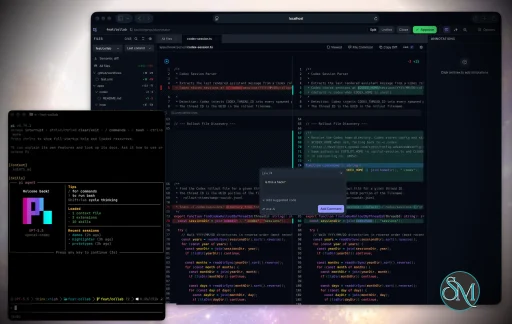
Plannotator is an open-source platform designed to review and validate plans and code generated by AI coding agents.
The platform provides a centralized interface where developers can:
Review AI-generated plans
Annotate proposed actions
Approve or reject tasks
Inspect code changes
Provide structured feedback
Improve agent outputs
Maintain human oversight
Rather than replacing developers, Plannotator aims to keep humans involved in critical decision-making during AI-assisted development.
As AI coding agents become increasingly capable, developers face a growing challenge: ensuring that AI-generated plans and code changes align with project requirements before they are executed. Plannotator addresses this problem by acting as a review layer between developers and AI coding agents.
Instead of generating code itself, Plannotator focuses on making AI-driven development more transparent and controllable. It allows teams to review, annotate, approve, reject, and refine agent-generated plans and code changes before they affect a project.
Download Plannotator v0.27.11 - Software Mirrors |
|---|
Plannotator v0.27.11 for Windowsplannotator-paste-win32-arm64.exe | 90.2 MB plannotator-paste-win32-x64.exe | 93.92 MB |
Plannotator v0.27.11 for macOSplannotator-darwin-arm64 | 114.25 MB plannotator-darwin-x64 | 119.3 MB |
Plannotator v0.27.11 for Linuxplannotator-linux-arm64 | 142.67 MB plannotator-linux-x64 | 143.54 MB |
Plannotator v0.27.11 for Other |
Plannotator v0.27.11 Release Notes:Follow @plannotator on X for updatesMissed recent releases?
What's New in v0.27.11A patch release with one important resource fix, one new safety net, and a CLI fix from a first-time contributor. Every change went through independent adversarial review and a six-agent QA sweep before tagging.OpenCode servers no longer pile up in the backgroundIf you had theopencode CLI installed, every Plannotator session quietly started an opencode serve process at launch, just to list OpenCode's models in the Ask AI dropdown. Ending a session with Ctrl-C never cleaned that process up, and every later session found the leftover server and loaded more state into it. Over a day of normal use this grew into a multi-gigabyte orphan process nobody started on purpose.
Three things changed. Nothing starts anymore until you actually select OpenCode in Ask AI; most users never do, and now never spawn it. When it does start, each session runs its own private server on its own port instead of sharing one, so sessions can never pile into each other. And the server is now closed when the session ends, including on Ctrl-C.
Two visible differences for OpenCode users of Ask AI: the model list fills in when you first select the provider instead of being preloaded, and you will see one opencode serve process per active Plannotator session rather than a shared one. Both are the intended shape of the fix.
#1445
Your submitted feedback is now archived locallyEvery plan decision, code review submission, and annotate submission is now recorded on your machine, under~/.plannotator/feedback/, organized by project. Each record is one line in an append-only index plus a readable markdown file holding your review text, the excerpts it quoted, and annotation metadata, with lightweight provenance such as file paths and the git ref under review.
The reason it exists: feedback used to be gone the moment it was sent. An agent times out, a terminal closes, and the review you wrote is unrecoverable. Now there is a durable record of everything you submitted, and a growing personal archive you can analyze or learn from over time. Herdr Annotate, the terminal-side annotator, writes to the same archive with its own client label, so both tools build one history.
The archive stays on your machine and is never transmitted. It is on by default; set PLANNOTATOR_FEEDBACK_HISTORY=0 (or "feedbackHistory": false in ~/.plannotator/config.json) to turn it off, and delete ~/.plannotator/feedback/ to forget what is there. The privacy page documents it. The write path is deliberately fail-safe: if the archive cannot be written for any reason, your feedback still submits exactly as before.
#1438
A typo'd command now tells you instead of hanging foreverplannotator annotatte README.md used to print nothing and hang until killed, because an unrecognized subcommand fell through to the plan-review hook path, which waits for hook data on stdin that never arrives from a terminal. An unknown subcommand now exits immediately with the misspelled word, a "Did you mean" suggestion, and a pointer to --help. A registry test scrapes the real dispatcher so the known-command list can never drift and reject a valid command.
Contributed by @SumeraMartin in #1444, whose diagnosis of the stdin fallthrough was exact, in their first contribution to the project.
Additional Changes
Install / UpdatemacOS / Linux:/plugin in Claude Code, find plannotator, and click "Update now".
Pi: Update @plannotator/pi-extension to 0.27.11 and restart Pi.
OpenCode: Clear cache and restart:
What's Changed
New Contributors
Community@SumeraMartin found the unknown-subcommand hang, diagnosed the exact stdin fallthrough that caused it, and shipped the fix with a drift-proof test suite in a first contribution that merged as written. The opencode leak was caught during our own multi-agent operations when a monitoring session flagged a multi-gigabyte orphan process, and the feedback archive grew out of repeated user reports of reviews lost to agent timeouts. Thank you. Plannotator gets better because you tell us where it falls short. Full Changelog: v0.27.10...v0.27.11 |
Key Features of Plannotator
Plan Review System
One of Plannotator's core capabilities is reviewing plans generated by AI agents before execution.
Developers can examine:
Proposed tasks
Implementation strategies
Agent reasoning
Planned file modifications
Workflow sequences
This visibility helps reduce unintended changes and costly mistakes.
Annotation Tools
The platform allows users to add comments, notes, and guidance directly to AI-generated plans.
These annotations can be used to:
Clarify requirements
Correct misunderstandings
Provide context
Guide future agent actions
AI Code Review
Plannotator extends the review process beyond planning by supporting inspection of generated code.
Developers can:
Review modifications
Analyze diffs
Leave comments
Request revisions
Validate implementation details
This workflow resembles modern pull-request review systems.
Human-in-the-Loop Workflows
A major design goal is ensuring that AI actions remain subject to human approval.
Organizations can establish review processes where important actions require validation before execution.
Open Source Foundation
Plannotator is open source, allowing teams to inspect, modify, and self-host the platform according to their needs.
This transparency is particularly valuable for organizations adopting AI-assisted software development.
User Experience
The interface is designed around review workflows rather than direct code generation.
Instead of interacting with a chatbot, users primarily:
Receive agent-generated plans
Review proposed actions
Add feedback
Approve or reject changes
Monitor execution results
The workflow feels familiar to developers accustomed to pull requests, code reviews, and project planning tools.
Productivity Benefits
As AI coding tools become more autonomous, review processes become increasingly important.
Plannotator helps organizations:
Reduce risky AI actions
Improve code quality
Increase accountability
Preserve architectural consistency
Encourage collaboration between developers and AI agents
For teams adopting AI-driven development, these safeguards can be as valuable as the coding agents themselves.
Collaboration Features
The platform supports collaborative review workflows where multiple team members can participate in evaluating AI-generated outputs.
This allows:
Peer review
Team approval processes
Shared annotations
Collective decision-making
Such features are especially useful for larger engineering teams.
Performance
Because Plannotator focuses on workflow management and review rather than model inference, performance largely depends on the connected AI agents and integrations.
The platform itself is lightweight and primarily serves as an orchestration and review layer.
Open Source Advantages
Being open source provides several benefits:
Transparent development
Self-hosting capabilities
Custom integrations
Community contributions
Vendor independence
Organizations concerned about compliance, security, or proprietary workflows may find these advantages particularly appealing.
Limitations
Plannotator is designed as a companion tool rather than a complete AI development platform.
Common limitations include:
Requires external AI coding agents
Best suited for teams already using AI-assisted development
Smaller ecosystem than mature developer platforms
Additional review steps may slow rapid prototyping
Some users may prefer fully autonomous workflows
The software delivers the most value in environments where oversight and quality control are priorities.
Pros
Improves transparency of AI-generated plans
Supports structured review workflows
Human-in-the-loop design
Useful annotation system
Open source
Self-hosting support
Familiar review experience for developers
Helps reduce AI-generated mistakes
Cons
Not a standalone coding agent
Requires integration with AI development tools
Smaller community than established developer platforms
Adds review overhead to workflows
Best suited for teams rather than casual users
Who Should Use Plannotator?
Plannotator is ideal for:
Software development teams
Engineering managers
AI-assisted development workflows
Organizations adopting coding agents
Open-source projects
Teams prioritizing code quality and governance
It is particularly valuable for environments where AI-generated code requires oversight before reaching production systems.
Plannotator fills an increasingly important role in the AI development ecosystem by providing visibility and control over AI-generated plans and code changes. Its focus on human oversight, structured reviews, and collaborative workflows makes it a useful companion for modern coding agents. While it is not a replacement for AI coding tools themselves, it offers a practical solution for teams seeking greater confidence and accountability in AI-assisted software development.
Developer:
backnotprop
Operating System:
Windows / macOS / Linux
Date Added:
2026-09-01T23:00:20.217Z
Categories:
Post a Comment/Report Broken Link: