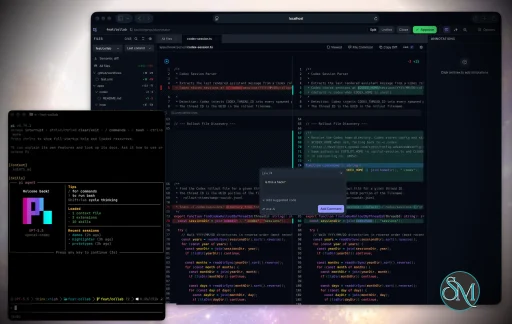
Plannotator is an open-source platform designed to review and validate plans and code generated by AI coding agents.
The platform provides a centralized interface where developers can:
Review AI-generated plans
Annotate proposed actions
Approve or reject tasks
Inspect code changes
Provide structured feedback
Improve agent outputs
Maintain human oversight
Rather than replacing developers, Plannotator aims to keep humans involved in critical decision-making during AI-assisted development.
As AI coding agents become increasingly capable, developers face a growing challenge: ensuring that AI-generated plans and code changes align with project requirements before they are executed. Plannotator addresses this problem by acting as a review layer between developers and AI coding agents.
Instead of generating code itself, Plannotator focuses on making AI-driven development more transparent and controllable. It allows teams to review, annotate, approve, reject, and refine agent-generated plans and code changes before they affect a project.
Download Plannotator v0.27.6 - Software Mirrors |
|---|
Plannotator v0.27.6 for Windowsplannotator-paste-win32-arm64.exe | 90.2 MB plannotator-paste-win32-x64.exe | 93.92 MB |
Plannotator v0.27.6 for macOSplannotator-darwin-arm64 | 114.13 MB plannotator-darwin-x64 | 119.17 MB |
Plannotator v0.27.6 for Linuxplannotator-linux-arm64 | 142.54 MB plannotator-linux-x64 | 143.41 MB |
Plannotator v0.27.6 for Other |
Plannotator v0.27.6 Release Notes:Follow @plannotator on X for updatesMissed recent releases?
What's New in v0.27.6You can now annotate your running app. Pointplannotator annotate at a localhost URL and the actual application opens inside the annotate UI: click any element to comment on it, press Esc to use the app normally, and send it all back to your agent. This works on Claude Code and Pi. The release also brings configurable Agent TUI placement, collapsed lockfiles in code review, and a wave of fixes across Pi, VS Code, and the annotation surface. Nineteen PRs, three from first-time contributors.
Note: v0.27.6 is v0.27.5 plus same-day Pi support for live app annotation; these notes cover both.
Annotate your running appplannotator annotate http://localhost:5173 no longer converts the page to a snapshot. A per-session loopback proxy mirrors your dev server and opens the real, running app inside the annotate UI, hot reload and SPA navigation included. Click any element to pin a comment on it, shift-click to join more elements into the same comment, and use placed numbered markers to track everything. --static forces the old conversion; --app forces live mode and fails loudly if the server is not reachable.
The security boundary is deliberate: the proxy binds loopback only, validates the Host header before touching your app, authenticates every message between the page and the editor with a per-session token, and refuses to run at all in remote or tailnet-published sessions (use --static there). Live sessions write no session content to disk beyond your annotation draft, which is keyed per target app.
Pi users get the same feature. The proxy's decision logic (injection, host validation, security gates, redirect handling) lives in one shared core used by both server runtimes, and the Pi extension ships its own Node transport with every security guard test-covered, including working hot reload through the proxied WebSocket. /plannotator-annotate http://localhost:5173 on Pi opens the live app.
One behavior change to know: under PLANNOTATOR_REMOTE, annotating a localhost URL previously converted the page silently. It now exits with a clear message asking for --static, because silently converting when you asked for the live app hides what you are actually reviewing.
This closes the oldest open feature request in the tracker. Thanks @JulianS-Uni for the original ask in #642, and @notxcain, who saw this feature early and built the first working take on a preview proxy in #1049 before we landed a from-scratch implementation.
One interaction model for HTML and live pagesHTML and live-app annotate sessions now open with annotation armed: hover outlines what you are pointing at, a click opens the comment composer. Press Esc and you are in interact mode, where clicks, forms, and navigation reach the page itself. The pen button in the header (or Mod+Shift+A) re-arms annotation, text selection comments work in both modes, and the eye button hides every floating control when you just want to read. These surfaces are comment-only now: the markup-delete and label tools were markdown concepts that never fit pages, and removing them made the whole flow simpler. On phones and tablets the same controls live in the Options menu. This also fixes the class of bug where a JS-driven page could not be used at all during annotation, reported by @Chrysweel in #1360 for slide decks.Put the Agent TUI where you want itThe annotate-mode agent terminal can now dock Left or Right, or stay Hidden until you ask for it. The preference persists in~/.plannotator/config.json, and the terminal's Position control lives in its Display popover with a matching entry in Settings. A bug fix rides along: entering wide mode used to unmount the terminal and kill a running agent session; it now stays alive in the background.
Lockfiles stop burying your reviewGenerated files (lockfiles, minified bundles, source maps, and anything markedlinguist-generated in .gitattributes) now start collapsed in the all-files review view, the way GitHub treats them. The patch itself is never filtered; a visible notice shows what was collapsed and one click expands any of it.
Your VS Code theme choice winsThe VS Code extension used to force the IDE's colors onto the panel, so choosing Plannotator's light theme in a dark IDE gave you a broken mix. Now your chosen theme always wins and only the System setting follows the IDE, with a one-time migration so panels upgraded from older versions follow a light IDE again instead of being stuck on an auto-seeded dark.Pi fixesThree fixes for the Pi extension.thinking: "max" in phase config is accepted now (the whitelist predated Pi adding the level) and unrecognized values warn instead of vanishing, closing #1304 reported by @edision. Hosts that do not expose Pi's project-trust capability get an honest warning instead of being told to update Pi, closing #1353 reported by @materemias from OMP. And turning plan mode off can no longer leave stale planning instructions steering the session, closing #1320 reported by @nwhitley-trAIner.
Additional Changes
Install / UpdatemacOS / Linux:/plugin in Claude Code, find plannotator, and click "Update now".
Pi: Update @plannotator/pi-extension to 0.27.6 and restart Pi.
OpenCode: Clear cache and restart:
What's Changed
New Contributors
ContributorsThree first-time contributors landed code in this release. @leoreisdias built the Agent TUI placement feature, and it arrived alongside a stack of other PRs from them that are working through review; more of that work lands soon. @galmadar added the Shift+1-4 annotation mode shortcuts. @unexge fixed the review toolbar drifting off screen, with before/after recordings that made the review easy. @notxcain gets a special mention: their PR #1049 was the first working take on live localhost annotation, months before this release shipped it. We missed the PR at the time, which was our failure, not theirs. Community reports that shaped this release:
|
Key Features of Plannotator
Plan Review System
One of Plannotator's core capabilities is reviewing plans generated by AI agents before execution.
Developers can examine:
Proposed tasks
Implementation strategies
Agent reasoning
Planned file modifications
Workflow sequences
This visibility helps reduce unintended changes and costly mistakes.
Annotation Tools
The platform allows users to add comments, notes, and guidance directly to AI-generated plans.
These annotations can be used to:
Clarify requirements
Correct misunderstandings
Provide context
Guide future agent actions
AI Code Review
Plannotator extends the review process beyond planning by supporting inspection of generated code.
Developers can:
Review modifications
Analyze diffs
Leave comments
Request revisions
Validate implementation details
This workflow resembles modern pull-request review systems.
Human-in-the-Loop Workflows
A major design goal is ensuring that AI actions remain subject to human approval.
Organizations can establish review processes where important actions require validation before execution.
Open Source Foundation
Plannotator is open source, allowing teams to inspect, modify, and self-host the platform according to their needs.
This transparency is particularly valuable for organizations adopting AI-assisted software development.
User Experience
The interface is designed around review workflows rather than direct code generation.
Instead of interacting with a chatbot, users primarily:
Receive agent-generated plans
Review proposed actions
Add feedback
Approve or reject changes
Monitor execution results
The workflow feels familiar to developers accustomed to pull requests, code reviews, and project planning tools.
Productivity Benefits
As AI coding tools become more autonomous, review processes become increasingly important.
Plannotator helps organizations:
Reduce risky AI actions
Improve code quality
Increase accountability
Preserve architectural consistency
Encourage collaboration between developers and AI agents
For teams adopting AI-driven development, these safeguards can be as valuable as the coding agents themselves.
Collaboration Features
The platform supports collaborative review workflows where multiple team members can participate in evaluating AI-generated outputs.
This allows:
Peer review
Team approval processes
Shared annotations
Collective decision-making
Such features are especially useful for larger engineering teams.
Performance
Because Plannotator focuses on workflow management and review rather than model inference, performance largely depends on the connected AI agents and integrations.
The platform itself is lightweight and primarily serves as an orchestration and review layer.
Open Source Advantages
Being open source provides several benefits:
Transparent development
Self-hosting capabilities
Custom integrations
Community contributions
Vendor independence
Organizations concerned about compliance, security, or proprietary workflows may find these advantages particularly appealing.
Limitations
Plannotator is designed as a companion tool rather than a complete AI development platform.
Common limitations include:
Requires external AI coding agents
Best suited for teams already using AI-assisted development
Smaller ecosystem than mature developer platforms
Additional review steps may slow rapid prototyping
Some users may prefer fully autonomous workflows
The software delivers the most value in environments where oversight and quality control are priorities.
Pros
Improves transparency of AI-generated plans
Supports structured review workflows
Human-in-the-loop design
Useful annotation system
Open source
Self-hosting support
Familiar review experience for developers
Helps reduce AI-generated mistakes
Cons
Not a standalone coding agent
Requires integration with AI development tools
Smaller community than established developer platforms
Adds review overhead to workflows
Best suited for teams rather than casual users
Who Should Use Plannotator?
Plannotator is ideal for:
Software development teams
Engineering managers
AI-assisted development workflows
Organizations adopting coding agents
Open-source projects
Teams prioritizing code quality and governance
It is particularly valuable for environments where AI-generated code requires oversight before reaching production systems.
Plannotator fills an increasingly important role in the AI development ecosystem by providing visibility and control over AI-generated plans and code changes. Its focus on human oversight, structured reviews, and collaborative workflows makes it a useful companion for modern coding agents. While it is not a replacement for AI coding tools themselves, it offers a practical solution for teams seeking greater confidence and accountability in AI-assisted software development.
Developer:
backnotprop
Operating System:
Windows / macOS / Linux
Date Added:
2026-08-21T23:07:16.416Z
Categories:
Post a Comment/Report Broken Link: