Netcatty v1.1.80

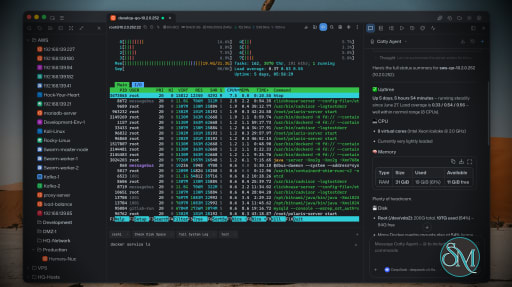
Netcatty is an open source SSH client and remote server management application designed for developers, DevOps engineers, and system administrators. Rather than being a simple terminal emulator, it combines SSH, SFTP, port forwarding, terminal management, and workspace organization into a single desktop application. Available for Windows, macOS, and Linux, Netcatty aims to streamline remote server administration with a modern interface and powerful productivity features.

Managing multiple remote servers often means juggling several terminal windows, file transfer tools, and SSH configurations. Netcatty brings these tasks together into one application with organized workspaces, split terminals, and integrated file management.

Unlike traditional SSH clients that focus solely on terminal access, Netcatty provides a complete remote administration environment with support for SSH, Telnet, Mosh, serial connections, SFTP, jump hosts, proxy servers, and port forwarding.

Key Features of Netcatty

Modern SSH Workspace

Netcatty organizes servers into a built-in Vault, allowing users to manage large numbers of hosts using grid, list, or tree views with fast search capabilities. This makes navigating complex infrastructures much easier than maintaining separate configuration files.

Split Terminal Support

Multiple terminal sessions can be displayed simultaneously using horizontal and vertical split layouts. This is especially useful when monitoring several servers or comparing outputs side by side.

Built-In SFTP Client

The integrated SFTP browser supports drag-and-drop file transfers, remote file editing, and directory management without requiring a separate application.

Multiple Connection Protocols

In addition to SSH, Netcatty supports Telnet, Mosh, and serial connections. It also includes support for jump hosts, proxy servers, and legacy SSH algorithms for compatibility with older systems.

Port Forwarding

The application supports local, remote, and dynamic port forwarding with reusable configurations and automatic startup, making it suitable for development, database access, and secure tunneling.

Secure Authentication

Netcatty supports password authentication, SSH keys, certificates, and SSH agent forwarding, providing flexibility for both personal and enterprise environments.

Cloud Configuration Sync

Users can synchronize their configuration across multiple devices using supported cloud storage providers such as GitHub, Google Drive, OneDrive, or Amazon S3.

AI Assistant

Recent versions include an integrated AI assistant that helps automate terminal workflows and assists with remote administration tasks directly within the application.

Download Netcatty v1.1.80 - Software Mirrors

Netcatty v1.1.80 for Windows

Netcatty-1.1.80-portable-win-x64.exe | 129.25 MB

Netcatty-1.1.80-win-x64.exe | 129.48 MB

Netcatty-1.1.80-win-x64.zip | 177.73 MB

Netcatty v1.1.80 for macOS

Netcatty-1.1.80-mac-arm64.dmg | 147.28 MB

Netcatty-1.1.80-mac-arm64.zip | 147.42 MB

Netcatty-1.1.80-mac-x64.dmg | 152.43 MB

Netcatty-1.1.80-mac-x64.zip | 152.61 MB

Netcatty v1.1.80 for Linux

Netcatty-1.1.80-linux-aarch64.pacman | 103.73 MB

Netcatty-1.1.80-linux-aarch64.rpm | 150.91 MB

Netcatty-1.1.80-linux-amd64.deb | 153.93 MB

Netcatty-1.1.80-linux-arm64.AppImage | 154.3 MB

Netcatty-1.1.80-linux-arm64.deb | 150.97 MB

Netcatty-1.1.80-linux-x64.pacman | 110.54 MB

Netcatty-1.1.80-linux-x86_64.AppImage | 156.35 MB

Netcatty-1.1.80-linux-x86_64.rpm | 153.88 MB

Netcatty v1.1.80 Release Notes:

✨ Release Highlights

Netcatty v1.1.80 makes the AI composer stay responsive while you type, finishes the keyword-highlight flicker work, and hardens SFTP replace / reconnect plus a few terminal transfer and settings gaps.

πŸ€– AI composer stays responsive

  • Expanding the chat panel and typing the first characters no longer hitch: Streamdown / Shiki wait until the composer is idle, history stays plaintext until the renderer is warm, and the composer stays mounted on hidden retained panels (#2993, #2997).
  • The textarea is uncontrolled — per-keystroke draft flushes and ChatInput chrome re-renders are gone. Send still reads the live box, then clears immediately so the last prompt does not linger (#2995, #2996).
  • Before an agent injects a command into an interactive PTY, unfinished prompt-line input is discarded so the wrapper is not concatenated onto what you already typed (#2982 / #2962).
  • Windows OpenSSH AI exec detects PowerShell / cmd instead of falling through to a bash wrapper (#2960).

πŸ”¦ Keyword highlight and search

  • Existing highlighted rows are no longer repainted on ordinary Enter / output; quiet catch-up recolors offscreen first and refreshes the viewport once (#2951, #2994).
  • Esc / close / clear no longer leaves yellow search cells behind, including WebGL atlas stains and decorations that revived after reset (#2986, #2981 / #2980).

πŸ“‚ SFTP replace and reconnect

  • Conflict Replace keeps the remote file so mode bits (e.g. +x) survive upload; a missing destination is treated as no-conflict instead of a hard lstat error (#2955, #2991).
  • The SFTP side panel rebinds after SSH Start-over reconnect instead of holding a stale browse channel (#2958).

⌨️ Terminal, transfers, and connect UX

  • Large ZMODEM rz uploads wait for a real transport drain, so Windows SSH no longer drops the session after a flood (#2968).
  • Alternate-screen Shift+Enter sends Kitty CSI-u so Codex sees a real shift-enter; sudo autofill stays off on Shift+Enter broadcast targets (#2975).
  • Connecting progress only moves forward — the bar no longer rewinds when hop / phase / TCP-dial state changes (#2989).
  • Mounted-disk capacity scales into T / P units (136.37G/6.93T instead of 118736.4G) (#2949).

πŸ—‚️ Vault, settings, and system

  • Scripts can target dynamic groups by path — hosts added later match automatically (#2897).
  • Settings → System → Session Restore can open a local terminal on launch when nothing is restored (#2965).
  • Closing auto-sync is no longer undone by a later version save rewriting stale autoSync: true (#2978 / #2976).
  • System overview shows cumulative interface RX / TX traffic alongside live rates (#2953).

✨ Smaller polish

  • macOS 16×16 / 32×32 icons lose the bright one-pixel frame (#2957).
  • Settings system footer hints have room under cards (#2990).

Download based on your OS:

  • Windows: Setup x64
  • macOS: DMG Apple Silicon DMG Intel X64
  • Linux: AppImage x64 DebPackage x64 RpmPackage x64 ArchPackage x64
    AppImage arm64 DebPackage arm64 RpmPackage arm64 ArchPackage arm64

Code signing policy

Netcatty is applying to the SignPath Foundation open-source program. Once approved, covered Windows release artifacts will use Free code signing provided by SignPath.io, certificate by SignPath Foundation. See the Code signing policy and Privacy policy.

What's Changed

  • Update Nix release metadata for v1.1.79 by @netcatty-bot in https://github.com/binaricat/Netcatty/pull/2948
  • feat(terminal): scale mounted-disk capacity into T and P units by @atoz03 in https://github.com/binaricat/Netcatty/pull/2949
  • feat(vault): ζ·»εŠ εŠ¨ζ€η»„θ·―εΎ„ζ”―ζŒη”¨δΊŽθ‡ͺεŠ¨εŒ–θ„šζœ¬ by @yintian710 in https://github.com/binaricat/Netcatty/pull/2897
  • fix(mac): remove bright frame from small icons by @LJAYi in https://github.com/binaricat/Netcatty/pull/2957
  • fix(terminal): avoid keyword highlight flicker by @binaricat in https://github.com/binaricat/Netcatty/pull/2951
  • fix(ai): detect Windows OpenSSH shell for PTY exec wrappers by @netcatty-bot in https://github.com/binaricat/Netcatty/pull/2960
  • fix(zmodem): wait for transport drain on large rz uploads by @netcatty-bot in https://github.com/binaricat/Netcatty/pull/2968
  • fix(sftp): preserve remote permissions on upload replace by @netcatty-bot in https://github.com/binaricat/Netcatty/pull/2955
  • fix(sftp): rebind side panel after SSH start-over reconnect by @netcatty-bot in https://github.com/binaricat/Netcatty/pull/2958
  • fix(ai): clear unfinished terminal input before agent inject by @binaricat in https://github.com/binaricat/Netcatty/pull/2982
  • fix(terminal): prevent search highlights from reviving after reset by @netcatty-bot in https://github.com/binaricat/Netcatty/pull/2981
  • chore(ci): keep Cursor automation on triage only by @binaricat in https://github.com/binaricat/Netcatty/pull/2983
  • fix(terminal): send CSI-u Shift+Enter on alternate screen by @netcatty-bot in https://github.com/binaricat/Netcatty/pull/2975
  • fix(cloud-sync): stop version saves from re-enabling auto-sync by @netcatty-bot in https://github.com/binaricat/Netcatty/pull/2978
  • fix(system-manager): show interface RX/TX total traffic on overview by @netcatty-bot in https://github.com/binaricat/Netcatty/pull/2953
  • feat(settings): add startup landing preference for local terminal by @netcatty-bot in https://github.com/binaricat/Netcatty/pull/2965
  • fix(terminal): drop leftover search highlights after Esc by @binaricat in https://github.com/binaricat/Netcatty/pull/2986
  • fix(terminal): keep connection progress from rewinding by @binaricat in https://github.com/binaricat/Netcatty/pull/2989
  • fix(settings): give system footer hints space under cards by @binaricat in https://github.com/binaricat/Netcatty/pull/2990
  • fix(sftp): treat IPC-wrapped lstat absence as no conflict by @binaricat in https://github.com/binaricat/Netcatty/pull/2991
  • fix(dev): do not reload the app on stale Vite optimize 504s by @binaricat in https://github.com/binaricat/Netcatty/pull/2992
  • fix(ai): stop first-type hitch after expanding the chat panel by @binaricat in https://github.com/binaricat/Netcatty/pull/2993
  • fix(terminal): refresh keyword catch-up once on tall viewports by @binaricat in https://github.com/binaricat/Netcatty/pull/2994
  • fix(ai): keep composer typing off the draft notify path by @binaricat in https://github.com/binaricat/Netcatty/pull/2995
  • fix(ai): clear the composer as soon as a message is sent by @binaricat in https://github.com/binaricat/Netcatty/pull/2996
  • fix(ai): keep ChatInput chrome still while typing by @binaricat in https://github.com/binaricat/Netcatty/pull/2997
Full Changelog: https://github.com/binaricat/Netcatty/compare/v1.1.79...v1.1.80

Performance and User Experience

Netcatty delivers a polished desktop experience with a clean interface and responsive terminal performance. Workspace restoration allows users to resume previous sessions after restarting the application, reducing setup time for daily work.

Although the application is built with Electron, performance is generally smooth on modern hardware. Memory usage is higher than lightweight native SSH clients, but the added functionality justifies the additional resource consumption for most professional users.

The project is actively maintained, with frequent updates introducing new features, performance improvements, and bug fixes.

Pros

  • Free and open source.

  • Modern interface with workspace management.

  • SSH, SFTP, Telnet, Mosh, and serial support.

  • Split terminal layouts.

  • Built-in SFTP browser.

  • Flexible port forwarding.

  • Secure authentication options.

  • Cross-platform support.

  • Active development.

Cons

  • Electron-based application uses more memory than native SSH clients.

  • Advanced features may be unnecessary for users who only need basic SSH access.

  • Some enterprise users may prefer highly specialized commercial SSH management tools.

Who Should Use Netcatty?

Netcatty is an excellent choice for developers, DevOps engineers, cloud engineers, system administrators, security professionals, and IT consultants who regularly manage multiple remote servers.

It is particularly valuable for users looking to replace separate SSH clients, SFTP applications, and terminal windows with a unified workspace.

Final Verdict

Netcatty is far more than a traditional SSH client. By combining terminal management, secure file transfers, workspace organization, port forwarding, and modern productivity features into one application, it offers an impressive environment for remote server administration.

Its clean interface, broad protocol support, and active development make it one of the most compelling open source SSH workspaces currently available. For professionals managing remote infrastructure on a daily basis, Netcatty is well worth considering.
Netcatty v1.1.80
Free
Software Informations:
Developer:

Operating System:
Windows / macOS / Linux
Date Added:
2026-08-15T10:07:14.508Z
Categories:

Post a Comment/Report Broken Link:









