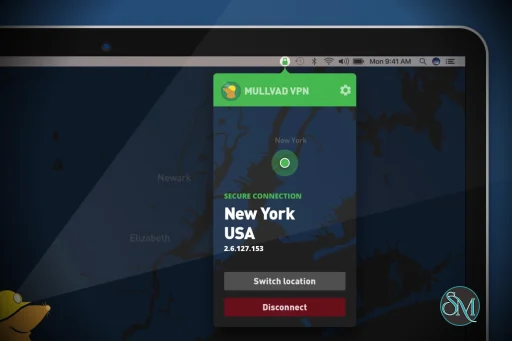
Mullvad VPN is a VPN service and desktop application that encrypts internet traffic and routes it through secure servers located around the world.
The desktop app allows users to:
Secure internet connections
Hide IP addresses
Protect traffic on public Wi-Fi
Bypass network restrictions
Access servers in multiple countries
Configure advanced privacy settings
Use WireGuard and OpenVPN protocols
Unlike many VPN providers, Mullvad does not require an email address to create an account. Instead, users receive a randomly generated account number.
Mullvad VPN has earned a reputation as one of the most privacy-conscious VPN services available. Unlike many competitors that rely heavily on marketing claims, Mullvad focuses on transparency, strong security practices, and minimizing the amount of information it collects from users.
The service is particularly popular among privacy advocates, security professionals, journalists, developers, and users who value anonymity over flashy features. Its desktop application reflects this philosophy by providing a clean, straightforward interface centered around secure VPN connectivity.
Download Mullvad VPN desktop App 2026.4 - Software Mirrors |
|---|
Mullvad VPN desktop App 2026.4 for WindowsMullvadVPN-2026.4.exe | 238.61 MB |
Mullvad VPN desktop App 2026.4 for macOSMullvadVPN-2026.4.pkg | 240.54 MB |
Mullvad VPN desktop App 2026.4 for LinuxMullvadVPN-2026.4_aarch64.rpm | 85.92 MB MullvadVPN-2026.4_amd64.deb | 106.43 MB |
Mullvad VPN desktop App 2026.4 Release Notes:This release is for desktop only. Here is a list of all changes since last stable release 2026.3:Added
Changed
Windows
macOS
Fixed
macOS
Linux
Windows
Security
MULLVAD_MANAGEMENT_SOCKET_GROUP. This addresses the advisory GHSA-p9rr-wc9m-qmwg.
Linux
|
Key Features of Mullvad VPN
Anonymous Account Creation
One of Mullvad's most distinctive features is its account system.
Users do not need to provide:
Email addresses
Names
Phone numbers
Instead, the service generates a unique account number that serves as the login credential.
This approach minimizes the amount of personal information associated with an account.
WireGuard Support
Mullvad was one of the earliest VPN providers to fully embrace WireGuard.
The desktop application offers:
Fast connection speeds
Modern encryption
Efficient performance
Low latency
WireGuard is the recommended protocol for most users.
OpenVPN Support
For compatibility and flexibility, Mullvad also supports OpenVPN.
This allows users to choose the protocol that best fits their network environment and security requirements.
Multihop Connections
The application supports advanced routing options that allow traffic to pass through multiple VPN servers.
This can improve privacy for users who require additional layers of protection.
Kill Switch
Mullvad includes a built-in kill switch that prevents traffic from leaking outside the VPN tunnel if the connection unexpectedly drops.
This is an important feature for maintaining privacy.
Split Tunneling
Users can choose which applications use the VPN and which connect directly to the internet.
This flexibility is useful for:
Gaming
Streaming
Development workflows
Local network access
DNS Leak Protection
The application routes DNS requests through Mullvad infrastructure to reduce the risk of DNS leaks and improve privacy.
User Experience
Mullvad's desktop application prioritizes simplicity.
The main interface focuses on:
Connection status
Server location selection
Security settings
Account information
Most users can connect to a VPN server with a single click.
Advanced options remain accessible without cluttering the interface.
The design is clean, responsive, and easy to navigate on both Windows and macOS.
Performance
Performance is generally excellent.
The WireGuard implementation delivers:
Fast download speeds
Low latency
Reliable connections
Efficient resource usage
While performance varies depending on server location and network conditions, Mullvad consistently ranks among the better-performing privacy-focused VPN providers.
Security and Privacy
Privacy is where Mullvad truly distinguishes itself.
The company is known for:
Minimal account information collection
No-email registration
Transparent policies
Open-source applications
Independent security audits
Strong encryption standards
For users prioritizing anonymity, these practices are among the strongest in the VPN industry.
Open Source Applications
The Mullvad desktop application is open source.
Benefits include:
Public code review
Transparency
Independent auditing
Community trust
Security researchers can inspect the application's implementation rather than relying solely on vendor claims.
Streaming and Everyday Use
Mullvad is capable of handling common internet activities such as:
Web browsing
Remote work
Video conferencing
File transfers
General streaming
However, unlike some competitors, Mullvad does not heavily market itself as a streaming-focused VPN service.
Its priorities remain privacy and security rather than media unblocking.
Limitations
Despite its strengths, Mullvad may not be the ideal choice for every user.
Common limitations include:
Fewer streaming-focused features
Smaller marketing ecosystem
Limited emphasis on geo-unblocking services
Fewer bundled extras than some competitors
Users seeking maximum entertainment-focused features may prefer VPN providers specifically optimized for streaming.
Pros
Exceptional privacy practices
Anonymous account creation
Strong WireGuard implementation
Open-source applications
Independent security audits
Clean and intuitive interface
Kill switch and split tunneling support
Transparent company practices
Cons
Less focused on streaming access
Fewer bundled consumer features
Advanced privacy options may be unnecessary for casual users
Smaller server network than some large competitors
Who Should Use Mullvad VPN?
Mullvad VPN is ideal for:
Privacy-conscious users
Journalists
Developers
Security professionals
Remote workers
Open-source enthusiasts
Users seeking anonymous VPN accounts
It is particularly valuable for individuals who prioritize privacy, transparency, and security over marketing-driven extras.
Mullvad VPN delivers one of the strongest privacy-focused VPN experiences available today. Its anonymous account system, open-source applications, WireGuard performance, and transparent approach to security make it a standout choice in the VPN market. While it may not offer every entertainment-focused feature found in mainstream competitors, it excels at what matters most: protecting user privacy and securing internet traffic.
Post a Comment/Report Broken Link: