KillerPDF is a lightweight PDF conversion and document processing application that focuses on simplicity, speed, and privacy. Instead of relying on cloud-based services, it performs PDF operations locally on your computer, allowing you to convert, merge, split, compress, and manage PDF documents without uploading sensitive files to external servers.
For users who frequently work with confidential documents, KillerPDF offers a practical alternative to online PDF tools.
Many online PDF services require users to upload documents before processing them. While convenient, this approach may not be suitable for business documents, contracts, invoices, or personal files.
KillerPDF addresses this by processing documents locally whenever possible. This reduces privacy concerns while also eliminating the need to wait for files to upload and download.
The application is designed with a straightforward interface that emphasizes common PDF tasks over complex editing features.
Key Features of KillerPDF
PDF Conversion
KillerPDF supports converting documents between PDF and various file formats, making it easier to work with reports, presentations, and office documents.
The conversion process is simple and requires only a few steps.
Merge PDF Files
Users can combine multiple PDF files into a single document.
This feature is useful for creating reports, assembling scanned documents, or organizing related files into one PDF.
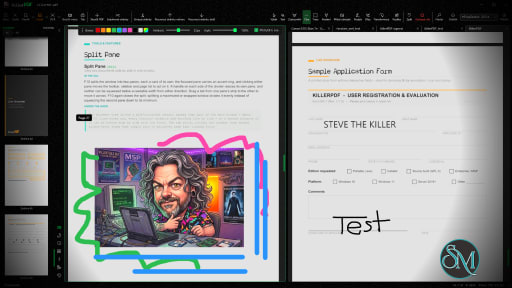
Split PDF Documents
Large PDF files can be divided into smaller documents or individual pages.
This makes it easier to extract specific sections without modifying the original file.
PDF Compression
The built-in compression tool helps reduce PDF file sizes while maintaining acceptable document quality.
Smaller files are easier to email, upload, and archive.
Local Processing
One of KillerPDF's strongest advantages is local document processing.
Keeping files on your own computer improves privacy and may also speed up processing for large documents since there is no need to transfer files over the internet.
Easy-to-Use Interface
The application focuses on essential PDF tools with a clean interface that is suitable for beginners.
Most operations require only selecting a file, choosing the desired action, and saving the result.
Download KillerPDF v1.8.1 - Software Mirrors |
|---|
KillerPDF v1.8.1 for Windows |
Others Download related to KillerPDF v1.8.1 |
KillerPDF v1.8.1 Source Code |
KillerPDF v1.8.1 Release Notes:1.8.1 fixes urgent 1.8 regressions and adds several focused page-management improvements.Added
Fixed
|
Performance and User Experience
KillerPDF performs common PDF tasks quickly and provides an uncomplicated workflow.
Because the application focuses on core document processing rather than advanced publishing features, the interface remains easy to understand even for first-time users.
Performance depends primarily on the size and complexity of the documents being processed, but common operations such as merging, splitting, and compression are generally completed quickly.
Pros
Simple and easy to use.
Local document processing for better privacy.
PDF conversion tools.
Merge and split PDF files.
PDF compression.
Fast processing.
Suitable for everyday document management.
Lightweight interface.
Cons
Lacks advanced PDF editing features found in professional software.
Feature set is more limited than comprehensive PDF suites.
Platform availability may be limited depending on the release.
Some specialized workflows may require dedicated PDF editing software.
Who Should Use KillerPDF?
KillerPDF is a good choice for students, office workers, freelancers, and home users who regularly perform basic PDF tasks such as converting, merging, splitting, and compressing documents.
It is especially suitable for users who prefer processing sensitive files locally instead of uploading them to online services.
Final Verdict
KillerPDF focuses on doing common PDF tasks efficiently without unnecessary complexity. Its emphasis on local processing makes it attractive for privacy-conscious users, while its clean interface keeps everyday document management simple.
Although it is not intended to replace professional PDF editing software, it covers many of the most frequently used PDF operations with minimal effort.
Developer:
Steve the Killer
Operating System:
Windows
Date Added:
2026-08-29T22:07:07.070Z
Categories:
Post a Comment/Report Broken Link: