KillerPDF is a lightweight PDF conversion and document processing application that focuses on simplicity, speed, and privacy. Instead of relying on cloud-based services, it performs PDF operations locally on your computer, allowing you to convert, merge, split, compress, and manage PDF documents without uploading sensitive files to external servers.
For users who frequently work with confidential documents, KillerPDF offers a practical alternative to online PDF tools.
Many online PDF services require users to upload documents before processing them. While convenient, this approach may not be suitable for business documents, contracts, invoices, or personal files.
KillerPDF addresses this by processing documents locally whenever possible. This reduces privacy concerns while also eliminating the need to wait for files to upload and download.
The application is designed with a straightforward interface that emphasizes common PDF tasks over complex editing features.
Key Features of KillerPDF
PDF Conversion
KillerPDF supports converting documents between PDF and various file formats, making it easier to work with reports, presentations, and office documents.
The conversion process is simple and requires only a few steps.
Merge PDF Files
Users can combine multiple PDF files into a single document.
This feature is useful for creating reports, assembling scanned documents, or organizing related files into one PDF.
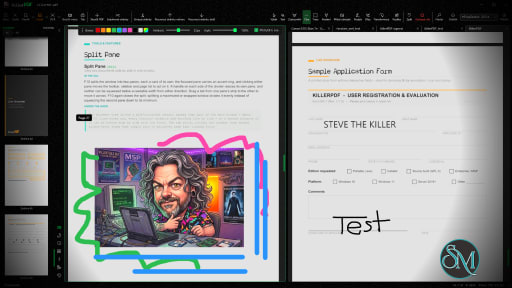
Split PDF Documents
Large PDF files can be divided into smaller documents or individual pages.
This makes it easier to extract specific sections without modifying the original file.
PDF Compression
The built-in compression tool helps reduce PDF file sizes while maintaining acceptable document quality.
Smaller files are easier to email, upload, and archive.
Local Processing
One of KillerPDF's strongest advantages is local document processing.
Keeping files on your own computer improves privacy and may also speed up processing for large documents since there is no need to transfer files over the internet.
Easy-to-Use Interface
The application focuses on essential PDF tools with a clean interface that is suitable for beginners.
Most operations require only selecting a file, choosing the desired action, and saving the result.
Download KillerPDF v1.7.4 - Software Mirrors |
|---|
KillerPDF v1.7.4 for WindowsKillerPDF.exe | 11.03 MB |
Others Download related to KillerPDF v1.7.4SHA256SUMS.txt | 270 B KillerPDF-1.7.4-src.zip | 9.85 MB |
KillerPDF v1.7.4 Source Code
KillerPDF v1.7.4 Source code (zip)
KillerPDF v1.7.4 Source code (tar.gz)
|
KillerPDF v1.7.4 Release Notes:
KillerPDF 1.7.4 keeps the convenience of one portable download while installing as a normal multi-file application, cutting initial startup time substantially. This release also fixes annotation rotation, form fields on comma-decimal locales, installation scope, and a range of viewer, dialog, and localization problems. Hungarian localization and page image export are included as well.
Added
- "Export page as image" on the Pages panel's right-click menu, including multi-page selections (#207, thanks 1mk3r).
- Hungarian (hu-HU) localization, the twelfth interface language, in the language picker as "Magyar" (PR #214, thanks CsokiHUN).
- Hide the toolbar from its right-click menu or Alt+M, and full screen no longer sits over other applications when you switch away (#215, thanks Subjuntivos).
- Translations can be tested in a normal install and reload on every save of the file; TRANSLATING.md has the steps (#211, thanks bovirus).
- The page badge fires on grid scrolling and names the visible span (#197, thanks Ryokoxx).
Changed
- KillerPDF now remains one portable download while installing as a normal multi-file application. The portable EXE carries one compressed, verified payload and cleans up its temporary files after use; installed shortcuts launch the inner app directly, avoiding Costura extraction and reducing measured first startup by about 40% on the development machine (#189, thanks ags1234). The new package is also roughly 34% smaller than the previous woven EXE.
- Builds no longer risk the net48 CS8336 attribute collision introduced by compiler-generated polyfills (PR #218, thanks Ryokoxx).
Fixed
- Printing now composes and spools on a dedicated thread, keeping the progress window responsive throughout large jobs (PR #228, thanks Ryokoxx). Print layout choices are frozen when the job begins so keyboard input during preparation cannot change N-up grouping or skip or duplicate pages.
- Rotating a page no longer deletes the document's unsaved annotations; they now turn with the page (#169, thanks terada-d).
- Form fields saved on systems whose decimal separator is a comma (German and most European locales) now get valid appearance streams; they previously came out blank or garbled with repeated, re-wrapped text in other viewers and in print, flatten, and export, thanks Thomas.
- Print, flatten, image export, and thumbnails no longer draw a form field twice when its stored appearance disagrees with the regenerated one.
- Installation scope is now guarded end to end: a per-user install cannot sit beside an all-users install, existing dual installs are detected with an offer to remove the inactive copy, converting to all-users removes the older per-user copy, and machine-wide uninstall requests administrator access instead of reporting success after permission failures.
- The Open dialog no longer crashes where Explorer's Quick Access cannot be read, such as under Wine and CrossOver; the pinned folders and drives still list (#210, thanks Ximelay).
- Opening a PDF from Explorer while KillerPDF is still starting no longer crashes; the file now opens once the window is ready (#202, thanks tgv123456).
- Dropping a damaged PDF on the Pages panel now offers the same repair the Open dialog offers, instead of silently ignoring the file (#203, thanks 1mk3r).
- After an install relaunch or split-pane session restore, the sidebar now attaches the active pane's thumbnail cache before the first visible frame instead of remaining blank until the user clicks a pane.
- Snapping, maximizing, or restoring the window keeps the split panes' proportions, and a sidebar you closed stays closed when a tab loads its document.
- Grid view no longer drops its last column into the next row at certain pane widths.
- In grid view, drawing on a page or clicking one of its annotations now selects that page, as a plain click already did.
- Image pickers (Insert Image, image signatures and stamps, watermark) now return to the last folder an image was picked from, instead of wherever the last PDF was opened.
- Dragging the title bar downward restores a maximized window from anywhere along the bar, including over the logo, on every theme (#206, thanks 1mk3r).
- The page list's top and bottom edge fades are restored on every theme except 98SE, which deliberately has none. Switching away from 98SE now explicitly restores them instead of carrying its zero-opacity setting into the next theme.
- The empty-state recent-files panel now responds to ordinary window resizing, hiding before it crowds the drop target and returning when the pane has enough room.
- The theme and language tooltips are no longer all caps, the VIEW shortcut category matches the other headings, and the zoom shortcuts read Ctrl++ instead of Ctrl+=, in every language (PR #216, thanks Mr-Update).
- The "Show current file size" shortcut description is translated in every language (#217, thanks Mr-Update).
- Unsigned local development packages can now exercise the complete install path, while public release launchers retain a non-bypassable digital-signature requirement.
- Every remaining hardcoded English string is now translated in all twelve languages. This includes dialog titles, file-picker filters, error and confirmation dialogs, status messages, busy overlays, and the default DRAFT watermark text. Polish also gained the seven newest theme names (#227, thanks Mr-Update).
- The annotate settings bars (text, draw, highlight, line, shape) now reflow in single-row groups on a narrow window or split pane; anything that would need a third row collapses into an overflow chevron, least-used controls first.
- A render failure partway through streaming grid tiles no longer strands the remaining pages blank; the failed page is skipped and the stream retries once.
- Grid view opened in an unfocused split pane now fills the pane width instead of keeping a surround margin and showing a horizontal scrollbar.
- A print page range ending in a huge number no longer freezes the app, and a range matching no pages now says so and disables Print instead of spooling the whole document (PRs #222 and #220, thanks Ryokoxx).
- Checkbox labels now wrap instead of clipping in languages with longer text, and dropdown lists respect their intended maximum height (PRs #224 and #225, thanks Ryokoxx).
- The print preview's scrollbar and chevrons now follow the theme, and visiting the 98SE theme no longer leaves its gray chip color behind on other themes (PR #219, thanks Ryokoxx).
- The color picker's OK button is readable at rest on every theme; it previously only showed its label on hover, and its Cancel button and remaining tooltips are now translated (#227, thanks Mr-Update).
- On the 98SE theme, the color picker now wears the classic caption bar and raised window frame with beveled buttons, code-built dialogs are square-cornered, and the annotate settings bars dock as flush full-width toolbar bands with the proper 2px bevel instead of floating with a thin misdrawn edge and leftover film grain.
|
Performance and User Experience
KillerPDF performs common PDF tasks quickly and provides an uncomplicated workflow.
Because the application focuses on core document processing rather than advanced publishing features, the interface remains easy to understand even for first-time users.
Performance depends primarily on the size and complexity of the documents being processed, but common operations such as merging, splitting, and compression are generally completed quickly.
Pros
Simple and easy to use.
Local document processing for better privacy.
PDF conversion tools.
Merge and split PDF files.
PDF compression.
Fast processing.
Suitable for everyday document management.
Lightweight interface.
Cons
Lacks advanced PDF editing features found in professional software.
Feature set is more limited than comprehensive PDF suites.
Platform availability may be limited depending on the release.
Some specialized workflows may require dedicated PDF editing software.
Who Should Use KillerPDF?
KillerPDF is a good choice for students, office workers, freelancers, and home users who regularly perform basic PDF tasks such as converting, merging, splitting, and compressing documents.
It is especially suitable for users who prefer processing sensitive files locally instead of uploading them to online services.
Final Verdict
KillerPDF focuses on doing common PDF tasks efficiently without unnecessary complexity. Its emphasis on local processing makes it attractive for privacy-conscious users, while its clean interface keeps everyday document management simple.
Although it is not intended to replace professional PDF editing software, it covers many of the most frequently used PDF operations with minimal effort.
Post a Comment/Report Broken Link: