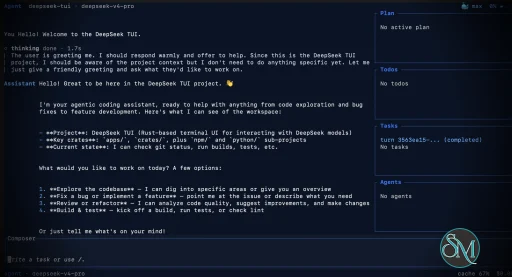
DeepSeek TUI is an open source terminal based coding agent designed for DeepSeek AI models. Unlike a simple chatbot, it can interact with your local workspace, execute shell commands, manage git operations, and assist with software development tasks directly from the command line.
The project is written in Rust and focuses on speed, low resource usage, and keyboard driven workflows. It is especially appealing for developers who spend most of their time in the terminal.
DeepSeek TUI is gaining attention among developers who prefer terminal based workflows and want direct access to AI powered coding tools without relying on heavy IDE integrations. Built around DeepSeek models, it transforms the terminal into an interactive coding assistant capable of editing files, running commands, and managing development workflows.
Download Codewhale v0.9.10 (Formerly DeepSeek TUI) - Software Mirrors |
|---|
Codewhale v0.9.10 (Formerly DeepSeek TUI) for Windowscodewhale-windows-x64.zip | 55.11 MB codewhale-windows-x64.exe | 76.96 MB codewhale-windows-x64-portable.zip | 55.11 MB codewhale-windows-arm64.zip | 51.44 MB codewhale-windows-arm64.exe | 62.06 MB codewhale-windows-arm64-portable.zip | 51.44 MB codewhale-tui-windows-x64.exe | 76.96 MB codewhale-tui-windows-arm64.exe | 62.06 MB |
Codewhale v0.9.10 (Formerly DeepSeek TUI) for macOScodewhale-tui-macos-x64 | 57.34 MB codewhale-tui-macos-arm64 | 51.29 MB codewhale-macos-x64.tar.gz | 51.51 MB codewhale-macos-x64 | 57.34 MB codewhale-macos-arm64.tar.gz | 48.04 MB |
Codewhale v0.9.10 (Formerly DeepSeek TUI) for Linuxcodewhale-tui-linux-x64 | 61.47 MB codewhale-tui-linux-arm64 | 50.81 MB codewhale-linux-x64.tar.gz | 52.85 MB codewhale-linux-x64 | 61.47 MB codewhale-linux-arm64.tar.gz | 48.89 MB |
Codewhale v0.9.10 (Formerly DeepSeek TUI) for Androidcodewhale-tui-android-arm64 | 51.65 MB codewhale-android-arm64.tar.gz | 48.51 MB |
Others Download related to Codewhale v0.9.10 (Formerly DeepSeek TUI) |
Codewhale v0.9.10 (Formerly DeepSeek TUI) Source CodeCodewhale v0.9.10 (Formerly DeepSeek TUI) Source code (zip) Codewhale v0.9.10 (Formerly DeepSeek TUI) Source code (tar.gz) |
Codewhale v0.9.10 (Formerly DeepSeek TUI) Release Notes:Codewhale is the public product from Shannon Labs. The
command, npm package, and release-asset names remain lowercase technical identifiers. The legacy npm package
receives no further releases. Users coming from v0.8.x legacy
InstallRecommended — npm (one command, both entrypoints)codewhale and codew command assets
from this Release. Both contain the same compiled runtime.
Docker / GHCRcodewhale and codew. The
latest tag is also updated on release.
Cargo (Linux / macOS)codewhale. Cargo cannot create a second command
alias from one binary target; users who want the shorter spelling can add a
codew symlink to that installed executable. The npm, Homebrew, archive,
shell-installer, and container channels install both command names directly.
Manual download — platform archives (recommended)Each archive below contains the same runtime under thecodewhale and
codew command names, plus an install script:
codewhale.exe, codew.exe, and codewhale.bat under
%LOCALAPPDATA%\Programs\CodeWhale\bin, adds that directory to the
current-user PATH, and creates a Start Menu shortcut that prefers
Windows Terminal (wt.exe) when it is installed.
codewhale-windows-arm64.zip
codewhale.bat from any directory. The NSIS installer is currently unsigned and may trigger Windows SmartScreen until a signing certificate is wired into the release pipeline.
Each platform also has bare, unarchived codewhale- and
codew- assets. The seven codewhale-tui- filenames
attached to v0.9.5 are byte-identical compatibility copies used only to let
already-installed v0.9.4 clients discover and cross this single-binary
transition; current installers do not expose a third runtime. The legacy npm
package deepseek-tui is deprecated and is not republished. For migration
from v0.8.x legacy binary names, see docs/REBRAND.md.
Verify (recommended)Download the checksum manifests from this Release and verify:What's in v0.9.10
[runtime] user message. Retry state is a typed engine-internal
descriptor; a thinking-only drop re-issues the request without claiming a
partial reply was preserved, the retry budget is enforced in mechanism, and
recovery produces exactly one authoritative final answer.
Codewhale v0.9.10 is a retention, identity, and product-clarity release: the shell and
transcript can no longer retain unbounded tool output in memory or on disk,
mid-turn history inserts no longer strand in-flight tool rows, every agent
that ran this session is visible from /agents list, the PTY acceptance
lane has a stall watchdog and bounded CI steps, approval outcomes are
durable and fail closed (cyq1017, #5360), and three $HOME disk leaks are
reclaimed. Extension surfaces now name their real state and act only
through the reviewed install and trust flows, and sub-agent, shell, task,
and workflow state is owned by the session that created it (#5518). Test
threads get an 8 MiB stack so the lib suite can no longer
abort under load.
Fixed
bash tool left an omitted timeout_ms at the internal
ceiling (~24.8 days) instead of the 120 s default its own schema
advertises, so a CLI that blocked on an interactive prompt or a hung
network call held the turn open indefinitely — one report sat on a single
unauthenticated CLI call for over two hours with the tool row simply
counting seconds. The advertised default now applies, which arms the
existing recovery: the process is killed and the model is told to rerun
with background=true and poll with action="wait". An explicit
timeout_ms is still honored for genuinely long foreground work, and
background and interactive runs keep their own lifetimes.
, /mcp enable, and /plugin` install/trust controllers, so
no second trust path exists. Browser Use and Sandbox Runtime stay
honestly Unavailable with their real setup routing instead of implying an
install Codewhale cannot perform.
MCP (6) can no longer sit above two rendered rows. Disabled servers
stay visible and labeled disabled instead of silently disappearing, and
configured servers absent from the live snapshot list as not-yet-inspected
with their own explicit reload affordance through the MCP command
controller.
/plugin show), offers Enable for a trusted-but-disabled bundle,
or routes an untrusted bundle to the existing trust review — through the
same confirmation and persistence controllers as the slash commands.
GLM-5.2 route saved. The saved 5.2
route remains exact; choosing 5.3 sends and remembers the distinct 5.3 ID.
DEEPSEEK_* names remain as 0.9.x
compatibility aliases (#5443).
codewhale.bat (CRLF, wt.exe then the exe), install.bat copies that
launcher, and the NSIS Start Menu shortcut opens it instead of the raw
binary (#1854).
cw span and asked for a second mark beside the effort chip, then
filtered the second one against the literal "cw"; because cw, the legacy
whale opt-in, and every unknown value all normalize onto that same mark,
the filter discarded them and left off with nothing to turn off. cw,
whale, off, and a typo all rendered byte-identical headers. There is one
mark now and the setting owns it: cw/whale draw the typographic mark,
dots draws the activity frames, off removes it (thejayjetson, #5512).
— /rename` mid-turn left the running tool row spinning forever
(#5478).
/zidong, and Alt+Y can no longer set Full Access + trust + shell when
config or managed requirements own the posture.
$SHELL -i through
SandboxManager::prepare like bash.
cp /etc/passwd ..
~/.codewhale/config.toml; they need an EnvVarGuard
like settings already did. Safety-gate and CNB workspace tests pin a
hermetic CODEWHALE_HOME. exec_persistent_service is serialized in
nextest and inside the cargo-test binary instead of dropped (#5355).
session_end is recorded and the buffer ships on the next
interactive session.
/model, /settings, /resume, and /rc. The full command inventory
remains searchable through /help, the command palette, and direct prefix
typing, without front-loading the entire control surface (#5442, #5439).
/setup repair guide. The idle aquarium
asks one task-oriented question instead of advertising a tutorial or command
billboard, and the localized telemetry choice appears after the workspace is
ready without blocking the composer.
Added
AGENTS.md files resolve repository-root to current-directory in
order under one aggregate budget, a linked worktree is its own root, and
scope is never inferred from path mentions or whichever branch is named
main.
/rename, survives session save/load, and sanitizes control, bidi, and
zero-width characters (PR #5509 by @SparkofSpike).
CODEWHALE_RELEASE_BASE_URL / CODEWHALE_USE_CNB_MIRROR=1 still skip the
race; other targets stay on GitHub.
/workflow confirm can launch that
reviewed draft; status, cancel, settings, and the /workflows dashboard stay
host-owned and do not spend a model turn (#5439).
[goal] continuation_delay_seconds gives coordinator goals a visible quiet
period between successful turns while reusing the existing coalesced goal
continuation token; Esc, Ctrl+C, pause/done/blocked/clear cancel before the
next provider request, and failures never continue (#5508).
App. Zero production commands migrate in
this slice (#5316).
docs/zh_hans/ and docs/id/, with
redirect stubs at the old paths for one release cycle (#5482).
docs/design/STATUS_BAR_COLOR_GRAMMAR.md and
palette::grammar; header and phase-strip ink resolve through named
ChromeInk slots so chrome cannot invent an eighth meaning or spend
Failure red on a dirty worktree or selected mode. The footer's session
metrics strip resolves through the same inks, and the red reservation is
checked against every selectable theme, not just the whale default;
typed footer toasts resolve through the grammar too.
Repo/worktree chrome stays metadata and still renders when Git names a
location but not a ref (#5437).
/agents list and the sidebar fan-out rows
(#5479 spec items 1 and 5).
Contributors
/title as an independent, persistent terminal-window title in PR #5509,
in addition to the Tier 1 Chinese and Indonesian documentation work below.
App
(#5506, EPIC-005/FEAT-015 under #5316, which they also filed).
docs/zh_hans/ and
docs/id/ with redirect stubs held at the old paths for one release cycle
(#5507, epic #5482, which they also filed).
isZh branches become typed English
and Chinese dictionaries held to key and token parity, while the other
sixteen locales keep the English fallback (#5517, a further phase of #5337).
fancy_animations combination already ruled out (#5512).
|
Key Features of DeepSeek TUI
Terminal Native Workflow
DeepSeek TUI operates entirely within the terminal, allowing developers to work without switching between browser windows or external interfaces.AI Assisted Coding
The assistant can read and edit files, generate code, explain logic, and help automate development tasks.Shell Command Execution
It supports running terminal commands directly through the interface, streamlining development workflows.Git Integration
Developers can manage repositories, review changes, and handle version control related tasks from inside the tool.Multiple Work Modes
DeepSeek TUI includes modes like Plan, Agent, and YOLO, offering different levels of automation and approval control.Large Context Handling
The tool is built around DeepSeek V4 capabilities, including support for extremely large context windows that help with understanding bigger codebases.
User Experience
DeepSeek TUI is designed for developers comfortable with terminal environments. The interface is keyboard focused and efficient, though beginners may need time to adapt.
The workflow feels closer to tools like Claude Code or Codex style assistants rather than traditional chat applications. Community feedback on Reddit and GitHub discussions highlights its speed and practical coding workflow.
Performance and Compatibility
Because it is written in Rust, DeepSeek TUI is lightweight and responsive. It supports Linux, macOS, and Windows, with installation available through npm, Cargo, or direct binaries.
Performance depends heavily on the connected DeepSeek models and API configuration, but the local interface itself remains fast and efficient.
Pros
Fast terminal native workflow
AI powered coding and automation
Lightweight Rust based architecture
Supports file editing and shell execution
Open source and actively developed
Cons
Requires familiarity with terminal workflows
Depends on external AI APIs
Advanced automation modes may feel risky for inexperienced users
DeepSeek TUI is ideal for developers, DevOps engineers, and terminal focused power users who want AI assistance integrated directly into their command line workflow. It is especially attractive for users seeking a lightweight alternative to browser based AI coding tools.
DeepSeek TUI combines AI coding assistance with the efficiency of terminal workflows. Its fast performance, flexible automation, and developer focused design make it one of the most interesting open source AI terminal tools currently gaining traction.
Developer:
Hunter Bown
Operating System:
Windows / macOS / Linux
Date Added:
2026-08-20T16:07:16.954Z
Categories:
Post a Comment/Report Broken Link: