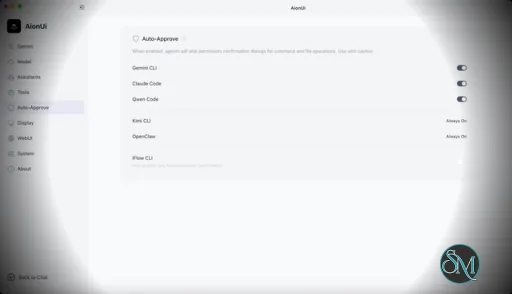
AionUi is a cross platform desktop application that transforms command line AI agents into an intuitive graphical interface. It detects locally installed AI CLI tools and presents them in a structured environment where users can manage conversations, sessions, and files more efficiently.
The software is open source, allowing users to customize and extend its functionality according to their workflow requirements.
AionUI v2.1.61 Release Notes - Software Mirrors |
|---|
Highlights
Appearance: pick your own font family and weight
- Settings → Appearance now lets you choose the typeface across four regions — app, chat, markdown and code — from a searchable list of fonts installed on your machine, plus a matching font-weight control (Light/Regular/Medium/Semibold/Bold, or system default) for each region.
Archived conversations, fully reachable
- The archived conversations list now pages in the rest of each group instead of silently truncating it — a "load more" button reveals older archived chats a page at a time.
Plan bar pinned above the send box
- The agent's plan / to-do snapshot moves out of the message stream into a collapsible bar pinned above the send box, and a bug that could duplicate the plan card while destroying a neighboring message is fixed.
Preview panel: maximize toggle and better tab menu
- The preview panel gains a maximize/restore toggle that hides the chat area and gives the preview the full width; restoring is instant.
- Right-clicking a preview tab no longer opens an invisible off-screen menu, and the menu now includes Close and Close Unmodified actions (with
Cmd/Ctrl+W support scoped to the panel).
Slash commands and diagrams
- The slash-command menu in the chat send box now accepts the highlighted command with
Tab/Shift+Tab, and a race that could send the raw /command text instead of selecting it on fast typing is fixed.
- Markdown now renders WaveDrom/WaveJSON timing diagrams inline, with the same pan, zoom and click-to-zoom interactions already available for Mermaid diagrams.
Engine updates (AionCore v0.1.71 → v0.1.72)
- Model selection for Claude sessions is now applied the same way the Claude CLI applies it, so the app and the CLI agree on which model is actually running.
- Session JWTs now last 30 days to match the cookie lifetime, avoiding unexpected re-authentication.
- Plan snapshots are now persisted with the conversation so they can be restored later, and archiving a conversation properly tears down its agent process.
- Skill descriptions injected into the agent context are trimmed to fit the injection budget, reducing overhead on startup.
Bug Fixes
- Fixed conversations started from an empty message showing a blank, unclickable title — the title area is now always clickable to rename, even when empty.
- Fixed markdown tables without explicit alignment markers rendering with a centered header above left-aligned body rows; headers now align left like the rest of the table.
- Fixed a case where an unpicked model silently inherited a stale choice from a previous session instead of letting the agent start on its own default.
What's Changed- feat(settings): page archived groups with load-more by @tcp404 in https://github.com/iOfficeAI/AionUi/pull/4137
- feat(settings): add font family selection by @tcp404 in https://github.com/iOfficeAI/AionUi/pull/4138
- feat(plan): pin the plan above the send box and fix the duplicate-card merge by @kaizhou-lab in https://github.com/iOfficeAI/AionUi/pull/4133
- feat(settings): add font weight selection by @tcp404 in https://github.com/iOfficeAI/AionUi/pull/4152
- feat(preview): add maximize toggle for the preview panel by @tcp404 in https://github.com/iOfficeAI/AionUi/pull/4153
- feat(chat): accept slash command with Tab and fix Enter send race by @tcp404 in https://github.com/iOfficeAI/AionUi/pull/4154
- feat(renderer): render WaveDrom timing diagrams in markdown by @heartacker in https://github.com/iOfficeAI/AionUi/pull/4135
- fix(guid): stop turning "no model picked" into a silent pick by @piorpua in https://github.com/iOfficeAI/AionUi/pull/4162
- feat(preview): fix off-screen tab context menu and add tab actions by @kaizhou-lab in https://github.com/iOfficeAI/AionUi/pull/4164
- fix(conversation): make empty conversation title clickable to rename by @piorpua in https://github.com/iOfficeAI/AionUi/pull/4169
- fix(markdown): align table header with body rows by @kaizhou-lab in https://github.com/iOfficeAI/AionUi/pull/4167
- chore: bump version to 2.1.61 by @piorpua in https://github.com/iOfficeAI/AionUi/pull/4173
Full Changelog: https://github.com/iOfficeAI/AionUi/compare/v2.1.60...v2.1.61
📦 Download
Installers are no longer published on GitHub. Download the latest build from the official website — https://www.aionui.com/
|
Key Features
Multi Agent Support
AionUi allows users to run multiple AI sessions simultaneously. Each session maintains its own context, enabling parallel workflows without cross interference.
Modern Chat Interface
The application provides a clean and organized chat environment. Users can scroll through conversation history, manage session tabs, and interact with AI responses in a visually structured format.
Smart File Management
AionUi includes drag and drop support, file previews, and structured file browsing. This improves productivity when working with code, documents, or AI generated content.
Multi Model Compatibility
The software supports various AI models through local or API based configurations. Users can switch between models depending on task requirements.
Session Control and Workflow Tools
Users can manage sessions independently, review outputs, and maintain organized AI workflows. This structure helps reduce clutter when working on complex tasks.
Cross Platform Availability
AionUi runs on major operating systems, ensuring accessibility for developers working in different environments.
Ease of Use
The interface is designed to simplify complex AI workflows. While some familiarity with AI tools is helpful, the graphical layout significantly reduces the learning curve compared to pure command line usage.
Navigation is intuitive, and core features are accessible without excessive configuration.
Performance and Compatibility
AionUi operates efficiently as a desktop application. Performance depends partly on the underlying AI services or APIs being used, but the interface itself remains responsive during normal use.
Compatibility with standard AI command line tools ensures flexibility for technical users.
Final Verdict
AionUi is a powerful desktop interface for managing AI command line tools in a structured and visual way. Its ability to handle multiple sessions, integrate different models, and organize workflows makes it a valuable productivity solution for advanced users.
For professionals seeking greater control and efficiency in AI driven projects, AionUi delivers a practical and modern solution.
AionUi is a free and open source desktop application that provides a modern graphical interface for command line AI tools. It is designed to simplify AI workflows by replacing terminal based interaction with a visual environment that supports multiple AI models, parallel sessions, and productivity focused features. AionUi is suitable for developers, researchers, and advanced users who want a unified way to manage AI driven tasks.
Post a Comment/Report Broken Link: