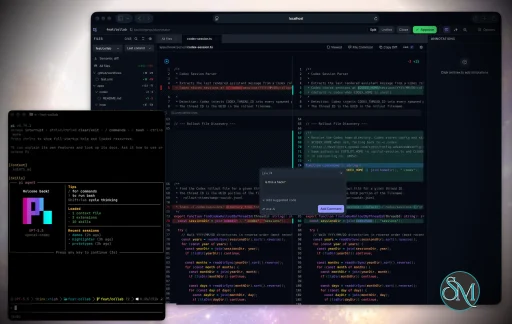
Plannotator is an open-source platform designed to review and validate plans and code generated by AI coding agents.
The platform provides a centralized interface where developers can:
Review AI-generated plans
Annotate proposed actions
Approve or reject tasks
Inspect code changes
Provide structured feedback
Improve agent outputs
Maintain human oversight
Rather than replacing developers, Plannotator aims to keep humans involved in critical decision-making during AI-assisted development.
As AI coding agents become increasingly capable, developers face a growing challenge: ensuring that AI-generated plans and code changes align with project requirements before they are executed. Plannotator addresses this problem by acting as a review layer between developers and AI coding agents.
Instead of generating code itself, Plannotator focuses on making AI-driven development more transparent and controllable. It allows teams to review, annotate, approve, reject, and refine agent-generated plans and code changes before they affect a project.
Download Plannotator v0.27.17 - Software Mirrors |
|---|
Plannotator v0.27.17 for Windowsplannotator-win32-x64.exe | 151.18 MB plannotator-win32-arm64.exe | 148.15 MB |
Plannotator v0.27.17 for macOSplannotator-paste-darwin-x64 | 65.97 MB plannotator-paste-darwin-arm64 | 60.51 MB |
Plannotator v0.27.17 for Linuxplannotator-paste-linux-x64 | 89.3 MB plannotator-paste-linux-arm64 | 89.35 MB |
Plannotator v0.27.17 Source Code |
Plannotator v0.27.17 Release Notes:Follow @plannotator on X for updatesMissed recent releases?
What's New in v0.27.17This is a stability release after the diagram-heavy v0.27.16. Twenty-four pull requests went in, ten of them written by community contributors, with two first-time authors and a third whose long-open branch finally landed. Two additions are worth naming up front: diagram files now open in the diagram viewer that fences already got, and approving a plan in OpenCode 2 switches the session model along with the agent. Everything else is repair work, most of it on code review.Diagram files open in the diagram viewerplannotator annotate flow.mmd used to refuse the file outright with File type not supported, and the same for .mermaid, .dot, and .gv. A Mermaid or Graphviz fence inside a plan, meanwhile, already got the whole diagram engine from v0.27.16: themed rendering, zoom, pan, fit, the full-size popout, and click-to-comment on a node, an edge, a cluster, or the diagram itself. People who keep their diagrams as files got none of it.
Those four extensions now open as one diagram in exactly that engine. The file is the document, the diagram fills the document card, and comments, drafts, export, version history, and share links behave the way they do for a fence. The extensions are not treated as markdown, so Mermaid's own --- … --- config block stays diagram content instead of being stripped as frontmatter, and they join the annotatable set everywhere else it matters: CLI target resolution, folder discovery, the file browser, the 2MB size cap, and /api/doc. Both runtimes decide the render kind through the same shared predicate, so a Bun session and a Pi session cannot disagree about what a .dot file is.
(#1571)
OpenCode switches the model with the agentOpenCode stores the session's agent and its model independently. Approving a plan selected Build but left Plan's model active, so anyone who configures different models for the two agents kept planning-model settings through the build. Model metadata from V2 agent discovery is now preserved and applied: the agent switch runs first, then the model switch, which is the order OpenCode's own clients use. A follow-up repaired older V2 hosts. The first change madeswitchModel support a prerequisite for switching agents at all, and hosts that expose switchAgent without it stopped changing the agent on approval. Agent selection now happens first and stands on its own; a missing or failing model switch warns rather than undoing it, while a failed agent switch still prevents the model attempt. @rcdailey wrote both.
(#1569, #1570)
An idle review stops touching the git remoteAn open but idle code review session rangit ls-remote --symref origin HEAD about once a minute, for as long as the page stayed open. @freimer reported it from the worst place to hit it: SSH authentication backed by a hardware token, where every probe is a physical touch prompt, so a YubiKey kept blinking next to an agent that correctly reported itself as idle, with nothing in the UI showing an operation in flight.
The client polls /api/diff/fresh every five seconds to keep the "Diff out of date" banner honest, and that handler refreshed the remote base info, where a 60-second rate limit was the only thing between a five-second poll and a network round trip. The remote is now queried on the interactions where a reviewer is actually asking for a fresh answer: startup, the page load, a diff-type or base switch, and the explicit Fetch. A failed probe backs off by doubling up to fifteen minutes and resets on success. Separately, git commands spawned detached for timeout control were only ever reaped by a parent-side timer that dies with the parent, so a server stopped mid-probe orphaned the git and ssh pair; both runtimes now kill those process groups from an exit hook.
There is a full opt-out for anyone who would rather the review never reach the network on its own: plannotator review --no-git-remote-check, PLANNOTATOR_GIT_REMOTE_CHECK=0, or { "gitRemoteCheck": false } in ~/.plannotator/config.json, in that order of precedence. With it off, the session issues zero ls-remote calls including at startup, since the compare-target detection is itself an ls-remote. The flag is parsed by the shared review argument parser, so it works on Claude Code, OpenCode, and Pi rather than the Bun CLI alone.
One behavior change comes with this. A push that lands on the base branch in the middle of a review is no longer noticed within the minute on its own; it shows up on the next refresh, diff switch, or page reload. With the opt-out on, the compare target is resolved from local refs only, so a repository whose origin/HEAD is unset may pick a different default than the remote would have reported.
(#1585, closing #1553)
Long lines scroll, per fileA diff with long lines put its horizontal scrollbar at the bottom of the file's content, which is off-screen on any file taller than the panel. Each file's diff now carries its own horizontal scrollbar pinned to the file header, so a wide line is reachable without scrolling to the end of the file first. The code is @Karrq's, written in #1224 and merged here from a replacement branch because the original could not take a maintainer push. Rebasing it onto current main meant resolving one conflict in the review editor's theme hook and dropping a lockfile revert; the change itself is unmodified. (#1586, closing #1566 and #1048)The review setup dialog is goneThe one-time "Set up your review view" chooser never appeared on a fresh profile. The settings store seeds every registry default into a cookie the first time settings are read, which happens before the first-run initializer runs, so the initializer always saw a persisted panel view and retired itself without showing anything. @FNDEVVE proposed fixing the gate in #1474, which is what surfaced the real path. Rather than repair a dialog that asks a question the panel toggle already answers, the dialog is removed and Tree becomes the default panel view. TheTree | Git status | Commits toggle and Settings → Git remain the two ways to change it, with the toggle session-scoped and Settings persisting. Only fresh profiles are affected: a saved panel view still wins over the default, and anyone who has already chosen a view sees no change. The one-time dialog chain is now guide intro, look-and-feel, Edit Mode, token hover cards, terminal tools.
(#1587, closing #1463)
Selections at a block boundaryA double-click just past the end of a heading, paragraph, list item, fence, or blockquote leaves a selection whose entire content is the line break between two blocks. Depending on where the browser put the range's end, one of two things happened: the highlighter painted an invisible highlight and opened the toolbar on an empty quote, which stored an annotation with a newline as its text that counted toward the total, exported to the agent, and could never be re-anchored on the next load; or the range resolved past the last child node and an uncaughtTypeError escaped the library's own listener.
Both are fixed. A run of 44 real mouse gestures in headless Chromium against a live annotate session produced three uncaught errors and 21 blank-quote toolbars before the change, and none of either after, with the 15 valid selections still opening the toolbar as they did.
@bohjak reported this in #881 with both failure modes separated, the stack trace, the offending line in the range model, and a proposed bounds check. The diagnosis was correct. The fix lands in Plannotator's own selection hook rather than in the highlighter library, so it does not wait on a new release of that dependency.
(#1584, closing #881)
Additional Changes
Install / UpdatemacOS / Linux:/plugin in Claude Code, find plannotator, and click "Update now".
Pi: Update @plannotator/pi-extension to 0.27.17 and restart Pi.
OpenCode: Clear cache and restart:
What's Changed
New Contributors
Contributors@rcdailey returned with the OpenCode model switch in #1569 and then caught what it broke on older V2 hosts before anyone else hit it, fixing it in #1570. The ordering he landed, agent first and model second when the host supports it, is what OpenCode's own clients do. @Karrq wrote the per-file horizontal scrollbar in #1224 and waited a long time for it. The branch could not accept a maintainer push, so it was rebased and merged as #1586; the code is theirs and closes two separate reports. @FNDEVVE landed three more: the indentation-aware frontmatter parser in #1548, the Oh My Pi plan submission guard in #1547, and short links for small plans in #1475. Their #1474 is also why the review setup dialog was looked at in the first place; the investigation there found the seeded-cookie gate, and the owner chose to drop the dialog rather than repair it. @leoreisdias fixed the review submission dialog's footer overlap in #1513, with before and after screenshots and a regression test asserting the footer sits outside the scroll region. @katya4oyu kept the image annotator's Save button reachable on narrow screens in #1469, verified on a physical phone, following their compact-viewport toolbar fix from the previous cycle. @rNoz fixed the root build order in #1389, validated on a clean Linux checkout, and filed the issue behind it. @Shujakuinkuraudo made Pi Web RPC sessions show the review URL in #1407, a first contribution that came with the issue, the one-line diagnosis, and a regression test that does not need a real browser. @centraldogma99 corrected the documented compile command in #1420, also a first contribution. They traced both failure modes to the release workflow, including the macOS signing regression that kills a binary built with an older Bun without printing anything. The reports that shaped this release:
|
Key Features of Plannotator
Plan Review System
One of Plannotator's core capabilities is reviewing plans generated by AI agents before execution.
Developers can examine:
Proposed tasks
Implementation strategies
Agent reasoning
Planned file modifications
Workflow sequences
This visibility helps reduce unintended changes and costly mistakes.
Annotation Tools
The platform allows users to add comments, notes, and guidance directly to AI-generated plans.
These annotations can be used to:
Clarify requirements
Correct misunderstandings
Provide context
Guide future agent actions
AI Code Review
Plannotator extends the review process beyond planning by supporting inspection of generated code.
Developers can:
Review modifications
Analyze diffs
Leave comments
Request revisions
Validate implementation details
This workflow resembles modern pull-request review systems.
Human-in-the-Loop Workflows
A major design goal is ensuring that AI actions remain subject to human approval.
Organizations can establish review processes where important actions require validation before execution.
Open Source Foundation
Plannotator is open source, allowing teams to inspect, modify, and self-host the platform according to their needs.
This transparency is particularly valuable for organizations adopting AI-assisted software development.
User Experience
The interface is designed around review workflows rather than direct code generation.
Instead of interacting with a chatbot, users primarily:
Receive agent-generated plans
Review proposed actions
Add feedback
Approve or reject changes
Monitor execution results
The workflow feels familiar to developers accustomed to pull requests, code reviews, and project planning tools.
Productivity Benefits
As AI coding tools become more autonomous, review processes become increasingly important.
Plannotator helps organizations:
Reduce risky AI actions
Improve code quality
Increase accountability
Preserve architectural consistency
Encourage collaboration between developers and AI agents
For teams adopting AI-driven development, these safeguards can be as valuable as the coding agents themselves.
Collaboration Features
The platform supports collaborative review workflows where multiple team members can participate in evaluating AI-generated outputs.
This allows:
Peer review
Team approval processes
Shared annotations
Collective decision-making
Such features are especially useful for larger engineering teams.
Performance
Because Plannotator focuses on workflow management and review rather than model inference, performance largely depends on the connected AI agents and integrations.
The platform itself is lightweight and primarily serves as an orchestration and review layer.
Open Source Advantages
Being open source provides several benefits:
Transparent development
Self-hosting capabilities
Custom integrations
Community contributions
Vendor independence
Organizations concerned about compliance, security, or proprietary workflows may find these advantages particularly appealing.
Limitations
Plannotator is designed as a companion tool rather than a complete AI development platform.
Common limitations include:
Requires external AI coding agents
Best suited for teams already using AI-assisted development
Smaller ecosystem than mature developer platforms
Additional review steps may slow rapid prototyping
Some users may prefer fully autonomous workflows
The software delivers the most value in environments where oversight and quality control are priorities.
Pros
Improves transparency of AI-generated plans
Supports structured review workflows
Human-in-the-loop design
Useful annotation system
Open source
Self-hosting support
Familiar review experience for developers
Helps reduce AI-generated mistakes
Cons
Not a standalone coding agent
Requires integration with AI development tools
Smaller community than established developer platforms
Adds review overhead to workflows
Best suited for teams rather than casual users
Who Should Use Plannotator?
Plannotator is ideal for:
Software development teams
Engineering managers
AI-assisted development workflows
Organizations adopting coding agents
Open-source projects
Teams prioritizing code quality and governance
It is particularly valuable for environments where AI-generated code requires oversight before reaching production systems.
Plannotator fills an increasingly important role in the AI development ecosystem by providing visibility and control over AI-generated plans and code changes. Its focus on human oversight, structured reviews, and collaborative workflows makes it a useful companion for modern coding agents. While it is not a replacement for AI coding tools themselves, it offers a practical solution for teams seeking greater confidence and accountability in AI-assisted software development.
Developer:
backnotprop
Operating System:
Windows / macOS / Linux
Date Added:
2026-09-21T23:03:44.720Z
Categories:
Post a Comment/Report Broken Link: