Plannotator is an open-source platform designed to review and validate plans and code generated by AI coding agents.
The platform provides a centralized interface where developers can:
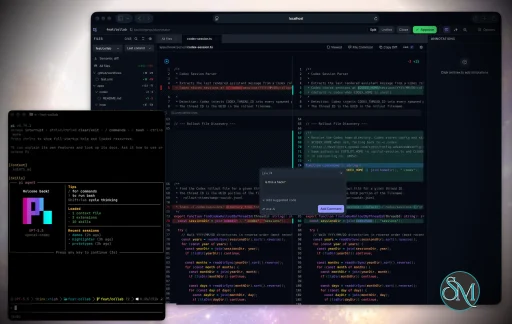
Review AI-generated plans
Annotate proposed actions
Approve or reject tasks
Inspect code changes
Provide structured feedback
Improve agent outputs
Maintain human oversight
Rather than replacing developers, Plannotator aims to keep humans involved in critical decision-making during AI-assisted development.
As AI coding agents become increasingly capable, developers face a growing challenge: ensuring that AI-generated plans and code changes align with project requirements before they are executed. Plannotator addresses this problem by acting as a review layer between developers and AI coding agents.
Instead of generating code itself, Plannotator focuses on making AI-driven development more transparent and controllable. It allows teams to review, annotate, approve, reject, and refine agent-generated plans and code changes before they affect a project.
Download Plannotator v0.27.16 - Software Mirrors |
|---|
Plannotator v0.27.16 for Windowsplannotator-win32-x64.exe | 151.41 MB plannotator-win32-arm64.exe | 148.38 MB |
Plannotator v0.27.16 for macOSplannotator-paste-darwin-x64 | 65.97 MB plannotator-paste-darwin-arm64 | 60.51 MB |
Plannotator v0.27.16 for Linuxplannotator-paste-linux-x64 | 89.3 MB plannotator-paste-linux-arm64 | 89.35 MB |
Plannotator v0.27.16 Source Code |
Plannotator v0.27.16 Release Notes:Follow @plannotator on X for updatesMissed recent releases?
What's New in v0.27.16Diagrams are the theme of this release. Plans and documents with Mermaid or Graphviz fences now render in your color palette, on Mermaid 12, in a viewer you can zoom, pan, and comment on directly: a node, an edge, a sequence message, or the whole diagram. Twelve pull requests went in, three from the community, one from a first-time contributor. Code review learned to open a diff file without a repository, HTML annotation renders embedded sibling pages instead of a blank app, and a release-wide QA pass fixed a crash, a print regression, and a VS Code panel break before any of it shipped.Themed diagramsMermaid diagrams used to render in one fixed dark-blue palette no matter which theme you chose. Now they follow the active palette and mode. Node fills come from your card color, text from your foreground, edges from your muted foreground, subgraphs from your muted surface, and the categorical fills that pie slices and git branches use are seeded from your palette's own accent colors. Every text-on-fill pair is checked against the 4.5:1 contrast rule and every line against 3:1, for all 78 palette and mode combinations that exist, so a diagram never becomes unreadable because a palette has a dark accent. Mermaid itself moved from 11 to 12.0.0. The visible change is layout: 12 uses the ELK engine by default, which routes edges orthogonally and packs subgraphs more tightly. Flowcharts, state, class, ER, and requirement diagrams re-lay out; sequence, gitgraph, and pie are unchanged. The runtime is larger, so the plan editor loads it lazily on the first diagram, and a plan with no diagram never runs it. Mermaid 12 also introduced a heavier default node shadow; this release tones it down and derives its color from your palette, light on dark themes and dark on light ones, with a Diagram shadow control in Settings → Display if you prefer none, or the original strength. (#1556, #1557, #1563)Comment on any node, edge, or diagramThe diagram canvas is new. Every Mermaid and Graphviz fence renders inside a viewer with zoom, pan, fit, and keyboard controls, and a full-screen popout of the same viewer. Click a node, an edge, a subgraph, a sequence actor or message, a note, or a class relation, and the comment composer opens on that part. Click empty space and the comment attaches to the whole diagram. Each comment gets a numbered badge and a ring on its target, lists in the annotations panel beside your text comments, survives a reload and a theme change, and exports to the agent with its location:Diagram node Router (router), line 14.
Interaction was shaped by hands-on use. Nothing highlights on a plain mouse-over, because hover targeting fought the pan hand; a click selects and a drag pans, with a small threshold so a shaky click still lands. Hold Cmd (Ctrl elsewhere) to preview the target under the pointer. Edges were nearly impossible to hit at their 1 px stroke, so every edge carries an invisible 14 px hit area, and the edge label box no longer swallows the click at the midpoint. Sequence diagrams, whose parts Mermaid gives no ids, got their own anchor family. A pinned comment resolves by id, then label, then source line, and shows an Unanchored chip only when the diagram no longer contains it.
The viewer arrived from the commercial Workspaces app, where it was built first, and now ships in @plannotator/ui as the one diagram engine for both. (#1560, #1562)
Review a diff file, no repository requiredplannotator review --patch-file change.diff opens the code review UI on a unified diff from anywhere: an email, a paste, a CI artifact, a remote agent's output. --patch-file - reads it from stdin. The server takes the patch as its snapshot and skips VCS detection entirely; staging, hunk expansion, base switching, and open-in-editor are hidden rather than left to fail, the header names the patch file, and a bad or empty patch says so. Reviews without the flag are byte-identical to before.
@soundvibe wrote the feature as a first contribution, with the server degrading cleanly on every repo-dependent endpoint. The browser-side gating and the open-in fix were added on top before merge. (#1554)
Embedded HTML documents renderAn annotated HTML page that embeds a sibling page, through<iframe src="prototype.html">, <embed>, <object>, or a src assigned by script at runtime, used to show a second Plannotator inside every frame. The annotated page has no URL of its own, so relative references resolved onto the Plannotator server and hit the app's catch-all. Now the served page carries a base URL pointing at the session's asset route, which covers static attributes, script-assigned ones, and relative fetch calls alike; the asset route serves sibling HTML with its query string intact; and a framed request for a missing file gets a small 404 page naming it, never the app. Embedded documents stay sandboxed with no access to the session API. An armed pinpoint click on an embed pins the frame itself.
A release-QA check found that the framed 404 also fired for the app's own document when VS Code framed it, so the extension panel showed "Not found" on annotate sessions. Fixed before tagging: the 404 applies only to paths that name a file. (#1561, #1565)
References finds code in packages named bash
curl -fsSL https://plannotator.ai/install.sh | bash
powershell
irm https://plannotator.ai/install.ps1 | iex
vendor package exclusion in #1558 with a two-command ripgrep reproduction; the fix and its follow-up both use his exact directory shape as the regression test |
Key Features of Plannotator
Plan Review System
One of Plannotator's core capabilities is reviewing plans generated by AI agents before execution.
Developers can examine:
Proposed tasks
Implementation strategies
Agent reasoning
Planned file modifications
Workflow sequences
This visibility helps reduce unintended changes and costly mistakes.
Annotation Tools
The platform allows users to add comments, notes, and guidance directly to AI-generated plans.
These annotations can be used to:
Clarify requirements
Correct misunderstandings
Provide context
Guide future agent actions
AI Code Review
Plannotator extends the review process beyond planning by supporting inspection of generated code.
Developers can:
Review modifications
Analyze diffs
Leave comments
Request revisions
Validate implementation details
This workflow resembles modern pull-request review systems.
Human-in-the-Loop Workflows
A major design goal is ensuring that AI actions remain subject to human approval.
Organizations can establish review processes where important actions require validation before execution.
Open Source Foundation
Plannotator is open source, allowing teams to inspect, modify, and self-host the platform according to their needs.
This transparency is particularly valuable for organizations adopting AI-assisted software development.
User Experience
The interface is designed around review workflows rather than direct code generation.
Instead of interacting with a chatbot, users primarily:
Receive agent-generated plans
Review proposed actions
Add feedback
Approve or reject changes
Monitor execution results
The workflow feels familiar to developers accustomed to pull requests, code reviews, and project planning tools.
Productivity Benefits
As AI coding tools become more autonomous, review processes become increasingly important.
Plannotator helps organizations:
Reduce risky AI actions
Improve code quality
Increase accountability
Preserve architectural consistency
Encourage collaboration between developers and AI agents
For teams adopting AI-driven development, these safeguards can be as valuable as the coding agents themselves.
Collaboration Features
The platform supports collaborative review workflows where multiple team members can participate in evaluating AI-generated outputs.
This allows:
Peer review
Team approval processes
Shared annotations
Collective decision-making
Such features are especially useful for larger engineering teams.
Performance
Because Plannotator focuses on workflow management and review rather than model inference, performance largely depends on the connected AI agents and integrations.
The platform itself is lightweight and primarily serves as an orchestration and review layer.
Open Source Advantages
Being open source provides several benefits:
Transparent development
Self-hosting capabilities
Custom integrations
Community contributions
Vendor independence
Organizations concerned about compliance, security, or proprietary workflows may find these advantages particularly appealing.
Limitations
Plannotator is designed as a companion tool rather than a complete AI development platform.
Common limitations include:
Requires external AI coding agents
Best suited for teams already using AI-assisted development
Smaller ecosystem than mature developer platforms
Additional review steps may slow rapid prototyping
Some users may prefer fully autonomous workflows
The software delivers the most value in environments where oversight and quality control are priorities.
Pros
Improves transparency of AI-generated plans
Supports structured review workflows
Human-in-the-loop design
Useful annotation system
Open source
Self-hosting support
Familiar review experience for developers
Helps reduce AI-generated mistakes
Cons
Not a standalone coding agent
Requires integration with AI development tools
Smaller community than established developer platforms
Adds review overhead to workflows
Best suited for teams rather than casual users
Who Should Use Plannotator?
Plannotator is ideal for:
Software development teams
Engineering managers
AI-assisted development workflows
Organizations adopting coding agents
Open-source projects
Teams prioritizing code quality and governance
It is particularly valuable for environments where AI-generated code requires oversight before reaching production systems.
Plannotator fills an increasingly important role in the AI development ecosystem by providing visibility and control over AI-generated plans and code changes. Its focus on human oversight, structured reviews, and collaborative workflows makes it a useful companion for modern coding agents. While it is not a replacement for AI coding tools themselves, it offers a practical solution for teams seeking greater confidence and accountability in AI-assisted software development.
Developer:
backnotprop
Operating System:
Windows / macOS / Linux
Date Added:
2026-09-19T12:28:23.583Z
Categories:
Post a Comment/Report Broken Link: