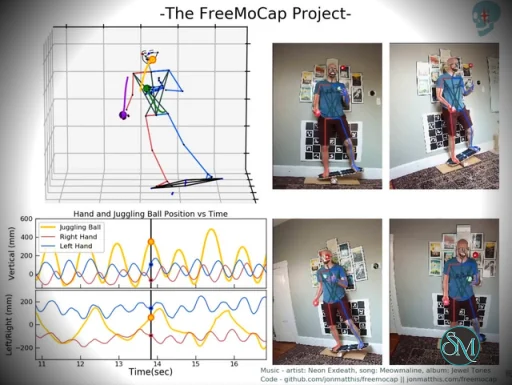
FreeMoCap is a free and open-source markerless motion capture system that allows users to record 3D human movement using standard webcams or video files instead of specialised motion capture suits.
Unlike traditional mocap systems that require body markers and high-end camera arrays, FreeMoCap relies on software-based tracking and computer vision techniques. This makes motion capture more affordable and accessible for students, indie creators, and researchers.
Download FreeMoCap v2.0.0-alpha.24 - Software Mirrors |
|---|
FreeMoCap v2.0.0-alpha.24 for Windowsfreemocap_server_2.0.0-alpha.24_windows-x64-cpu.zip | 509.52 MB |
FreeMoCap v2.0.0-alpha.24 for macOSfreemocap_server_2.0.0-alpha.24_macos-arm64-apple-silicon.zip | 373.17 MB freemocap_server_2.0.0-alpha.24_linux-x64-cpu.zip | 776.32 MB freemocap_2.0.0-alpha.24_macos-arm64-apple-silicon.zip | 414.41 MB freemocap_2.0.0-alpha.24_macos-arm64-apple-silicon.dmg | 429.45 MB |
FreeMoCap v2.0.0-alpha.24 for Linux |
FreeMoCap v2.0.0-alpha.24 Source Code |
FreeMoCap v2.0.0-alpha.24 Release Notes:FreeMoCap v2.0.0-alpha.24 comes with support for virtual cameras! By default, FreeMoCap does not search for virtual cameras. You can now enable virtual camera finding, with these steps:
Process Recording with Blender button was not working properly.
What's Changed
Warning: Alpha means Busted!This alpha release is the first test version packaged for general users, and may have errors. Expect rough edges, missing functionality, and the possibility of data-affecting bugs. Please report issues on GitHub or in the Discord server.Installation GuideDownload the correct installer from your platform from our Download Page. Follow platform specific instructions for installing from there: Windows 1. Download the .exe installer (or the portable .zip if you'd rather not install system-wide). 6. Run the installer. If Windows SmartScreen shows an "unrecognized app" warning, click More info → Run anyway. 7. Follow the setup wizard prompts to complete installation. 8. Launch FreeMoCap from the Start menu. _Portable_ _.zip_ _alternative:_ extract the archive anywhere and run the FreeMoCap executable inside — no installation required. macOS 1. Download the .dmg (or .zip) for Apple Silicon (Arm) Macs. 2. Open the .dmg and drag FreeMoCap into your Applications folder. 3. On first launch, you may see a warning that FreeMoCap is an app downloaded from the internet, click Open Anyway. 4. Launch FreeMoCap from Applications or Spotlight. 9. You will be prompted about camera/microphone permissions - grant access to FreeMoCap can detect connected cameras. ▎ _Note: Intel Macs are not currently supported (see Known Problems below)._ Linux 10. Download the .AppImage or .deb package, x64. 11. AppImage: make it executable (chmod +x FreeMoCap*.AppImage) and run it directly.
.deb: install with sudo dpkg -i freemocap*.deb (or your distro's package manager), then launch from your applications menu.
12. If prompted about camera/microphone permissions, grant access so FreeMoCap can detect connected cameras.
13.
Upgrading from 1.xFreeMoCap 2.0 uses a different installation method than FreeMoCap (1.x). The old version usedpip install freemocap, while the new version uses dedicated desktop installers. The two versions are compatible and will not interfere with each other. We recommend keeping your 1.x environment around until the stable 2.0 is released. Recording data compatibility between versions has not been fully verified yet, but you can reprocess videos from one version in the other.
Known Problems
Share Your WorkIf you're making something with FreeMoCap, we would love to see it. Please share your.blend files if you're comfortable with us using them for promotional material - Share your work in the #freemocap-clips channel of the Discord server and/or via this Media Upload Form
Not sure which build to download? See the download guide: https://docs.freemocap.org/freemocap/download GPU (CUDA) builds — hosted on Cloudflare R2(Too large for GitHub's 2 GB asset limit.) |
Key Features of FreeMoCap
Markerless Motion Capture
FreeMoCap captures full-body motion without requiring wearable markers or suits. It processes recorded video to reconstruct 3D skeletal movement data.
Multi-Camera and Video Support
Users can connect multiple webcams for better depth accuracy or import pre-recorded video footage. This flexibility allows you to scale your setup based on your budget and technical requirements.
Data Export and Analysis
Captured motion data can be exported in formats such as CSV and NumPy arrays. It also supports workflows compatible with 3D animation tools like Blender. Built-in analysis tools help users inspect skeletal tracking results.
Open-Source Ecosystem
FreeMoCap is fully open source, allowing developers to modify, extend, and integrate it into research or production pipelines. The project benefits from active community contributions and ongoing development.
Performance and Usability
FreeMoCap typically runs in a Python environment and may require installation through package managers. While it provides a graphical interface, initial setup, camera calibration, and environment configuration may require technical familiarity.
Accuracy: Motion tracking can be surprisingly detailed with proper lighting and calibration, though results vary based on camera quality and positioning.
Processing Speed: Most workflows rely on post-processing rather than real-time tracking.
Ease of Use: Setup can be complex for beginners, especially those unfamiliar with Python or camera calibration workflows.
Pros and Cons
Pros
Completely free and open source
No specialised hardware required
Flexible export formats for animation and research
Strong developer and academic community
Cons
Technical setup may be challenging
Limited real-time processing
Accuracy depends heavily on camera setup and lighting
Final Verdict
FreeMoCap stands out as a capable and accessible open-source motion capture platform. While it may not fully replace high-end professional mocap systems for commercial film or AAA game production, it provides impressive performance considering its zero cost.
If you’re interested in motion capture but don’t want to invest in expensive suits or proprietary systems, FreeMoCap offers a compelling alternative.
Sources
Official documentation: https://docs.freemocap.org
GitHub repository: https://github.com/freemocap/freemocap
Developer:
The FreeMoCap Project.
Operating System:
Windows / macOS / Linux
Date Added:
2026-09-18T16:49:44.579Z
Categories:
Post a Comment/Report Broken Link: