Chat2DB Community is a free and open source AI-powered database client and SQL workspace designed for developers, database administrators, analysts, and data engineers. It combines a modern SQL editor, multi-database management, and AI-assisted SQL generation into a single cross-platform application. Supporting more than 30 database systems, Chat2DB Community has become one of the fastest-growing open source alternatives to traditional database tools such as DBeaver and DataGrip.
Managing multiple databases often requires several tools for querying, schema exploration, and administration. Chat2DB Community brings these capabilities together while adding AI-powered assistance for writing, explaining, and optimizing SQL queries.
Unlike the commercial Pro edition, the Community edition is completely local. Users connect their own AI model or API provider, ensuring database access and AI configuration remain under their control. It is available for Windows, macOS, Linux, and Docker deployments.
Key Features of Chat2DB Community
AI-Assisted SQL Development
One of Chat2DB Community's biggest strengths is its AI integration. After configuring a supported AI provider, users can:
Generate SQL from natural language
Explain existing SQL statements
Optimize query performance
Understand unfamiliar database structures
The Community edition supports user-configured AI models rather than bundled cloud AI services.
Broad Database Support
Chat2DB Community supports a wide variety of databases, including:
MySQL
PostgreSQL
MariaDB
Oracle Database
Microsoft SQL Server
SQLite
ClickHouse
MongoDB
Redis
Snowflake
DB2
Hive
BigQuery
Elasticsearch
Additional databases can be added through plugins.
Modern SQL Workspace
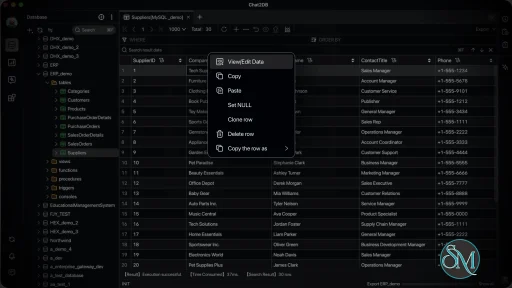
The built-in SQL editor includes:
Syntax highlighting
Auto-completion
SQL formatting
Query history
Saved SQL scripts
Multiple query tabs
These features make day-to-day database development efficient and comfortable.
Database Management
Users can browse schemas, inspect tables, view indexes, manage connections, and execute SQL without switching between multiple utilities.
Cross-Platform Support
Chat2DB Community runs on Windows, macOS, Linux, and Docker, making it suitable for both desktop development and server-based deployments.
Self-Hosted
The Community edition can be deployed locally using Docker or by building from source. This makes it attractive for organizations that require complete control over their database tools and AI configuration.
Open Source
The project is actively maintained and developed in the open. Recent Community releases continue to improve usability, database compatibility, and AI integration while distinguishing Community and commercial editions more clearly.
Download Chat2DB Community v5.3.7 - Software Mirrors |
|---|
Chat2DB Community v5.3.7 for Windows |
Chat2DB Community v5.3.7 for macOSpackage-community-macos-x64-macos-app-archive.tar.gz | 379.76 MB package-community-macos-arm64-macos-app-archive.tar.gz | 370.91 MB |
Chat2DB Community v5.3.7 for Linuxpackage-community-linux-x64-linux-rpm.rpm | 382.92 MB package-community-linux-x64-linux-deb.deb | 344.74 MB package-community-linux-x64-linux-appimage.AppImage | 371.65 MB package-community-linux-arm64-linux-rpm.rpm | 383.84 MB package-community-linux-arm64-linux-deb.deb | 343.32 MB package-community-linux-arm64-linux-appimage.AppImage | 371.2 MB Chat2DB-Community-5.3.7-x86_64.rpm | 382.92 MB Chat2DB-Community-5.3.7-x86_64.AppImage | 371.65 MB Chat2DB-Community-5.3.7-arm64.deb | 343.32 MB Chat2DB-Community-5.3.7-arm64.AppImage | 371.2 MB |
Others Download related to Chat2DB Community v5.3.7 |
Chat2DB Community v5.3.7 Source Code |
Chat2DB Community v5.3.7 Release Notes:Chat2DB Community 5.3.7 adds in-app desktop updates for the packaged macOS, Windows and Linux builds; basic configuration and preview for Excel, JSON and SQL imports, plus an ultra-fast CSV import mode; an Update Time column in the table list; OracleEXPLAIN PLAN results; and 28 user-visible improvements and fixes across the query console, task center, dashboards, AI history and connection handling.
Added (5)
Optimization (3)
Fixed (20)
IndexOutOfBoundsException. by @HandSonic in #2815 #2824
11. Corrupted caches recover: a corrupted scalar JSON entry no longer makes the key unusable for the rest of its TTL; only the damaged key is removed and the cached value is rebuilt. by @HandSonic in #2828
12. A failed save no longer leaves memory and disk out of sync: data source order, namespace position, ER-diagram position and small data writes are persisted before memory is updated, so a failed write is not shown as saved and does not revert to the old state after a refresh. by @HandSonic @Aias00 in #2480 #2830 #2840 #2846
13. More reliable AI conversation history: sessions and message history are written with a temporary file and an atomic replace, so an interrupted write no longer destroys the last usable history, and a failed message deletion rolls back the session index instead of losing the owning record. by @HandSonic in #2843 #2841
14. Line endings when copying results on Windows: copied result rows use CRLF, so pasting into native programs such as SAP GUI no longer merges the rows or shows #. by @openai0229 in #2909
15. SSH connection test failures: a failed request or a desktop timeout reports a clear message instead of leaving the test loading forever. by @Aias00 in #2548
16. Cursor flickering in the Windows editor: moving the mouse inside the SQL editor no longer switches between the arrow, I-beam and zoom cursors, and macOS and Linux keep their previous behaviour. by @openai0229 in #2922
17. Duplicated connections keep their fields: duplicating a data source keeps the BigQuery and service name fields, deep-copies the SSH, driver and extension configuration, and resets runtime handles. by @HandSonic in #2793
18. Local data source filtering: alias search and type filters apply before paging and counting, PRIVATE and SHARED match case-insensitively, and a missing type in older data is treated as private. by @HandSonic in #2820
19. Clean process exit: the cookie cleanup thread is a daemon thread, so exiting or stopping the service no longer blocks process termination. by @Aias00 in #2522
20. Redacted IPC debug logs: passwords, SSH passphrases and JDBC connection strings in desktop request and response debug logs are no longer written in clear text. by @Aias00 in #2473
Full Changelog: v5.3.6...v5.3.7 |
Performance and User Experience
Chat2DB Community provides a modern interface that feels cleaner than many traditional database clients. Database connections are responsive, query execution is fast, and the SQL editor offers useful productivity features.
The AI assistant is particularly valuable for developers learning SQL or working with unfamiliar schemas. Being able to generate or explain queries directly within the editor reduces context switching and speeds up development.
Although the Community edition lacks several enterprise capabilities found in Chat2DB Pro, such as advanced data migration, hosted AI services, and cloud synchronization, it remains highly capable for individual developers and small teams.
Pros
Free and open source.
Supports more than 30 database systems.
AI-assisted SQL generation and explanation.
Modern SQL editor.
Cross-platform support.
Docker deployment available.
Self-hosted with user-controlled AI providers.
Active development and growing community.
Cons
Advanced enterprise features require the commercial edition.
AI functionality requires configuring your own compatible AI model or API.
Large database schemas may take longer to index initially.
Documentation continues to evolve as the project grows.
Who Should Use Chat2DB Community?
Chat2DB Community is an excellent choice for software developers, database administrators, DevOps engineers, data analysts, and students who work with multiple database systems.
It is particularly useful for users who want an AI-assisted SQL client while retaining control over their own infrastructure and AI provider.
Final Verdict
Chat2DB Community successfully combines a capable database client with practical AI-assisted development features. Its broad database support, clean interface, flexible deployment options, and open source nature make it one of the strongest modern alternatives to traditional SQL tools.
While professional teams may benefit from the additional capabilities offered by the commercial edition, the Community version provides more than enough functionality for most developers and stands out as one of the best open source AI database clients available today.
Post a Comment/Report Broken Link: