Readest is a modern open source ebook reader designed for readers who want more than a basic EPUB viewer. It combines support for multiple ebook and document formats with annotations, customizable reading layouts, text-to-speech, translation, side-by-side reading, library management, and cross-device synchronization. It is available across Windows, macOS, Linux, Android, iOS, and the web.
Readest is built around the idea of making digital reading feel consistent across devices. Instead of maintaining separate applications for desktop, mobile, and web reading, users can keep the same library and reading progress across supported platforms.
The project is a modern rewrite of Foliate and uses Next.js and Tauri as part of its technology stack. It is released under the AGPL-3.0 license, making the source code available for inspection, modification, and contribution.
Key Features of Readest
Wide Format Support
Readest supports a broad range of formats, including:
This makes it useful as a general reading application rather than an EPUB-only reader.
Customizable Reading Experience
Readers can adjust typography, fonts, margins, spacing, themes, and reading layouts. Both scrolling and paginated reading modes are available, allowing users to choose an experience that suits the book and device.
Parallel Reading
One of Readest's most interesting features is Parallel Read. It allows two books or documents to be displayed side by side with synchronized navigation.
This is particularly useful for comparing translations, studying textbooks, reading technical documentation, or working with two related documents.
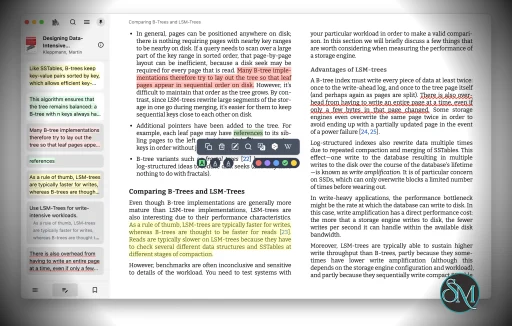
Notes and Highlights
Readest provides tools for highlighting passages, creating notes, and bookmarking important sections. These features make it suitable for studying and research as well as casual reading.
Annotations can also be exported, while integrations with services such as Readwise and Hardcover provide additional ways to manage reading information.
Text to Speech
The built-in text-to-speech functionality allows users to listen to supported books instead of reading them manually. Readest supports on-device, browser, and cloud TTS options depending on the platform and configuration.
Translation and Lookup
Readers can select passages and use integrated tools for translation or terminology lookup without leaving the book. DeepL, Wikipedia, and Wiktionary integrations make this particularly useful for language learners and readers working with unfamiliar subjects.
Cross-Device Sync
Readest can synchronize reading progress, highlights, notes, and library information across supported devices. It also supports integration with OPDS catalogs and personal Calibre libraries.
The project also supports synchronization with KOReader, which is especially useful for users who read on dedicated e-ink devices.
Local-First Approach
Readest emphasizes privacy and control over personal reading data. The application can be used locally, while cloud synchronization is available when users want it. The project states that it does not require forced accounts or data harvesting.
Web Version
A web version makes it possible to access the reading experience without installing a desktop or mobile application. This complements the native applications and makes the platform more flexible for users working across different devices.
Download Readest v0.11.20 - Software Mirrors |
|---|
Readest v0.11.20 for WindowsReadest_0.11.20_x64-setup.exe | 31.45 MB Readest_0.11.20_x64-portable.exe | 64.07 MB Readest_0.11.20_arm64-setup.exe | 30.13 MB Readest_0.11.20_arm64-portable.exe | 56.17 MB |
Readest v0.11.20 for macOSReadest_0.11.20_universal.dmg | 72 MB |
Readest v0.11.20 for LinuxReadest_0.11.20_arm64.deb | 38.55 MB Readest_0.11.20_amd64.deb | 37.87 MB Readest_0.11.20_amd64.AppImage | 145.94 MB Readest_0.11.20_aarch64.AppImage | 137.75 MB Readest-0.11.20-1.x86_64.rpm | 37.87 MB Readest-0.11.20-1.aarch64.rpm | 38.55 MB |
Readest v0.11.20 for AndroidReadest_0.11.20_universal.apk | 268.81 MB Readest_0.11.20_arm64.apk | 73.44 MB |
Others Download related to Readest v0.11.20send-to-readest-0.2.1.zip | 459.46 kB Readest_0.11.20_universal.app.tar.gz | 71.52 MB Readest-0.11.20.calibre-plugin.zip | 38.77 kB Readest-0.11.20-1.koplugin.zip | 222.91 kB Readest-0.11.20-1.calibre-plugin.zip | 43.07 kB |
Readest v0.11.20 Source CodeReadest v0.11.20 Source code (zip) Readest v0.11.20 Source code (tar.gz) |
Readest v0.11.20 Release Notes:Release HighlightText-to-Speech: Read-aloud voices can now be downloaded per book for offline listening, and adjustable pauses between sentences and paragraphs Text-to-Speech: Added CarPlay support on iOS and more reliable Android Auto controls so you can listen while driving Sync: Added OneDrive as a cloud provider, you can now sync to several providers at once Reading: Added a right-edge swipe to change Auto Scroll speed, footnotes in Markdown books, and copying text now keeps its paragraph breaks Reading: Smoother page-turn animations, steadier text selection on iOS, and a redesigned custom theme editor that stays readable on mobile Annotations: You can now copy a highlight or note together with a deep link that jumps straight back to its spot in the book Library: You can now sort and filter your shelf by time remaining, and the Recently Read shelf and widget show only books you're currently reading PDF: Fixed a crash that could happen when turning pages or zooming large PDFs on iOS More: Fixed OPDS catalogs disappearing after a restart, and improved 32-bit Android stability
What's Changedfix: Sentry high-priority crash batch (autoscroll, TTS, MOBI, book-open, PDF links) by @chrox in https://github.com/readest/readest/pull/5012 docs: move source build instructions to CONTRIBUTING.md by @dastarruer in https://github.com/readest/readest/pull/5017 fix(sentry): repair open-with crash-reporter arg and drop benign noise by @chrox in https://github.com/readest/readest/pull/5014 fix(transfer): stop the progress render storm (READEST-2, max update depth) by @chrox in https://github.com/readest/readest/pull/5015 fix: media-session teardown race + page_stat view migration idempotency by @chrox in https://github.com/readest/readest/pull/5019 chore: add zed-editor support by @dastarruer in https://github.com/readest/readest/pull/5026 chore(deps): bump the github-actions group with 9 updates by @dependabot[bot] in https://github.com/readest/readest/pull/5031 fix(reader): guard foliate paginator null-document crashes (READEST-1H, 2X) by @chrox in https://github.com/readest/readest/pull/5020 fix(reader): guard applyMarginAndGap against a torn-down view (READEST-2V) by @chrox in https://github.com/readest/readest/pull/5022 fix(updater): never throw from an auto update check (READEST-J, READEST-22) by @chrox in https://github.com/readest/readest/pull/5028 feat(sentry): upload browser source maps for symbolicated JS crashes by @chrox in https://github.com/readest/readest/pull/5027 Footer obstruction fix by @bincent0929 in https://github.com/readest/readest/pull/5029 fix(android): remove Android Auto opt-in from manifest to unblock Play review by @chrox in https://github.com/readest/readest/pull/5038 feat(reader): subscribe to RSS/Atom/JSON feeds as periodical feed books by @chrox in https://github.com/readest/readest/pull/5039 fix: add backticks to docstring for proper formatting by @dastarruer in https://github.com/readest/readest/pull/5040 feat(sync): add Microsoft OneDrive as a cloud sync provider by @chrox in https://github.com/readest/readest/pull/5048 chore(style): unified info bar font style by @chrox in https://github.com/readest/readest/pull/5045 feat(sync): sync S3 config + credentials cross-device, fix backup leak of device-local fields by @chrox in https://github.com/readest/readest/pull/5051 fix: fix malformed code block in docs by @dastarruer in https://github.com/readest/readest/pull/5059 fix(opds): fix logic for temporary destination filename (#5024) by @chloeroform in https://github.com/readest/readest/pull/5058 feat: add nicer issue templates by @dastarruer in https://github.com/readest/readest/pull/5060 refactor: rename ColorPanel to ThemePanel by @dastarruer in https://github.com/readest/readest/pull/5042 feat(tts): make inter-sentence and inter-paragraph gaps configurable by @muvox in https://github.com/readest/readest/pull/5057 fix(android): reliable Android Auto media controls by @chrox in https://github.com/readest/readest/pull/5066 feat(settings): Increase margin upper bounds by @GoatDamn-dev in https://github.com/readest/readest/pull/5071 fix: only open last book if book is not marked as finished by @dastarruer in https://github.com/readest/readest/pull/5072 feat(ios): CarPlay support and native TTS playout with Now Playing integration by @chrox in https://github.com/readest/readest/pull/5085 fix(dictionary): let a web search entry lead the popup when it is first in the configured order by @chrox in https://github.com/readest/readest/pull/5086 fix(sync): keep the cloud copy when deleting a book from the device only (#5084) by @chrox in https://github.com/readest/readest/pull/5087 fix(android): stop 32-bit ARM builds aborting at launch (#5070) by @chrox in https://github.com/readest/readest/pull/5089 fix(kosync): accept pulled progress from servers that omit document by @chrox in https://github.com/readest/readest/pull/5090 fix(macos): skip the minidump handler in sandboxed App Store builds by @chrox in https://github.com/readest/readest/pull/5091 feat(markdown): render footnotes in .md books (#5074) by @chrox in https://github.com/readest/readest/pull/5095 fix(sync): carry reading progress onto the shelf row in file sync by @chrox in https://github.com/readest/readest/pull/5096 chore(zed): enable typescript type checking across entire codebase by @dastarruer in https://github.com/readest/readest/pull/5098 feat(sorting): add toggle to filter by time remaining by @dastarruer in https://github.com/readest/readest/pull/5079 fix(i18n): merge the split cloud provider tip into one key by @chrox in https://github.com/readest/readest/pull/5102 fix(epub): load chapters whose zip entry name needs percent-encoding by @chrox in https://github.com/readest/readest/pull/5100 feat(koplugin): bind full annotation sync to a gesture, upload the open book by @chrox in https://github.com/readest/readest/pull/5106 fix(sentry): stop the crash reporter booting a second copy of the app (#5052) by @chrox in https://github.com/readest/readest/pull/5107 fix(reader): remove long-press to zoom images and tables by @chrox in https://github.com/readest/readest/pull/5108 fix(android): give each gallery image its own name and report insert failures by @chrox in https://github.com/readest/readest/pull/5109 fix(library): keep demo books out of the cloud book channel (#5049) by @chrox in https://github.com/readest/readest/pull/5110 fix(sentry): drop the minidump crash reporter, it re-execs our own binary by @chrox in https://github.com/readest/readest/pull/5112 fix(settings): keep the screen awake only while reading (#5104) by @chrox in https://github.com/readest/readest/pull/5113 fix(sync): verify the sync passphrase and make a wrong one recoverable by @chrox in https://github.com/readest/readest/pull/5115 fix(kosync): resolve element-offset XPointers and isolate percentage drift anchor to KOReader by @adagues in https://github.com/readest/readest/pull/5111 fix(tts): use more intuitive icons in tts player by @dastarruer in https://github.com/readest/readest/pull/5117 fix(opds): normalize XML MIME types by @yozlog in https://github.com/readest/readest/pull/5120 fix(opds): escape malformed XML in proxy by @yozlog in https://github.com/readest/readest/pull/5121 feat(sync): allow syncing to multiple providers at once (#5062) by @chrox in https://github.com/readest/readest/pull/5122 feat(tts): persistent per-book audio cache with offline downloads by @chrox in https://github.com/readest/readest/pull/5126 perf(sync): drop redundant deleted_at OR from stats pull cursor by @chrox in https://github.com/readest/readest/pull/5127 fix(pdf): prevent iOS WebContent OOM crash on PDF page turn and zoom (#5118) by @chrox in https://github.com/readest/readest/pull/5129 chore: update agent memories by @chrox in https://github.com/readest/readest/pull/5130 fix(deploy): restore webpack build so the Cloudflare worker fits 64 MiB by @chrox in https://github.com/readest/readest/pull/5136 fix: change dictionary icon by @dastarruer in https://github.com/readest/readest/pull/5135 chore(deps): bump actions/setup-node from 6.4.0 to 7.0.0 in the github-actions group by @dependabot[bot] in https://github.com/readest/readest/pull/5138 fix: fix param name typo by @dastarruer in https://github.com/readest/readest/pull/5145 fix(tts): keep Android system TTS reading with the screen locked (#4408) by @chrox in https://github.com/readest/readest/pull/5146 fix(tts): show mini player immediately and keep it above bottom bar and footer by @chrox in https://github.com/readest/readest/pull/5144 fix(sync): create Google Drive files atomically to stop stranding "Untitled" files in the Drive root by @chrox in https://github.com/readest/readest/pull/5150 fix(sync): sync WebDAV server URL for configured-but-disabled providers (#5141) by @chrox in https://github.com/readest/readest/pull/5149 test(tts): stop detached speak loops so no state dispatch escapes teardown by @chrox in https://github.com/readest/readest/pull/5151 docs(design): default primary buttons to btn-contrast, reserve btn-primary for CTAs by @chrox in https://github.com/readest/readest/pull/5155 chore: replace outdated react-color package with react-colorful by @dastarruer in https://github.com/readest/readest/pull/5128 feat: redesign custom theme creation menu by @dastarruer in https://github.com/readest/readest/pull/5152 chore: gate rust_lint on src-tauri changes and drop redundant btn-primary in WordLens by @chrox in https://github.com/readest/readest/pull/5156 fix(layout): items overlap in footer on Android phone (#5004) by @gojodennis in https://github.com/readest/readest/pull/5158 feat(tts): add 0.8x and 0.85x tts speech speed presets by @gojodennis in https://github.com/readest/readest/pull/5157 fix(reader): return the turn promise from the captured view.next/prev wrappers by @chrox in https://github.com/readest/readest/pull/5159 fix(reader): do not toggle bars on vertical pan swipes over fixed-layout pages by @chrox in https://github.com/readest/readest/pull/5160 fix(payment): stop Google Play RTDN fallback from downgrading paying subscribers by @chrox in https://github.com/readest/readest/pull/5163 feat(tts): refine the TTS player sheet and redesign the mini player by @chrox in https://github.com/readest/readest/pull/5162 feat(tts): add mini player Player Style (full/minimal); keep Tauri off the edge proxy by @chrox in https://github.com/readest/readest/pull/5170 feat(annotator): copy a highlight or note with its deep link by @chrox in https://github.com/readest/readest/pull/5171 fix(transfer): stop bulk cloud uploads from freezing the library (#5047) by @chrox in https://github.com/readest/readest/pull/5172 fix(library): anchor the native context menu popup at the pointer position by @chrox in https://github.com/readest/readest/pull/5182 refactor: create primitive Toggle component by @dastarruer in https://github.com/readest/readest/pull/5173 fix(reader): stop vertical swipes from turning or flashing the layered slide by @chrox in https://github.com/readest/readest/pull/5185 fix(reader): stabilize iOS text selection with instant highlight and captured page turns by @chrox in https://github.com/readest/readest/pull/5184 fix(koplugin): fix auto-sync push crash and UI-thread block on book open/close (#5006) by @chrox in https://github.com/readest/readest/pull/5186 fix(ios): keep the App Group on the widget and share extensions in App Store builds by @chrox in https://github.com/readest/readest/pull/5188 fix(opds): restore Calibre pipe-escaped commas in author names and join authors with & by @chrox in https://github.com/readest/readest/pull/5189 perf(test): reduce unit test runtime by @chrox in https://github.com/readest/readest/pull/5190 fix(opds): keep re-added catalogs from vanishing after app restart by @chrox in https://github.com/readest/readest/pull/5191 test: remove redundant cases and silence passing logs by @chrox in https://github.com/readest/readest/pull/5192 feat: use shorter quote in theme preview by @dastarruer in https://github.com/readest/readest/pull/5197 fix(reader): keep the side panel resize handle from sticking over PDF pages by @chrox in https://github.com/readest/readest/pull/5198 fix(library): keep the select-mode action bar from hiding the last book by @chrox in https://github.com/readest/readest/pull/5200 feat: improve accuracy of time remaining calculation by @dastarruer in https://github.com/readest/readest/pull/5194 fix(library): show only currently-reading books on recent shelf and widget by @chrox in https://github.com/readest/readest/pull/5201 fix(reader): preserve paragraph breaks when copying text by @chrox in https://github.com/readest/readest/pull/5202 feat(updater): show original text for auto-translated release notes by @chrox in https://github.com/readest/readest/pull/5203 fix(reader): synchronize toolbar with layered page turns by @chihumyum in https://github.com/readest/readest/pull/5179 ci(release): publish Send to Readest extension zip by @chrox in https://github.com/readest/readest/pull/5204 fix(reader): support offline dictionary pronunciation by @chrox in https://github.com/readest/readest/pull/5205 feat(reader): add right-edge swipe to adjust auto scroll speed by @chrox in https://github.com/readest/readest/pull/5206 fix(applock): hide PIN entry while the biometric sheet is on screen by @chrox in https://github.com/readest/readest/pull/5207 fix(reader): draw the theme background on the curl back face by @chrox in https://github.com/readest/readest/pull/5208 chore: update agent memories by @chrox in https://github.com/readest/readest/pull/5209 fix(reader): gate concurrent programmatic captured page turns by @chrox in https://github.com/readest/readest/pull/5211 fix(reader): make the custom theme editor readable on mobile by @chrox in https://github.com/readest/readest/pull/5212 fix(reader): keep TTS media session and volume control with volume-key paging by @chrox in https://github.com/readest/readest/pull/5218 fix(reader): keep captured turns aligned with the finger by @chihumyum in https://github.com/readest/readest/pull/5217 fix(ios): re-attach App Group to widget/share extensions in App Store builds by @chrox in https://github.com/readest/readest/pull/5219 release: version 0.11.20 by @chrox in https://github.com/readest/readest/pull/5220
New ContributorsFull Changelog: https://github.com/readest/readest/compare/v0.11.18...v0.11.20 |
Performance and User Experience
Readest has a clean interface that focuses on reading rather than surrounding the user with unnecessary controls. The application feels closer to a modern productivity tool than a traditional ebook utility.
Its biggest strength is the combination of simple reading features with tools aimed at deeper study. Side-by-side reading, annotations, translation, TTS, and customizable typography make it useful for everything from casual novels to technical books and academic material.
The project is also developing quickly. Recent releases have improved library performance, PDF support, reading layouts, synchronization, OPDS management, and accessibility.
Because Readest is still actively evolving, users should expect some features and interfaces to change over time.
Pros
Free and open source.
Supports EPUB, PDF, MOBI, AZW3, FB2, CBZ, and TXT.
Available on Windows, macOS, Linux, Android, iOS, and the web.
Clean and customizable reading interface.
Side-by-side Parallel Read mode.
Highlights, notes, and bookmarks.
Text-to-speech support.
Translation and dictionary tools.
Cross-device synchronization.
OPDS and Calibre support.
KOReader synchronization.
Local-first and privacy-focused design.
Active development.
Cons
Some advanced functionality is still evolving.
Cloud-based features may require additional configuration or services.
Users looking for a very minimal ebook reader may find the feature set extensive.
The ecosystem is smaller than established commercial ebook platforms.
Who Should Use Readest?
Readest is an excellent choice for students, researchers, developers, language learners, academics, and anyone who reads across multiple devices.
It is particularly appealing to people who want more control over their ebook library while still having modern conveniences such as synchronization, text-to-speech, annotations, translation, and OPDS support.
For users who already have a Calibre library or use KOReader on an e-ink device, Readest is also worth considering because of its interoperability with those ecosystems.
Final Verdict
Readest is one of the most impressive open source ebook readers currently available. It combines the simplicity of a traditional reader with features normally found across several separate applications.
The ability to read multiple formats, compare books side by side, annotate documents, translate passages, listen through TTS, and synchronize reading progress across platforms gives Readest a strong advantage over basic ebook readers.
It is not simply trying to replace a conventional EPUB viewer. Its focus on deep reading, study, interoperability, and cross-platform access makes it a compelling choice for anyone who wants a more complete reading environment while keeping their books and data under their control.
Post a Comment/Report Broken Link: