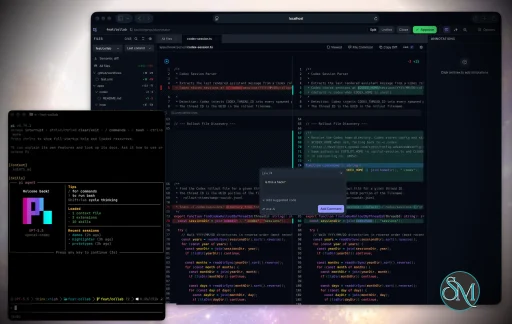
Plannotator is an open-source platform designed to review and validate plans and code generated by AI coding agents.
The platform provides a centralized interface where developers can:
Review AI-generated plans
Annotate proposed actions
Approve or reject tasks
Inspect code changes
Provide structured feedback
Improve agent outputs
Maintain human oversight
Rather than replacing developers, Plannotator aims to keep humans involved in critical decision-making during AI-assisted development.
As AI coding agents become increasingly capable, developers face a growing challenge: ensuring that AI-generated plans and code changes align with project requirements before they are executed. Plannotator addresses this problem by acting as a review layer between developers and AI coding agents.
Instead of generating code itself, Plannotator focuses on making AI-driven development more transparent and controllable. It allows teams to review, annotate, approve, reject, and refine agent-generated plans and code changes before they affect a project.
Download Plannotator v0.27.2 - Software Mirrors |
|---|
Plannotator v0.27.2 for Windowsplannotator-paste-win32-arm64.exe | 90.2 MB plannotator-paste-win32-x64.exe | 93.92 MB |
Plannotator v0.27.2 for macOSplannotator-darwin-arm64 | 113.76 MB plannotator-darwin-x64 | 118.81 MB |
Plannotator v0.27.2 for Linuxplannotator-linux-arm64 | 142.17 MB plannotator-linux-x64 | 143.05 MB |
Plannotator v0.27.2 Release Notes:Follow @plannotator on X for updatesMissed recent releases?
What's New in v0.27.2Plannotator now works on your phone. This release ships a full mobile experience for plan review, code review, and annotation, alongside a security hardening pass, a fix for Codex review jobs on current Codex CLI versions, a large folder-mode performance win, and configurable markdown extensions. Fourteen PRs, including a community fix from @leoreisdias and a community-requested feature from @sgiath.Plan and code review on phones and tabletsReview a plan from your couch. Approve a diff from the train. Plannotator's plan review, code review, and annotate surfaces now adapt to phones and tablets with a compact touch experience: full-width reading layouts, a full-screen navigator for files and contents, touch-safe comment composition that stays clear of the software keyboard, 44px touch targets, and safe-area-aware layouts that respect notches and home indicators. On iPhone Safari, plans use the browser's natural document scroll so the address bar collapses as you read. Desktop behavior is unchanged. The compact experience activates only on coarse-pointer devices at tablet widths and below, so a narrow desktop window keeps the workspace you know. Pair it with v0.27.0's--tailscale flag or remote mode and your phone becomes a first-class review device: start a review on your workstation, scan the QR code, and annotate from anywhere on your tailnet.
This shipped as a five-part stack: viewport and safe-area foundation, keyboard-safe comment composition, touch and dialog primitives, the code review shell, and the plan shell.
Codex review jobs work again on current Codex CLIsCodex CLI 0.147.0 removed the--full-auto flag, which broke every Plannotator Codex review, Guided Review, and Code Tour job at launch with an argument error. Plannotator now passes --approve-for-me, the flag Codex introduced as its replacement, across all three job builders.
Note the floor this implies: Codex review jobs now require codex-cli 0.147.0 or newer. Older Codex CLIs do not recognize the new flag. Thanks to @tgenov for independently reporting the breakage and pushing on a read-only sandbox for review jobs, an idea now tracked in #1310.
Folder annotate opens in milliseconds on large reposOpening a folder annotate session initialized a file watcher across the entire.git/refs tree to keep git status live in the file browser. On repos with hundreds of branches and tags that took 9 to 23 seconds before the first file selection was responsive. The watcher now targets the five specific git files that drive status display (HEAD, index, the reflog, packed-refs, and the current branch ref), bringing cold start to about 30ms on the same repos with the same live status behavior.
Annotate any markdown-like file with configurable extensionsLivebook notebooks, Quarto documents, and other markdown-dialect files were rejected by annotate because the accepted extensions were hardcoded. A new config-only setting registers extra extensions to treat as markdown:~/.plannotator/config.json. Listed extensions are accepted everywhere annotate accepts .md: the CLI, the folder file browser, linked-doc and wiki-link navigation, frontmatter stripping, and version history. Entries are validated hard, and dotenv-family extensions can never be registered since annotate history copies file contents. Requested by @sgiath in #1307.
Security hardening across the supply chainFour security-focused changes landed in this cycle:
Additional Changes
Install / UpdatemacOS / Linux:/plugin in Claude Code, find plannotator, and click "Update now".
OpenCode: Clear cache and restart:
What's Changed
CommunityThis release carries a lot of community fingerprints:
|
Key Features of Plannotator
Plan Review System
One of Plannotator's core capabilities is reviewing plans generated by AI agents before execution.
Developers can examine:
Proposed tasks
Implementation strategies
Agent reasoning
Planned file modifications
Workflow sequences
This visibility helps reduce unintended changes and costly mistakes.
Annotation Tools
The platform allows users to add comments, notes, and guidance directly to AI-generated plans.
These annotations can be used to:
Clarify requirements
Correct misunderstandings
Provide context
Guide future agent actions
AI Code Review
Plannotator extends the review process beyond planning by supporting inspection of generated code.
Developers can:
Review modifications
Analyze diffs
Leave comments
Request revisions
Validate implementation details
This workflow resembles modern pull-request review systems.
Human-in-the-Loop Workflows
A major design goal is ensuring that AI actions remain subject to human approval.
Organizations can establish review processes where important actions require validation before execution.
Open Source Foundation
Plannotator is open source, allowing teams to inspect, modify, and self-host the platform according to their needs.
This transparency is particularly valuable for organizations adopting AI-assisted software development.
User Experience
The interface is designed around review workflows rather than direct code generation.
Instead of interacting with a chatbot, users primarily:
Receive agent-generated plans
Review proposed actions
Add feedback
Approve or reject changes
Monitor execution results
The workflow feels familiar to developers accustomed to pull requests, code reviews, and project planning tools.
Productivity Benefits
As AI coding tools become more autonomous, review processes become increasingly important.
Plannotator helps organizations:
Reduce risky AI actions
Improve code quality
Increase accountability
Preserve architectural consistency
Encourage collaboration between developers and AI agents
For teams adopting AI-driven development, these safeguards can be as valuable as the coding agents themselves.
Collaboration Features
The platform supports collaborative review workflows where multiple team members can participate in evaluating AI-generated outputs.
This allows:
Peer review
Team approval processes
Shared annotations
Collective decision-making
Such features are especially useful for larger engineering teams.
Performance
Because Plannotator focuses on workflow management and review rather than model inference, performance largely depends on the connected AI agents and integrations.
The platform itself is lightweight and primarily serves as an orchestration and review layer.
Open Source Advantages
Being open source provides several benefits:
Transparent development
Self-hosting capabilities
Custom integrations
Community contributions
Vendor independence
Organizations concerned about compliance, security, or proprietary workflows may find these advantages particularly appealing.
Limitations
Plannotator is designed as a companion tool rather than a complete AI development platform.
Common limitations include:
Requires external AI coding agents
Best suited for teams already using AI-assisted development
Smaller ecosystem than mature developer platforms
Additional review steps may slow rapid prototyping
Some users may prefer fully autonomous workflows
The software delivers the most value in environments where oversight and quality control are priorities.
Pros
Improves transparency of AI-generated plans
Supports structured review workflows
Human-in-the-loop design
Useful annotation system
Open source
Self-hosting support
Familiar review experience for developers
Helps reduce AI-generated mistakes
Cons
Not a standalone coding agent
Requires integration with AI development tools
Smaller community than established developer platforms
Adds review overhead to workflows
Best suited for teams rather than casual users
Who Should Use Plannotator?
Plannotator is ideal for:
Software development teams
Engineering managers
AI-assisted development workflows
Organizations adopting coding agents
Open-source projects
Teams prioritizing code quality and governance
It is particularly valuable for environments where AI-generated code requires oversight before reaching production systems.
Plannotator fills an increasingly important role in the AI development ecosystem by providing visibility and control over AI-generated plans and code changes. Its focus on human oversight, structured reviews, and collaborative workflows makes it a useful companion for modern coding agents. While it is not a replacement for AI coding tools themselves, it offers a practical solution for teams seeking greater confidence and accountability in AI-assisted software development.
Developer:
backnotprop
Operating System:
Windows / macOS / Linux
Date Added:
2026-08-13T23:06:49.417Z
Categories:
Post a Comment/Report Broken Link: