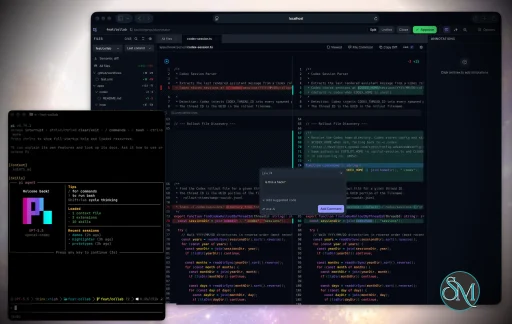
Plannotator is an open-source platform designed to review and validate plans and code generated by AI coding agents.
The platform provides a centralized interface where developers can:
Review AI-generated plans
Annotate proposed actions
Approve or reject tasks
Inspect code changes
Provide structured feedback
Improve agent outputs
Maintain human oversight
Rather than replacing developers, Plannotator aims to keep humans involved in critical decision-making during AI-assisted development.
As AI coding agents become increasingly capable, developers face a growing challenge: ensuring that AI-generated plans and code changes align with project requirements before they are executed. Plannotator addresses this problem by acting as a review layer between developers and AI coding agents.
Instead of generating code itself, Plannotator focuses on making AI-driven development more transparent and controllable. It allows teams to review, annotate, approve, reject, and refine agent-generated plans and code changes before they affect a project.
Download Plannotator v0.27.0 - Software Mirrors |
|---|
Plannotator v0.27.0 for Windowsplannotator-paste-win32-arm64.exe | 90.2 MB plannotator-paste-win32-x64.exe | 93.92 MB |
Plannotator v0.27.0 for macOSplannotator-darwin-arm64 | 113.86 MB plannotator-darwin-x64 | 118.91 MB |
Plannotator v0.27.0 for Linuxplannotator-linux-arm64 | 142.29 MB plannotator-linux-x64 | 143.14 MB |
Plannotator v0.27.0 Release Notes:Follow @plannotator on X for updatesMissed recent releases?
What's New in v0.27.0This is the largest release since v0.25.0: Call Flow analysis for code review, a first-class Tailscale story for reviewing from another device, a rework of the review panel around how people actually switch views, and a rebuilt Pi integration. Fourteen PRs landed. Every feature went through independent review, and the release as a whole passed two full QA sweeps (a 28-item verification workflow plus live journey, seam, and free-roam testing) before tagging.[!IMPORTANT] Breaking change for Pi users: the Pi plan-mode command is renamed Call Flow: see the call paths your diff changesCode review gets a third analysis layer alongside semantic diff: Call Flow, powered by CallDiff (AST-based, built with Tree-sitter, 22 languages supported). Enable it and the review computes, for the changeset on screen, every call path that gained or lost a call: trees rooted at your entry points, walking down to the exact functions the diff touched. A tax calculation moving from before a discount to after it shows up as a removed call and an added call in the same tree, rendered across every route that reaches it. A text diff cannot show you that. Enabling Call flow is consent for a small managed runtime install (about 5 MB: a pruned CallDiff core plus only the language packs your changed files need). The install runs in the background while you review; missing languages install themselves later under the same consent, and a Languages list supports installing ahead. Nothing is downloaded unless you opt in, the app works fully without it, and a failed install degrades to a clear retry, never a broken review. The path view organizes into collapsible entry sections with changed-path defaults and file boundaries. Every Call Flow row is commentable: click a row to start a comment, shift-click to collect multiple steps into one annotation. Comments on rows inside the visible diff anchor inline; rows outside it become file- or review-scoped feedback with the full call context preserved for your agent. A searchable raw view with a color-classified rendering is there when you want the unprocessed output, and Cmd+F inside the panel searches the analysis rather than the file tree.Review from your iPad: --tailscale mode, tailnet auto-detection, and a QR codeTwo community threads asked the same question from different directions: can I run the agent on my Mac and do the review from an iPad, and can I get a diff out of a VPS without SSH port-mapping gymnastics. @nikuscs went as far as building a proof-of-concept wrapper script. As of this release the answer is built in:tailscale serve in front of it, prints an HTTPS URL that works on every device in your tailnet, and renders a QR code in the terminal so a phone or tablet joins by pointing a camera at it. The serve mapping is cleaned up when the session ends, an existing mapping on the port is never stolen, and if Tailscale is not installed the command fails fast with an actionable message. annotate and annotate-last support the same flag.
For classic remote mode, PLANNOTATOR_URL_HOST=auto now resolves your machine's MagicDNS name (or tailnet IP) automatically, so multi-VPS setups no longer configure a hostname per machine. Remote-ready output includes the same QR code.
Security posture, spelled out: nothing binds beyond localhost under --tailscale, the URL is reachable only inside your own tailnet, public exposure (funnel, ngrok-style tunnels) is deliberately not supported, and the annotate agent terminal stays off for tailnet-published sessions unless you set the existing PLANNOTATOR_AGENT_TERMINAL_REMOTE=1 opt-in. The feature went through an independent security review plus an external reviewer's pass, and the follow-up hardening from both is included: startup failures exit immediately instead of hanging, serve mappings are retried on teardown and never leak silently, foreground serve configs are detected as conflicts, and nohup sessions survive terminal close exactly as they did before.
The review panel remembers how you workIf you review in the Tree view, every new session used to open on Git status anyway, and getting back meant one more click every single time. The panel now records the view you last used (Tree or Git status) and opens there. The toggle itself gets the full top row with Tree first, the search and collapse controls moved down next to the file tree, and the footer's copy button gave way to a copy-all control in the sidebar. An explicit choice in Settings still wins over the memo. The Commits rail also stops trapping you: clicking a commit used to permanently replace your working diff, with no way back short of restarting the session. Commits is now a self-contained detour. Entering it remembers what you were reviewing; returning to Tree restores that exact diff, and reloading mid-detour lands you back on your session default instead of stuck on a historical commit. Two smaller traps closed with the same work: the first-run setup dialog no longer re-runs its one-time reset if you closed the tab without dismissing it, and the fallback view toggle now reflects what is actually on screen.Pi integration rebuilt: no more prompt-cache bustingThe Pi extension no longer touches Pi's system prompt at all. Previously it injected planning instructions there, which busted Pi's prompt cache on every phase change and dropped AGENTS.md content, as @paullegranddc reported in #922. Phase framing now travels as ordinary conversation messages, so caching works the way Pi expects and your project instructions survive. This rebuild is why the plan-mode command is renamed:/plannotator → /plannotator-plan-mode describes what the command actually does now, and there is no alias for the old name. If you type /plannotator today, nothing happens; use /plannotator-plan-mode.
Focus mode from the keyboard@omardoescode asked for a keybind that clears both sidebars at once for keyboard-first annotation work, and it shipped the same day: Mod+. toggles focus mode in plan review and annotate. First press closes the Contents sidebar and the annotation panel, second press restores exactly what was open before. The binding was chosen after a full conflict audit across every surface and layout (it is also the same key code review already uses to collapse its sidebar), it never fires while you type, and the shortcuts help modal documents it in a new View section.Standing instructions for Guided ReviewGuided Review now accepts reviewer-supplied instructions, two ways: per-launch text appended to that guide's brief, and standing instructions stored once and applied to every guide whose launch carries none. Tell it "always lead with data-model changes" once and every future guide complies. Stored globally under your Plannotator data directory, editable from the guide launch surface. When a guide fails validation because it referenced files outside the changeset under review (for example, when instructions steer it toward a commit that is not on screen), the error now says exactly that, names the files, and tells you the fix: open that commit in the Commits panel first, then relaunch.Hardened release pipeline and security scanningThe release and deployment pipeline was rebuilt around supply-chain hygiene: every CI action is pinned to a commit SHA, releases validate that the tag sits on main and matches all seven release-coupled version manifests before anything publishes, npm publishing moved to trusted publishing (OIDC) with no long-lived token in the workflow, package construction is separated from the privileged publish step, and deploys wait for the exact commit to pass the full test suite. Gitleaks and zizmor scanning now run on every push and PR with SARIF output into GitHub code scanning, and Dependabot keeps dependencies under watch. None of this changes the product, but if you consume Plannotator's binaries or npm packages, the artifacts you install are now attested end to end under a stricter pipeline.Additional Changes
Install / UpdatemacOS / Linux:/plugin in Claude Code, find plannotator, and click "Update now".
OpenCode: Clear cache and restart:
What's Changed
CommunityThis release was shaped by the community more than any recent one:
|
Key Features of Plannotator
Plan Review System
One of Plannotator's core capabilities is reviewing plans generated by AI agents before execution.
Developers can examine:
Proposed tasks
Implementation strategies
Agent reasoning
Planned file modifications
Workflow sequences
This visibility helps reduce unintended changes and costly mistakes.
Annotation Tools
The platform allows users to add comments, notes, and guidance directly to AI-generated plans.
These annotations can be used to:
Clarify requirements
Correct misunderstandings
Provide context
Guide future agent actions
AI Code Review
Plannotator extends the review process beyond planning by supporting inspection of generated code.
Developers can:
Review modifications
Analyze diffs
Leave comments
Request revisions
Validate implementation details
This workflow resembles modern pull-request review systems.
Human-in-the-Loop Workflows
A major design goal is ensuring that AI actions remain subject to human approval.
Organizations can establish review processes where important actions require validation before execution.
Open Source Foundation
Plannotator is open source, allowing teams to inspect, modify, and self-host the platform according to their needs.
This transparency is particularly valuable for organizations adopting AI-assisted software development.
User Experience
The interface is designed around review workflows rather than direct code generation.
Instead of interacting with a chatbot, users primarily:
Receive agent-generated plans
Review proposed actions
Add feedback
Approve or reject changes
Monitor execution results
The workflow feels familiar to developers accustomed to pull requests, code reviews, and project planning tools.
Productivity Benefits
As AI coding tools become more autonomous, review processes become increasingly important.
Plannotator helps organizations:
Reduce risky AI actions
Improve code quality
Increase accountability
Preserve architectural consistency
Encourage collaboration between developers and AI agents
For teams adopting AI-driven development, these safeguards can be as valuable as the coding agents themselves.
Collaboration Features
The platform supports collaborative review workflows where multiple team members can participate in evaluating AI-generated outputs.
This allows:
Peer review
Team approval processes
Shared annotations
Collective decision-making
Such features are especially useful for larger engineering teams.
Performance
Because Plannotator focuses on workflow management and review rather than model inference, performance largely depends on the connected AI agents and integrations.
The platform itself is lightweight and primarily serves as an orchestration and review layer.
Open Source Advantages
Being open source provides several benefits:
Transparent development
Self-hosting capabilities
Custom integrations
Community contributions
Vendor independence
Organizations concerned about compliance, security, or proprietary workflows may find these advantages particularly appealing.
Limitations
Plannotator is designed as a companion tool rather than a complete AI development platform.
Common limitations include:
Requires external AI coding agents
Best suited for teams already using AI-assisted development
Smaller ecosystem than mature developer platforms
Additional review steps may slow rapid prototyping
Some users may prefer fully autonomous workflows
The software delivers the most value in environments where oversight and quality control are priorities.
Pros
Improves transparency of AI-generated plans
Supports structured review workflows
Human-in-the-loop design
Useful annotation system
Open source
Self-hosting support
Familiar review experience for developers
Helps reduce AI-generated mistakes
Cons
Not a standalone coding agent
Requires integration with AI development tools
Smaller community than established developer platforms
Adds review overhead to workflows
Best suited for teams rather than casual users
Who Should Use Plannotator?
Plannotator is ideal for:
Software development teams
Engineering managers
AI-assisted development workflows
Organizations adopting coding agents
Open-source projects
Teams prioritizing code quality and governance
It is particularly valuable for environments where AI-generated code requires oversight before reaching production systems.
Plannotator fills an increasingly important role in the AI development ecosystem by providing visibility and control over AI-generated plans and code changes. Its focus on human oversight, structured reviews, and collaborative workflows makes it a useful companion for modern coding agents. While it is not a replacement for AI coding tools themselves, it offers a practical solution for teams seeking greater confidence and accountability in AI-assisted software development.
Developer:
backnotprop
Operating System:
Windows / macOS / Linux
Date Added:
2026-08-12T23:06:57.521Z
Categories:
Post a Comment/Report Broken Link: