Plannotator is an open-source platform designed to review and validate plans and code generated by AI coding agents.
The platform provides a centralized interface where developers can:
Review AI-generated plans
Annotate proposed actions
Approve or reject tasks
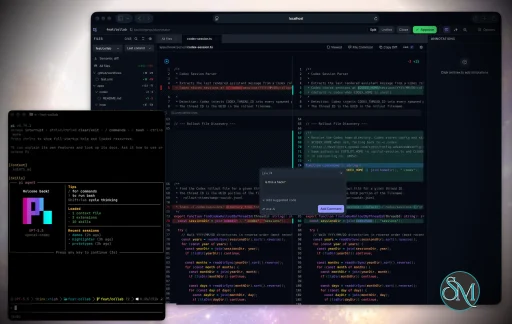
Inspect code changes
Provide structured feedback
Improve agent outputs
Maintain human oversight
Rather than replacing developers, Plannotator aims to keep humans involved in critical decision-making during AI-assisted development.
As AI coding agents become increasingly capable, developers face a growing challenge: ensuring that AI-generated plans and code changes align with project requirements before they are executed. Plannotator addresses this problem by acting as a review layer between developers and AI coding agents.
Instead of generating code itself, Plannotator focuses on making AI-driven development more transparent and controllable. It allows teams to review, annotate, approve, reject, and refine agent-generated plans and code changes before they affect a project.
Download Plannotator v0.26.8 - Software Mirrors |
|---|
Plannotator v0.26.8 for Windowsplannotator-paste-win32-arm64.exe | 90.2 MB plannotator-paste-win32-x64.exe | 93.92 MB |
Plannotator v0.26.8 for macOSplannotator-darwin-arm64 | 113.57 MB plannotator-darwin-x64 | 118.63 MB |
Plannotator v0.26.8 for Linuxplannotator-linux-arm64 | 141.98 MB plannotator-linux-x64 | 142.86 MB |
Plannotator v0.26.8 Release Notes:Follow @plannotator on X for updatesMissed recent releases?
What's New in v0.26.8This release rebuilds how annotations look and behave on HTML pages, and it is the largest change to the annotate surface since pinpoint mode shipped. Nine PRs landed, three of them from first-time contributors @Snaylaker, @atomicflag, and @monkhai.Placed comment markers replace inline highlights on HTML pagesAnnotating a raw HTML page used to write highlight markup directly into the page's own DOM. That caused two visible bugs: multi-paragraph selections often turned only their first paragraph blue, and on some pages the injected markup broke the page's layout. Both had the same root cause, so both are gone the same way: nothing writes into the page anymore. Annotations now appear as numbered comment bubbles projected onto a fixed overlay above the page. A bubble sits at the exact point you clicked, not a corner of the element, and it stays glued through scrolling, page re-renders, responsive reflows, and zoom. If the annotated element disappears or scrolls out of a clipped container, its bubble hides instead of floating over unrelated content, and it returns when the target does. Selections highlight through the same overlay, so highlights now always cover the full selection and can never disturb the page beneath. The bubbles are real buttons: click one, or click the highlighted text itself, to jump to that annotation in the panel. Highlights brighten on hover so you can tell they are clickable. Bubble numbers match the numbering in the feedback your agent receives, so "see comment 3" means the same thing on screen and in the session. Committed highlights still print; annotating with Cmd+P in mind works the way it did before. The implementation went through three adversarial review rounds, a 25-item QA gate with independent verification of every serious finding, and a follow-up hardening pass covering clipping, visibility, print, and per-frame performance on mutation-heavy pages.Shift-click selects multiple elements for one commentOne comment can now cover several places on an HTML page. Make a pinpoint selection, hold Shift, and click more elements: each gains an outline and a chip in the composer, Shift-clicking a selected element removes it, and removing the first selection promotes the next one rather than cancelling the draft. Up to 16 additional targets ride on one comment, and after saving, every target shows a bubble carrying the same comment number. Feedback to the agent lists every selected element, so "these three buttons need the same fix" is one comment, not three.HTML sessions open minimal, and stale preferences resetOpening an HTML page to annotate now shows just the page: pinpoint input ready, tools hidden, sidebar and annotations drawer closed. Anything you change persists for your next HTML session, but only while you keep using HTML annotate. A preference untouched for a week expires back to these defaults, so a mode you tried once months ago never becomes a permanent surprise. Active users keep their setup; annotating refreshes the clock.Pages with their own Content-Security-Policy are now annotatableAn HTML file carrying its own strict CSP meta tag (common in saved pages and generated reports) silently blocked the annotation script, leaving a page you could see but not annotate. The annotate viewer now removes the document's CSP meta tags before rendering. The iframe sandbox remains the security boundary, and the file on disk is untouched.OpenCode: Qwen3.6 no longer corrupts the planning promptOpenCode sessions using Qwen3.6 hit a Jinja template conflict: Plannotator injected its planning instructions as multiple system-prompt parts, and Qwen's template mangled them. @atomicflag rewrote the injection to compose one consolidated system part. The review process surfaced a subtle evaluation-order bug and an escaping edge case, both fixed and regression-tested, and the QA gate then caught that the OpenCode 2 adapter still used the old multi-part path, so the fix now covers both OpenCode 1 and OpenCode 2 entry points.Plan position survives window refocus in vim modeSwitching away from a plan review window and back again reset the vim cursor to the top of the document. @Snaylaker fixed the refocus path to preserve your position, so alt-tabbing to check something no longer costs you your place in a long plan.
Additional Changes
Install / UpdatemacOS / Linux:/plugin in Claude Code, find plannotator, and click "Update now".
OpenCode: Clear cache and restart:
opencode.json:
What's Changed
New Contributors
ContributorsThree first-time contributors landed changes in this release. @atomicflag took on a genuinely tricky compatibility problem between Plannotator's system-prompt injection and Qwen3.6's Jinja template, and stuck with it through three review rounds until the fix was airtight. @Snaylaker fixed the vim-mode position reset on window refocus, a small paper cut that anyone reviewing long plans felt daily. @monkhai polished the code review diff headers with a hover state that makes the collapse affordance discoverable. Welcome to all three, and thank you. Full Changelog: https://github.com/backnotprop/plannotator/compare/v0.26.7...v0.26.8 |
Key Features of Plannotator
Plan Review System
One of Plannotator's core capabilities is reviewing plans generated by AI agents before execution.
Developers can examine:
Proposed tasks
Implementation strategies
Agent reasoning
Planned file modifications
Workflow sequences
This visibility helps reduce unintended changes and costly mistakes.
Annotation Tools
The platform allows users to add comments, notes, and guidance directly to AI-generated plans.
These annotations can be used to:
Clarify requirements
Correct misunderstandings
Provide context
Guide future agent actions
AI Code Review
Plannotator extends the review process beyond planning by supporting inspection of generated code.
Developers can:
Review modifications
Analyze diffs
Leave comments
Request revisions
Validate implementation details
This workflow resembles modern pull-request review systems.
Human-in-the-Loop Workflows
A major design goal is ensuring that AI actions remain subject to human approval.
Organizations can establish review processes where important actions require validation before execution.
Open Source Foundation
Plannotator is open source, allowing teams to inspect, modify, and self-host the platform according to their needs.
This transparency is particularly valuable for organizations adopting AI-assisted software development.
User Experience
The interface is designed around review workflows rather than direct code generation.
Instead of interacting with a chatbot, users primarily:
Receive agent-generated plans
Review proposed actions
Add feedback
Approve or reject changes
Monitor execution results
The workflow feels familiar to developers accustomed to pull requests, code reviews, and project planning tools.
Productivity Benefits
As AI coding tools become more autonomous, review processes become increasingly important.
Plannotator helps organizations:
Reduce risky AI actions
Improve code quality
Increase accountability
Preserve architectural consistency
Encourage collaboration between developers and AI agents
For teams adopting AI-driven development, these safeguards can be as valuable as the coding agents themselves.
Collaboration Features
The platform supports collaborative review workflows where multiple team members can participate in evaluating AI-generated outputs.
This allows:
Peer review
Team approval processes
Shared annotations
Collective decision-making
Such features are especially useful for larger engineering teams.
Performance
Because Plannotator focuses on workflow management and review rather than model inference, performance largely depends on the connected AI agents and integrations.
The platform itself is lightweight and primarily serves as an orchestration and review layer.
Open Source Advantages
Being open source provides several benefits:
Transparent development
Self-hosting capabilities
Custom integrations
Community contributions
Vendor independence
Organizations concerned about compliance, security, or proprietary workflows may find these advantages particularly appealing.
Limitations
Plannotator is designed as a companion tool rather than a complete AI development platform.
Common limitations include:
Requires external AI coding agents
Best suited for teams already using AI-assisted development
Smaller ecosystem than mature developer platforms
Additional review steps may slow rapid prototyping
Some users may prefer fully autonomous workflows
The software delivers the most value in environments where oversight and quality control are priorities.
Pros
Improves transparency of AI-generated plans
Supports structured review workflows
Human-in-the-loop design
Useful annotation system
Open source
Self-hosting support
Familiar review experience for developers
Helps reduce AI-generated mistakes
Cons
Not a standalone coding agent
Requires integration with AI development tools
Smaller community than established developer platforms
Adds review overhead to workflows
Best suited for teams rather than casual users
Who Should Use Plannotator?
Plannotator is ideal for:
Software development teams
Engineering managers
AI-assisted development workflows
Organizations adopting coding agents
Open-source projects
Teams prioritizing code quality and governance
It is particularly valuable for environments where AI-generated code requires oversight before reaching production systems.
Plannotator fills an increasingly important role in the AI development ecosystem by providing visibility and control over AI-generated plans and code changes. Its focus on human oversight, structured reviews, and collaborative workflows makes it a useful companion for modern coding agents. While it is not a replacement for AI coding tools themselves, it offers a practical solution for teams seeking greater confidence and accountability in AI-assisted software development.
Developer:
backnotprop
Operating System:
Windows / macOS / Linux
Date Added:
2026-08-11T23:06:08.636Z
Categories:
Post a Comment/Report Broken Link: