Plannotator is an open-source platform designed to review and validate plans and code generated by AI coding agents.
The platform provides a centralized interface where developers can:
Review AI-generated plans
Annotate proposed actions
Approve or reject tasks
Inspect code changes
Provide structured feedback
Improve agent outputs
Maintain human oversight
Rather than replacing developers, Plannotator aims to keep humans involved in critical decision-making during AI-assisted development.
As AI coding agents become increasingly capable, developers face a growing challenge: ensuring that AI-generated plans and code changes align with project requirements before they are executed. Plannotator addresses this problem by acting as a review layer between developers and AI coding agents.
Instead of generating code itself, Plannotator focuses on making AI-driven development more transparent and controllable. It allows teams to review, annotate, approve, reject, and refine agent-generated plans and code changes before they affect a project.
Download Plannotator v0.26.2 - Software Mirrors |
|---|
Plannotator v0.26.2 for Windowsplannotator-paste-win32-arm64.exe | 106.86 MB plannotator-paste-win32-x64.exe | 110.08 MB |
Plannotator v0.26.2 for macOSplannotator-darwin-arm64 | 111.06 MB plannotator-darwin-x64 | 115.47 MB |
Plannotator v0.26.2 for Linuxplannotator-linux-arm64 | 146.57 MB plannotator-linux-x64 | 147.1 MB |
Plannotator v0.26.2 Release Notes:Follow @plannotator on X for updatesMissed recent releases?
What's New in v0.26.2This release fixes two review regressions that shipped in v0.26.0, both reported by users within a day of release, and brings two visible improvements: pick separate light and dark themes, and code blocks that match your palette. Updating from v0.25.x? The full v0.26.0 feature notes are embedded in the v0.26.1 release notes.Fixed: single-file diff tabs render fully againIn v0.26.0 and v0.26.1, opening a file as its own tab (clicking it in the file tree or sidebar, including PR review) showed only the changed hunks: the "N unmodified lines" bars between hunks had no expand controls and clicks did nothing, so surrounding code could not be revealed. The all-files scroll view was unaffected, which made the breakage feel random. The cause was the diff renderer upgrade in v0.26.0. The renderer began identifying content by cache key and defaulting that key to the file name, so when the tab swapped its initial partial diff for the full expandable one, the renderer saw the same name and kept serving the stale partial render forever. The single-file view now derives cache keys from content, the same invariant the all-files view already followed.Fixed: no more silently dropped files in review diffsThe more serious of the two. In v0.26.0 and v0.26.1, certain files rendered as empty cards: listed in the tree with a modified badge but no counts, no hunks, and no way to see the change. The diff totals quietly excluded them, so nothing indicated content was missing. A reviewer could approve believing they had seen everything. Affected shapes included renamed files carrying uncommitted edits, and repositories where an object was absent from git's local object database (partial clones, for example). The cause sat in the large-file memory bound introduced in v0.26.0. Its size probe asks git's object database how big each changed object is, but git reports a computed hash for worktree content it examined during rename detection, a hash for content that was never stored as an object. The probe got "missing" and treated missing as infinitely large, so the file was excluded and stubbed as binary. The probe now treats content it cannot find in the object database by checking the file on disk instead, and "missing" is no longer assumed oversized. The memory bound itself is unchanged: genuinely oversized files still render as stubs, and those stubs now say so on screen ("This file is over the 5 MB review limit") instead of appearing silently empty. This was reported by a user on X with side-by-side screenshots comparing Plannotator against their editor's diff view, exactly the evidence that cracked it. Thank you.Pair a light theme and a dark themeSettings > Theme now assigns each half of a pair: pick which palette is your light theme and which is your dark theme, and System mode switches between your two choices as your OS scheme changes (Kanagawa Lotus by day, Kanagawa Wave at night). Previously, choosing a dark-only palette pinned the mode and disabled system switching entirely. The pair persists to~/.plannotator/config.json, so it survives Plannotator's random ports and applies across every host. Existing theme choices migrate automatically.
One syntax highlighter, palette-matched code blocksPlannotator shipped two syntax highlighters: highlight.js for markdown code blocks, and Shiki inside the diff renderer. Code blocks now use the same Shiki instance the diff pane already loads, which means they finally render in your active palette (all built-in themes, colorblind included, light and dark) instead of a fixed dark style. highlight.js is removed entirely, along with a never-executed WebAssembly engine the diff renderer bundled. The plan review bundle shrank by about 1.3MB and the code review bundle by about 2.2MB. Bare code fences (no language tag) now render as plain monospaced text instead of getting auto-detected highlighting, matching how GitHub and most markdown renderers behave. Prose quoted inside fences no longer gets colored like code.Additional Changes
Install / UpdatemacOS / Linux:/plugin in Claude Code, find plannotator, and click "Update now".
OpenCode: Clear cache and restart:
opencode.json:
What's Changed
New Contributors
Community@zeke reported the auto-detected highlighting problem with a screenshot that made the case instantly (#1210) and fixed it himself the same day. First contribution. @kunaaal13 designed the theme pair system in a file-accurate proposal that was adopted nearly as written (#1211); parts 2 and 3 (custom user themes, separate fonts) remain open. And to the reporter on X whose side-by-side editor comparison exposed the silently dropped files: that report likely saved other users from approving reviews they could not fully see. Full Changelog: https://github.com/backnotprop/plannotator/compare/v0.26.1...v0.26.2 |
Key Features of Plannotator
Plan Review System
One of Plannotator's core capabilities is reviewing plans generated by AI agents before execution.
Developers can examine:
Proposed tasks
Implementation strategies
Agent reasoning
Planned file modifications
Workflow sequences
This visibility helps reduce unintended changes and costly mistakes.
Annotation Tools
The platform allows users to add comments, notes, and guidance directly to AI-generated plans.
These annotations can be used to:
Clarify requirements
Correct misunderstandings
Provide context
Guide future agent actions
AI Code Review
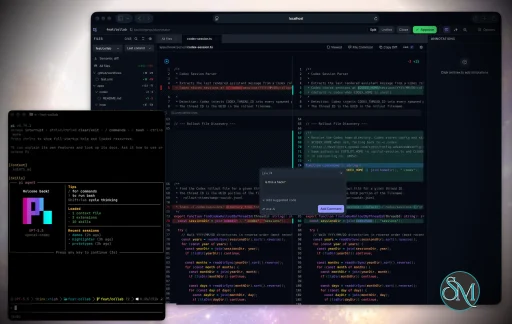
Plannotator extends the review process beyond planning by supporting inspection of generated code.
Developers can:
Review modifications
Analyze diffs
Leave comments
Request revisions
Validate implementation details
This workflow resembles modern pull-request review systems.
Human-in-the-Loop Workflows
A major design goal is ensuring that AI actions remain subject to human approval.
Organizations can establish review processes where important actions require validation before execution.
Open Source Foundation
Plannotator is open source, allowing teams to inspect, modify, and self-host the platform according to their needs.
This transparency is particularly valuable for organizations adopting AI-assisted software development.
User Experience
The interface is designed around review workflows rather than direct code generation.
Instead of interacting with a chatbot, users primarily:
Receive agent-generated plans
Review proposed actions
Add feedback
Approve or reject changes
Monitor execution results
The workflow feels familiar to developers accustomed to pull requests, code reviews, and project planning tools.
Productivity Benefits
As AI coding tools become more autonomous, review processes become increasingly important.
Plannotator helps organizations:
Reduce risky AI actions
Improve code quality
Increase accountability
Preserve architectural consistency
Encourage collaboration between developers and AI agents
For teams adopting AI-driven development, these safeguards can be as valuable as the coding agents themselves.
Collaboration Features
The platform supports collaborative review workflows where multiple team members can participate in evaluating AI-generated outputs.
This allows:
Peer review
Team approval processes
Shared annotations
Collective decision-making
Such features are especially useful for larger engineering teams.
Performance
Because Plannotator focuses on workflow management and review rather than model inference, performance largely depends on the connected AI agents and integrations.
The platform itself is lightweight and primarily serves as an orchestration and review layer.
Open Source Advantages
Being open source provides several benefits:
Transparent development
Self-hosting capabilities
Custom integrations
Community contributions
Vendor independence
Organizations concerned about compliance, security, or proprietary workflows may find these advantages particularly appealing.
Limitations
Plannotator is designed as a companion tool rather than a complete AI development platform.
Common limitations include:
Requires external AI coding agents
Best suited for teams already using AI-assisted development
Smaller ecosystem than mature developer platforms
Additional review steps may slow rapid prototyping
Some users may prefer fully autonomous workflows
The software delivers the most value in environments where oversight and quality control are priorities.
Pros
Improves transparency of AI-generated plans
Supports structured review workflows
Human-in-the-loop design
Useful annotation system
Open source
Self-hosting support
Familiar review experience for developers
Helps reduce AI-generated mistakes
Cons
Not a standalone coding agent
Requires integration with AI development tools
Smaller community than established developer platforms
Adds review overhead to workflows
Best suited for teams rather than casual users
Who Should Use Plannotator?
Plannotator is ideal for:
Software development teams
Engineering managers
AI-assisted development workflows
Organizations adopting coding agents
Open-source projects
Teams prioritizing code quality and governance
It is particularly valuable for environments where AI-generated code requires oversight before reaching production systems.
Plannotator fills an increasingly important role in the AI development ecosystem by providing visibility and control over AI-generated plans and code changes. Its focus on human oversight, structured reviews, and collaborative workflows makes it a useful companion for modern coding agents. While it is not a replacement for AI coding tools themselves, it offers a practical solution for teams seeking greater confidence and accountability in AI-assisted software development.
Developer:
backnotprop
Operating System:
Windows / macOS / Linux
Date Added:
2026-08-06T23:02:07.465Z
Categories:
Post a Comment/Report Broken Link: