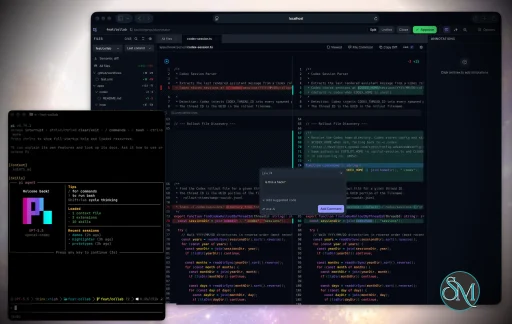
Plannotator is an open-source platform designed to review and validate plans and code generated by AI coding agents.
The platform provides a centralized interface where developers can:
Review AI-generated plans
Annotate proposed actions
Approve or reject tasks
Inspect code changes
Provide structured feedback
Improve agent outputs
Maintain human oversight
Rather than replacing developers, Plannotator aims to keep humans involved in critical decision-making during AI-assisted development.
As AI coding agents become increasingly capable, developers face a growing challenge: ensuring that AI-generated plans and code changes align with project requirements before they are executed. Plannotator addresses this problem by acting as a review layer between developers and AI coding agents.
Instead of generating code itself, Plannotator focuses on making AI-driven development more transparent and controllable. It allows teams to review, annotate, approve, reject, and refine agent-generated plans and code changes before they affect a project.
Download Plannotator v0.26.1 - Software Mirrors |
|---|
Plannotator v0.26.1 for Windowsplannotator-paste-win32-arm64.exe | 106.86 MB plannotator-paste-win32-x64.exe | 110.08 MB |
Plannotator v0.26.1 for macOSplannotator-darwin-arm64 | 114.63 MB plannotator-darwin-x64 | 119.02 MB |
Plannotator v0.26.1 for Linuxplannotator-linux-arm64 | 150.12 MB plannotator-linux-x64 | 150.65 MB |
Plannotator v0.26.1 Release Notes:Follow @plannotator on X for updatesMissed recent releases?
What's New in v0.26.1A single-fix patch: code review works again in GitButler workspaces running GitButler CLI 0.22.0. Because this patch landed a day after v0.26.0, the full v0.26.0 feature notes are included below; if you are updating from v0.25.x, everything in both sections is new to you.GitButler 0.22.0 compatibilityGitButler's CLI changed its JSON output flag twice this year. Their June change removed--json in favor of a global --format json, which is the syntax Plannotator's GitButler integration used and the one GitButler 0.21.x accepts. Their July cleanup then reverted it: GitButler 0.22.0 accepts only --json and rejects --format outright, so opening a review in a GitButler workspace on 0.22.0 failed immediately with a contract error.
Plannotator now probes capability instead of assuming a spelling. It tries --format json status first, and only when that fails with the specific unexpected-argument rejection does it retry once with --json status. Real status failures never retry and still fail loudly. The accepted spelling is remembered for the session, so 0.22.0 installs pay the failed probe once. If a future GitButler rejects both spellings, the error names both and the minimum supported version. The fix lives in the shared GitButler core, so the Bun and Pi runtimes both get it.
What's New in v0.26.0v0.26.0 introduces Edit Mode, makes Guided Review fast on large changesets, adds a colorblind theme and a safe uninstall command, and hardens the installer, the review server, and the OpenCode plugin. Thirty-two PRs shipped in this release; seven came from external contributors plus one co-authored port, and four contributors landed their first PR.Edit Mode: author suggestions by editing the codeA new experimental way to give review feedback: click Edit on a file in the all-files review view and fix the code right there in the diff. When you finish, your net changes become ordinary suggestion annotations, the same shape the suggestion editor produces, with the original code in a fencedReplaces: block and your replacement in Suggested code: so the applying agent can validate the anchor. You can also select text mid-edit and turn the selection into an annotation. The browser never writes to your files on disk; the agent applies the suggestions from your feedback.
Edit Mode is off by default behind Settings > Editor > "Edit Code to Suggest". A one-time announcement dialog introduces the feature with an embedded screen recording of the flow and an explicit enable switch. The switch is deliberate design: the first draft used a primary "Turn it on" button, which reads as a generic continue and invites reflex clicks, so the opt-in became a switch you must consciously flip before the neutral Done button applies it.
Two fixes landed before release from our own QA pass: Discard now repaints the pristine diff immediately instead of leaving edited pixels on screen until an async rerender, and the same repaint removes a brief flash of stale content on the Suggest path.
Guided Review handles large changesetsGuided Review used to mount a full code viewer for every file in the guide. On a large guide that meant hundreds of live viewers, around a million shadow DOM elements, 770MB of heap, and scrolling at 4 frames per second, with the view taking close to a minute to open. A shared viewport coordinator now keeps at most 8 file viewers mounted at once and swaps the rest for lightweight placeholders as you scroll. The same guide now opens in around a hundred milliseconds, holds ~140MB, and scrolls at full frame rate. Section reviewed-state, annotations, and search behave exactly as before.Colorblind themeA new built-in theme designed for red-green color vision deficiency, which covers most color blindness. Additions render blue and deletions orange across diff backgrounds, gutters, indicators, and syntax highlighting, in both light and dark. The palette was tuned with CIEDE2000 color-difference measurements under simulated deuteranopia and protanopia; the worst-case separation between "added" and "removed" improves from 1.7 (indistinguishable) to 9.0 (clearly distinct). A separate tritanopia variant was evaluated and skipped on the data: the default palette already reads correctly for tritanopes.Safe uninstallplannotator uninstall removes the binary, skills, hooks, and per-agent integrations, and walks through every host it recognizes (Claude Code, Codex, OpenCode, Gemini, Kiro, and friends) before touching the binary. Your data is preserved by default: plans, history, drafts, and settings stay unless you pass --purge. --dry-run shows the full removal list without deleting anything, and --yes skips the confirmation for scripted use. Host cleanup is required, not optional: if a host's cleanup fails, the uninstall stops with manual guidance rather than leaving a half-removed install behind.
Review server memory stays bounded on huge filesStaging a very large text file used to balloon the review server; a 51MB file drove resident memory to around 240MB. Tracked files above 5MiB are now excluded from the rendered diff and shown as bounded stubs, the same treatment untracked files already had. A follow-up fix hardened the failure path: the original implementation probed object sizes with onegit cat-file --batch-check call, and if that single call failed, every file in the review rendered as "Binary files differ" with no visible error. The size bound is now enforced by git itself through core.bigFileThreshold, so a failed probe degrades gracefully instead of blanking the review.
Installer: opt-outs, credential-free provenance, and honest failuresThe install scripts gained a family of opt-outs:--skip-codex, --skip-gemini, --skip-kiro, --skip-opencode, and now --skip-skills, each with a matching environment variable and skipInstall config key. Skipping means the installer writes nothing for that scope and never removes what a previous install wired. Attestation verification (--verify-attestation) now works with zero GitHub credentials by fetching the attestation bundle from GitHub's public API, falling back to authenticated gh only when needed. Both designs came from a single unusually rigorous report by @astradevkin, including the discovery of the public attestations endpoint.
Two honesty fixes shipped alongside: a failed skills checkout used to report success because of a POSIX errexit subtlety (the failure now aborts loudly, which is exactly why --skip-skills exists for offline installs), and installs on Windows PowerShell below 7.2 no longer die on git writing progress to stderr. The installer also authenticates its version lookup when a GitHub token is present, avoiding the anonymous 60-requests-per-hour rate limit on shared networks.
OpenCode 2 support (experimental)Plan review now works on OpenCode 2 through a V2 plugin adapter that shares the same host-independent plan submission path as every other agent, with OpenCode 1 behavior fully preserved. The plugin's packaging also got two weight reductions worth noticing: the prerelease@opencode-ai/plugin nightly is no longer a runtime dependency (it was pulling a 95MB, 101-package closure into every install), and the bun peerDependency is gone (npm auto-installed the entire 50MB Bun binary into every consumer's node_modules; the runtime requirement now lives in engines, which is informational). Known V2 limitations are documented in the plugin README: no tool abort signal, and agent switching after approval is manual.
Annotate understands natural language argumentsSlash-command hosts forward whatever the user typed, so/plannotator-annotate look at notes.md please used to fail with "File not found: look". The annotate CLI now probes each word and proceeds when exactly one resolves to a real file, URL, or folder. When two or more resolve, it errors naming every candidate rather than guessing, which also fixes a silent bug: annotate a.md b.md used to open a.md and drop b.md without a word. When nothing resolves, the CLI hands off to the reading agent with the words it tried, so the agent can re-run with a concrete target. A companion fix taught the token probe to recognize URLs wrapped in punctuation.
Additional Changes
Install / UpdatemacOS / Linux:/plugin in Claude Code, find plannotator, and click "Update now".
OpenCode: Clear cache and restart:
opencode.json:
What's Changedv0.26.1
New Contributors
Contributors@alexanderkreidich rebuilt Guided Review's rendering around a viewport coordinator (#1158), turning minute-long opens of large guides into instant ones, and backed it with the performance measurements quoted above. @rNoz shipped two fixes this release: the tracked-file memory bound for the review server (#1167) and markdown reference link rendering (#1168), the latter closing a request that had been open since #923. @sergical brought plan review to OpenCode 2 (#1194) and filed the follow-up to move the adapter to the stable plugin API (#1196). First contribution. @SyahrulBhudiF reported the Pi port exhaustion bug and then fixed it himself (#1159, #1160). First contribution. @tbontb-iaq did the same for the installer rate limit: report (#1156) and fix (#1157). First contribution. @rian-dolphin added the copy-feedback keyboard shortcut (#1155). First contribution. @technicalpickles reported the natural-language annotate failure (#1182), authored a parallel fix whose URL-probe catch and test coverage were ported with co-author credit (#1187), and supplied the history that anchored the final design. @astradevkin filed the report that shaped the installer work in #1197: the per-agent opt-out design and the discovery that attestation bundles can be fetched credential-free from GitHub's public API, complete with negative controls. Community members who reported issues that drove changes in this release:
Community@swushi reported the GitButler 0.22.0 breakage within hours of v0.26.0 shipping, with a complete reproduction, the upstream PR that caused it, and the capability-based fallback design the fix uses (#1215). Reports of this quality make same-day patches possible. Full Changelog: https://github.com/backnotprop/plannotator/compare/v0.26.0...v0.26.1 (patch) and https://github.com/backnotprop/plannotator/compare/v0.25.1...v0.26.0 (feature release) |
Key Features of Plannotator
Plan Review System
One of Plannotator's core capabilities is reviewing plans generated by AI agents before execution.
Developers can examine:
Proposed tasks
Implementation strategies
Agent reasoning
Planned file modifications
Workflow sequences
This visibility helps reduce unintended changes and costly mistakes.
Annotation Tools
The platform allows users to add comments, notes, and guidance directly to AI-generated plans.
These annotations can be used to:
Clarify requirements
Correct misunderstandings
Provide context
Guide future agent actions
AI Code Review
Plannotator extends the review process beyond planning by supporting inspection of generated code.
Developers can:
Review modifications
Analyze diffs
Leave comments
Request revisions
Validate implementation details
This workflow resembles modern pull-request review systems.
Human-in-the-Loop Workflows
A major design goal is ensuring that AI actions remain subject to human approval.
Organizations can establish review processes where important actions require validation before execution.
Open Source Foundation
Plannotator is open source, allowing teams to inspect, modify, and self-host the platform according to their needs.
This transparency is particularly valuable for organizations adopting AI-assisted software development.
User Experience
The interface is designed around review workflows rather than direct code generation.
Instead of interacting with a chatbot, users primarily:
Receive agent-generated plans
Review proposed actions
Add feedback
Approve or reject changes
Monitor execution results
The workflow feels familiar to developers accustomed to pull requests, code reviews, and project planning tools.
Productivity Benefits
As AI coding tools become more autonomous, review processes become increasingly important.
Plannotator helps organizations:
Reduce risky AI actions
Improve code quality
Increase accountability
Preserve architectural consistency
Encourage collaboration between developers and AI agents
For teams adopting AI-driven development, these safeguards can be as valuable as the coding agents themselves.
Collaboration Features
The platform supports collaborative review workflows where multiple team members can participate in evaluating AI-generated outputs.
This allows:
Peer review
Team approval processes
Shared annotations
Collective decision-making
Such features are especially useful for larger engineering teams.
Performance
Because Plannotator focuses on workflow management and review rather than model inference, performance largely depends on the connected AI agents and integrations.
The platform itself is lightweight and primarily serves as an orchestration and review layer.
Open Source Advantages
Being open source provides several benefits:
Transparent development
Self-hosting capabilities
Custom integrations
Community contributions
Vendor independence
Organizations concerned about compliance, security, or proprietary workflows may find these advantages particularly appealing.
Limitations
Plannotator is designed as a companion tool rather than a complete AI development platform.
Common limitations include:
Requires external AI coding agents
Best suited for teams already using AI-assisted development
Smaller ecosystem than mature developer platforms
Additional review steps may slow rapid prototyping
Some users may prefer fully autonomous workflows
The software delivers the most value in environments where oversight and quality control are priorities.
Pros
Improves transparency of AI-generated plans
Supports structured review workflows
Human-in-the-loop design
Useful annotation system
Open source
Self-hosting support
Familiar review experience for developers
Helps reduce AI-generated mistakes
Cons
Not a standalone coding agent
Requires integration with AI development tools
Smaller community than established developer platforms
Adds review overhead to workflows
Best suited for teams rather than casual users
Who Should Use Plannotator?
Plannotator is ideal for:
Software development teams
Engineering managers
AI-assisted development workflows
Organizations adopting coding agents
Open-source projects
Teams prioritizing code quality and governance
It is particularly valuable for environments where AI-generated code requires oversight before reaching production systems.
Plannotator fills an increasingly important role in the AI development ecosystem by providing visibility and control over AI-generated plans and code changes. Its focus on human oversight, structured reviews, and collaborative workflows makes it a useful companion for modern coding agents. While it is not a replacement for AI coding tools themselves, it offers a practical solution for teams seeking greater confidence and accountability in AI-assisted software development.
Developer:
backnotprop
Operating System:
Windows / macOS / Linux
Date Added:
2026-08-05T23:02:16.779Z
Categories:
Post a Comment/Report Broken Link: