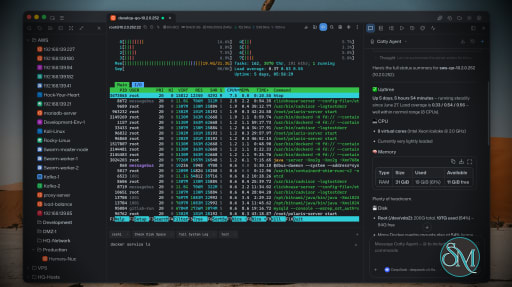
Netcatty is an open source SSH client and remote server management application designed for developers, DevOps engineers, and system administrators. Rather than being a simple terminal emulator, it combines SSH, SFTP, port forwarding, terminal management, and workspace organization into a single desktop application. Available for Windows, macOS, and Linux, Netcatty aims to streamline remote server administration with a modern interface and powerful productivity features.
Managing multiple remote servers often means juggling several terminal windows, file transfer tools, and SSH configurations. Netcatty brings these tasks together into one application with organized workspaces, split terminals, and integrated file management.
Unlike traditional SSH clients that focus solely on terminal access, Netcatty provides a complete remote administration environment with support for SSH, Telnet, Mosh, serial connections, SFTP, jump hosts, proxy servers, and port forwarding.
Key Features of Netcatty
Modern SSH Workspace
Netcatty organizes servers into a built-in Vault, allowing users to manage large numbers of hosts using grid, list, or tree views with fast search capabilities. This makes navigating complex infrastructures much easier than maintaining separate configuration files.
Split Terminal Support
Multiple terminal sessions can be displayed simultaneously using horizontal and vertical split layouts. This is especially useful when monitoring several servers or comparing outputs side by side.
Built-In SFTP Client
The integrated SFTP browser supports drag-and-drop file transfers, remote file editing, and directory management without requiring a separate application.
Multiple Connection Protocols
In addition to SSH, Netcatty supports Telnet, Mosh, and serial connections. It also includes support for jump hosts, proxy servers, and legacy SSH algorithms for compatibility with older systems.
Port Forwarding
The application supports local, remote, and dynamic port forwarding with reusable configurations and automatic startup, making it suitable for development, database access, and secure tunneling.
Secure Authentication
Netcatty supports password authentication, SSH keys, certificates, and SSH agent forwarding, providing flexibility for both personal and enterprise environments.
Cloud Configuration Sync
Users can synchronize their configuration across multiple devices using supported cloud storage providers such as GitHub, Google Drive, OneDrive, or Amazon S3.
AI Assistant
Recent versions include an integrated AI assistant that helps automate terminal workflows and assists with remote administration tasks directly within the application.
Download Netcatty v1.1.77 - Software Mirrors |
|---|
Netcatty v1.1.77 for WindowsNetcatty-1.1.77-portable-win-x64.exe | 129.22 MB Netcatty-1.1.77-win-x64.exe | 129.45 MB Netcatty-1.1.77-win-x64.zip | 177.7 MB |
Netcatty v1.1.77 for macOSNetcatty-1.1.77-mac-arm64.dmg | 147.31 MB Netcatty-1.1.77-mac-arm64.zip | 147.41 MB Netcatty-1.1.77-mac-x64.dmg | 152.44 MB Netcatty-1.1.77-mac-x64.zip | 152.61 MB |
Netcatty v1.1.77 for LinuxNetcatty-1.1.77-linux-aarch64.pacman | 103.67 MB Netcatty-1.1.77-linux-aarch64.rpm | 150.88 MB Netcatty-1.1.77-linux-amd64.deb | 153.87 MB Netcatty-1.1.77-linux-arm64.AppImage | 154.25 MB Netcatty-1.1.77-linux-arm64.deb | 150.94 MB Netcatty-1.1.77-linux-x64.pacman | 110.45 MB Netcatty-1.1.77-linux-x86_64.AppImage | 156.31 MB Netcatty-1.1.77-linux-x86_64.rpm | 153.85 MB |
Netcatty v1.1.77 Release Notes: ✨ Release Highlights
Netcatty v1.1.77 is a productivity-and-stability release: multi-tab shell performance is reworked, System Manager grows Ports/Services panels, workspace AI chat survives merge/dissolve, Notes paste/rendering is much closer to GitHub README quality, and Linux deb/rpm/pacman packages finally get in-app auto-update.
⚡ Faster multi-tab shell
- Terminal hot props are isolated and Host-island mega-subscribers are removed so theme, CWD, title, and AI panel churn no longer re-render every pane (#2790, #2809).
- StrictMode double-fire cleanups and Notes page jank fixes keep edit mode responsive under heavy note lists (#2810).
🖥️ System Manager: Ports & Services
- New Ports and Services tabs (with capability gating) let you inspect listening ports and systemctl units without leaving the terminal side panel (#2817).
- Disk overview shows PVE CT ZFS/bind mounts; Ascend 910B NPU tables parse correctly on CANN 24.x hosts (#2837, #2812).
🤖 AI chat across workspace merge
- Merging, dissolving, or detaching panes keeps the active chat, side panel, and SFTP mounts instead of dropping into a blank draft (#2851 / #2855 family).
- Follow-up typing after merge no longer silently creates a New Chat; MCP permissions restore on startup; sidebar Catty no longer exposes
host_open (#2876, #2861, #2859).
- Settings gain a one-click provider connection test (#2845).
📝 Notes: paste, images, and link chrome
- HTML clipboard paste goes through Turndown; long markdown, remote images, badge rows, centered blocks, and GitHub-like image scaling are preserved (#2868, #2869).
- MDX link preview toolbar stays anchored on the link instead of drifting into the notes tree (#2877).
📂 SFTP path UX and terminal handoff
- Path chrome gets its own toolbar row with tail-preferring breadcrumbs, pinned roots (including UNC), and a trailing overflow menu (#2857 family).
- Open current path in linked terminal jumps the paired shell to the folder you are browsing (#2825).
- Tree view search filtering and safer single-file overwrite / zmodem replace close real-world transfer gaps (#2829, #2863).
⌨️ Terminal autocomplete and history
- History recall, mid-line edits, search-highlight cleanup, CJK IME punctuation, pinyin snippet titles,
dnf completion, and SSH echo/path lag handling keep suggestions local and fail-closed when needed (#2850, #2849, #2834, #2814, #2840, #2831).
- Session logs no longer record alternate-screen TUI paint (htop/vim) as terminal history (#2875).
⚙️ Settings, vault, scripts, and updates
- Settings global search with expandable jump suggestions (#2816).
- Port-forward runtime state is authoritative in the main process for consistent tray/restart behavior (#2819).
- Host context menu can copy hostname; Scripts toolbar adds expand/collapse-all and delete-selected (#2820, #2828).
- Linux deb/rpm/pacman packages enable in-app auto-update, with recovery when a previous install attempt failed.
✨ Smaller polish
- Closing a temporary session restores the previous tab; external-editor temp downloads no longer look empty; and assorted SFTP/SSH bastion and CI automation false-positive fixes.
Download based on your OS:
- Windows:

- macOS:
 
Code signing policy
Netcatty is applying to the SignPath Foundation open-source program. Once
approved, covered Windows release artifacts will use Free code signing provided by SignPath.io, certificate by SignPath Foundation.
See the
Code signing policy
and Privacy policy.
What's Changed- perf: isolate Terminal hot props, cut memory/jank, and repay architecture debt by @binaricat in https://github.com/binaricat/Netcatty/pull/2790
- fix(ci): stop Cursor automation verify-gate false positives by @binaricat in https://github.com/binaricat/Netcatty/pull/2800
- fix(notes): protect title IME, surface persist failures, harden paste by @binaricat in https://github.com/binaricat/Netcatty/pull/2803
- fix(tabs): restore previous tab after closing temporary session by @binaricat in https://github.com/binaricat/Netcatty/pull/2804
- fix(terminal): stop keyword highlight flicker on Enter by @binaricat in https://github.com/binaricat/Netcatty/pull/2805
- fix(terminal): raise autocomplete suggestion cap for snippet matches by @binaricat in https://github.com/binaricat/Netcatty/pull/2797
- fix(sftp): stop treating external-editor temp download as empty by @binaricat in https://github.com/binaricat/Netcatty/pull/2799
- fix(system-manager): show Ascend 910B NPU info from CANN 24.x npu-smi tables by @binaricat in https://github.com/binaricat/Netcatty/pull/2812
- perf: StrictMode + Host-island mega-subscriber elimination by @binaricat in https://github.com/binaricat/Netcatty/pull/2809
- fix: StrictMode 双发清理 + 笔记页卡顿优化 by @binaricat in https://github.com/binaricat/Netcatty/pull/2810
- feat(settings): 设置全局搜索(可展开联想跳转) by @binaricat in https://github.com/binaricat/Netcatty/pull/2816
- feat(portforward): make main process authoritative for runtime state (#2288) by @binaricat in https://github.com/binaricat/Netcatty/pull/2819
- feat(system-manager): 端口占用与 systemctl 服务面板 (#2561) by @binaricat in https://github.com/binaricat/Netcatty/pull/2817
- fix(autocomplete): match Chinese snippet titles via pinyin and pre-echo input by @netcatty-bot in https://github.com/binaricat/Netcatty/pull/2814
- fix(sftp): apply search filter in tree view by @netcatty-bot in https://github.com/binaricat/Netcatty/pull/2829
- fix(terminal): add dnf command autocomplete for RHEL-family hosts by @netcatty-bot in https://github.com/binaricat/Netcatty/pull/2840
- fix(ssh): open Copy Tab shell before PID discovery on rate-limited bastions by @netcatty-bot in https://github.com/binaricat/Netcatty/pull/2808
- fix(terminal): commit CJK punctuation from IME insertText by @netcatty-bot in https://github.com/binaricat/Netcatty/pull/2834
- feat(sftp): open current path in linked terminal by @netcatty-bot in https://github.com/binaricat/Netcatty/pull/2825
- feat(ai): add one-click provider connection test in settings by @netcatty-bot in https://github.com/binaricat/Netcatty/pull/2845
- feat(scripts): add expand/collapse all and delete-selected toolbar actions by @netcatty-bot in https://github.com/binaricat/Netcatty/pull/2828
- fix(system): show PVE CT ZFS/bind disk mounts in overview by @netcatty-bot in https://github.com/binaricat/Netcatty/pull/2837
- fix(terminal): keep autocomplete local when SSH echo/path lags by @netcatty-bot in https://github.com/binaricat/Netcatty/pull/2831
- fix(notes): recover long markdown paste when Lexical insert no-ops by @netcatty-bot in https://github.com/binaricat/Netcatty/pull/2838
- ui(scripts): compact side panel toolbar like host tree by @binaricat in https://github.com/binaricat/Netcatty/pull/2847
- feat(vault): add copy hostname action in host context menu by @netcatty-bot in https://github.com/binaricat/Netcatty/pull/2820
- fix(terminal): clear leftover search highlights after reset by @netcatty-bot in https://github.com/binaricat/Netcatty/pull/2853
- fix(terminal): restore autocomplete popup after HMR dispose and pre-echo gate by @binaricat in https://github.com/binaricat/Netcatty/pull/2852
- fix(terminal): record full command after mid-line history edit by @netcatty-bot in https://github.com/binaricat/Netcatty/pull/2854
- fix(sftp): give path its own toolbar row and prefer the tail by @binaricat in https://github.com/binaricat/Netcatty/pull/2857
- fix(ai): keep host_open off sidebar Catty by @netcatty-bot in https://github.com/binaricat/Netcatty/pull/2859
- [fix] restore MCP permission on startup by @jingyaogong in https://github.com/binaricat/Netcatty/pull/2861
- fix(ai): keep chat session after terminal merge by @netcatty-bot in https://github.com/binaricat/Netcatty/pull/2855
- fix(zmodem): overwrite existing files on terminal drag-drop upload by @netcatty-bot in https://github.com/binaricat/Netcatty/pull/2864
- fix: stabilize AI session handoff, system manager tabs, and settings scroll by @binaricat in https://github.com/binaricat/Netcatty/pull/2866
- fix(notes): paste long markdown and HTML via Turndown by @binaricat in https://github.com/binaricat/Netcatty/pull/2868
- fix(update): enable Linux package auto-updates by @binaricat in https://github.com/binaricat/Netcatty/pull/2867
- fix(notes): domain paste policy + Codex review follow-ups by @binaricat in https://github.com/binaricat/Netcatty/pull/2869
- fix(session-logs): omit alternate-screen TUI paint from logs by @netcatty-bot in https://github.com/binaricat/Netcatty/pull/2875
- fix(ai): keep workspace chat when follow-up draft is typed after merge by @binaricat in https://github.com/binaricat/Netcatty/pull/2876
- fix(notes): keep MDX link preview toolbar over the link by @binaricat in https://github.com/binaricat/Netcatty/pull/2877
New Contributors- @jingyaogong made their first contribution in https://github.com/binaricat/Netcatty/pull/2861
Full Changelog: https://github.com/binaricat/Netcatty/compare/v1.1.76...v1.1.77
|
Performance and User Experience
Netcatty delivers a polished desktop experience with a clean interface and responsive terminal performance. Workspace restoration allows users to resume previous sessions after restarting the application, reducing setup time for daily work.
Although the application is built with Electron, performance is generally smooth on modern hardware. Memory usage is higher than lightweight native SSH clients, but the added functionality justifies the additional resource consumption for most professional users.
The project is actively maintained, with frequent updates introducing new features, performance improvements, and bug fixes.
Pros
Free and open source.
Modern interface with workspace management.
SSH, SFTP, Telnet, Mosh, and serial support.
Split terminal layouts.
Built-in SFTP browser.
Flexible port forwarding.
Secure authentication options.
Cross-platform support.
Active development.
Cons
Electron-based application uses more memory than native SSH clients.
Advanced features may be unnecessary for users who only need basic SSH access.
Some enterprise users may prefer highly specialized commercial SSH management tools.
Who Should Use Netcatty?
Netcatty is an excellent choice for developers, DevOps engineers, cloud engineers, system administrators, security professionals, and IT consultants who regularly manage multiple remote servers.
It is particularly valuable for users looking to replace separate SSH clients, SFTP applications, and terminal windows with a unified workspace.
Final Verdict
Netcatty is far more than a traditional SSH client. By combining terminal management, secure file transfers, workspace organization, port forwarding, and modern productivity features into one application, it offers an impressive environment for remote server administration.
Its clean interface, broad protocol support, and active development make it one of the most compelling open source SSH workspaces currently available. For professionals managing remote infrastructure on a daily basis, Netcatty is well worth considering.








Post a Comment/Report Broken Link: