Navidrome is an open source music server that turns your personal music collection into a private streaming service. It provides a modern web interface for browsing and playing your library while also supporting a large ecosystem of compatible mobile and desktop applications through the Subsonic and OpenSubsonic APIs.
For anyone who has a large collection of FLAC, MP3, or other audio files and wants to access that music from anywhere, Navidrome is one of the strongest self-hosted options available.
Navidrome is designed around a simple idea: your music library stays on your own server, while you access it through a browser or compatible music player.
It is lightweight enough to run on modest hardware, including Raspberry Pi-class devices, while also being capable of handling extremely large collections. The project says it has been tested with libraries approaching 900,000 songs.
Installation is available for Linux, macOS, and Windows, with official Docker images and Raspberry Pi binaries also provided.
Key Features of Navidrome
Personal Music Streaming
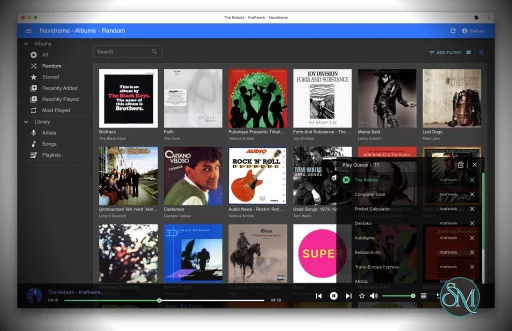
Navidrome gives your local music collection the convenience of a streaming service. You can browse artists, albums, songs, playlists, favorites, ratings, and other metadata through the web interface.
The system automatically monitors your music directory and detects new files and metadata changes, so maintaining the library is largely hands-off.
Excellent Large Library Support
One of Navidrome's biggest strengths is its ability to handle large collections without requiring a powerful server.
The project is designed to have very low resource usage while still supporting very large music libraries. This makes it a particularly good fit for home servers, NAS systems, VPS instances, and small computers.
Subsonic and OpenSubsonic Compatibility
Navidrome is compatible with the Subsonic ecosystem, which is one of its most important advantages.
Instead of being limited to the built-in web player, you can choose from a wide range of third-party clients for Android, iOS, Windows, macOS, Linux, Android Auto, Android TV, CarPlay, and other platforms.
This gives users considerable freedom to choose the interface and playback experience they prefer.
Multi-User Support
Multiple users can share the same Navidrome installation while maintaining separate play counts, playlists, favorites, ratings, and other personal information.
Recent versions also support multiple music libraries with user-specific access controls. This is useful when one server contains separate collections such as personal music, family music, and audiobooks.
On-the-Fly Transcoding
Navidrome can transcode audio while streaming, allowing users to reduce bitrate or convert formats when necessary.
This is especially useful when listening over mobile networks or when a particular client does not support the original audio format. Opus encoding is also supported.
Playlists and Ratings
The application includes playlists, favorites, bookmarks, star ratings, and queue management.
Audiobook listeners can also use bookmarks to continue from a previous position, making Navidrome useful beyond conventional music collections.
Lyrics and Metadata
Navidrome can display lyrics from embedded tags and external files. It also integrates with services such as Last.fm and ListenBrainz for additional metadata and scrobbling.
Recent releases have significantly expanded lyrics support, including synchronized sidecar lyrics and karaoke-style timing through newer OpenSubsonic extensions.
Plugins
Navidrome's plugin system has become increasingly capable. Plugins can extend the server with additional metadata sources, integrations, and other functionality.
The plugin architecture uses a WebAssembly-based sandbox and supports plugins written in languages including Go, Rust, Python, and JavaScript.
Smart Playlists
Smart playlists allow music collections to be organized dynamically using rules rather than manually maintaining every playlist.
This is particularly useful for large libraries where users want automatically generated collections based on ratings, artists, genres, play counts, or other attributes.
Download Navidrome v0.63.2 - Software Mirrors |
|---|
Navidrome v0.63.2 for Windowsnavidrome_0.63.2_windows_amd64_installer.msi | 124.67 MB navidrome_0.63.2_windows_amd64.zip | 22.57 MB |
Navidrome v0.63.2 for macOS |
Navidrome v0.63.2 for Linuxnavidrome_0.63.2_linux_riscv64.tar.gz | 21.35 MB navidrome_0.63.2_linux_riscv64.rpm | 21.25 MB navidrome_0.63.2_linux_riscv64.deb | 21.33 MB navidrome_0.63.2_linux_armv7.tar.gz | 21.22 MB navidrome_0.63.2_linux_armv7.rpm | 21.1 MB navidrome_0.63.2_linux_armv7.deb | 21.21 MB navidrome_0.63.2_linux_armv6.tar.gz | 21.29 MB navidrome_0.63.2_linux_armv6.rpm | 21.16 MB navidrome_0.63.2_linux_armv6.deb | 21.27 MB navidrome_0.63.2_linux_armv5.tar.gz | 21.29 MB navidrome_0.63.2_linux_armv5.rpm | 21.17 MB navidrome_0.63.2_linux_armv5.deb | 21.28 MB navidrome_0.63.2_linux_arm64.tar.gz | 21.36 MB navidrome_0.63.2_linux_arm64.rpm | 21.24 MB navidrome_0.63.2_linux_arm64.deb | 21.34 MB navidrome_0.63.2_linux_amd64.tar.gz | 22.76 MB navidrome_0.63.2_linux_amd64.rpm | 22.67 MB navidrome_0.63.2_linux_amd64.deb | 22.76 MB navidrome_0.63.2_linux_386.tar.gz | 21.63 MB |
Others Download related to Navidrome v0.63.2 |
Navidrome v0.63.2 Source Code |
Navidrome v0.63.2 Release Notes:ChangelogBug fixes
Build process updates
Other work
Full Changelog: https://github.com/navidrome/navidrome/compare/v0.63.1...v0.63.2 Helping outThis release is only possible thanks to the support of some awesome people! Want to be one of them? You can sponsor, pay me a Ko-fi, or contribute with code. Where to go next?
|
Performance and User Experience
Navidrome has an impressive balance between performance and usability. The server is lightweight enough for inexpensive hardware but still provides a polished web interface based on React and Material UI.
The interface focuses heavily on music discovery, with artwork, metadata, ratings, playlists, and search all integrated into the same experience.
Performance has also continued to improve as the project has grown. Recent releases have made significant improvements to large-library synchronization, with the 0.63 release addressing deep pagination performance for clients synchronizing very large libraries.
The availability of third-party clients is another major advantage. If you do not like the default web interface, there are numerous alternative players designed specifically for Navidrome and the wider OpenSubsonic ecosystem.
Pros
Free and open source.
Extremely low resource usage.
Handles very large music libraries.
Modern responsive web interface.
Excellent Subsonic and OpenSubsonic compatibility.
Large selection of third-party clients.
Multi-user support.
Multiple music libraries.
On-the-fly transcoding.
Lyrics and scrobbling support.
Smart playlists.
Plugin system.
Docker support.
Works well on Raspberry Pi and other low-powered hardware.
Active development.
Cons
Primarily focused on music rather than general media.
Does not provide video functionality.
Library organization relies heavily on metadata rather than traditional folder browsing.
Some advanced features depend on compatible third-party clients.
Initial setup may require some server and networking knowledge.
Who Should Use Navidrome?
Navidrome is an excellent choice for music collectors, homelab users, developers, audiophiles, and anyone who wants to replace a commercial music streaming service with their own library.
It is especially attractive if you already have a large collection of legally obtained music and want to access it remotely without uploading everything to a third-party cloud service.
It also works particularly well for households because multiple users can have separate preferences, playlists, and access to different libraries.
Final Verdict
Navidrome is one of the best self-hosted music servers available today. It combines low resource usage with excellent performance, a polished web interface, broad client compatibility, transcoding, multi-user support, and an increasingly powerful plugin ecosystem.
Its compatibility with the Subsonic and OpenSubsonic ecosystem is perhaps its biggest strength. You are not locked into one application, and the growing selection of clients means you can build a listening experience around the devices and interfaces you already prefer.
For anyone looking to turn a personal music collection into a private Spotify-style service, Navidrome is an easy recommendation.
Developer:
The Navidrome Authors
Operating System:
Windows / macOS / Linux
Date Added:
2026-08-02T15:25:05.000Z
Categories:
Post a Comment/Report Broken Link: