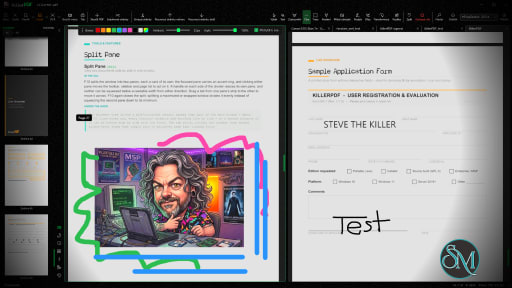
KillerPDF is a lightweight PDF conversion and document processing application that focuses on simplicity, speed, and privacy. Instead of relying on cloud-based services, it performs PDF operations locally on your computer, allowing you to convert, merge, split, compress, and manage PDF documents without uploading sensitive files to external servers.
For users who frequently work with confidential documents, KillerPDF offers a practical alternative to online PDF tools.
Many online PDF services require users to upload documents before processing them. While convenient, this approach may not be suitable for business documents, contracts, invoices, or personal files.
KillerPDF addresses this by processing documents locally whenever possible. This reduces privacy concerns while also eliminating the need to wait for files to upload and download.
The application is designed with a straightforward interface that emphasizes common PDF tasks over complex editing features.
Key Features of KillerPDF
PDF Conversion
KillerPDF supports converting documents between PDF and various file formats, making it easier to work with reports, presentations, and office documents.
The conversion process is simple and requires only a few steps.
Merge PDF Files
Users can combine multiple PDF files into a single document.
This feature is useful for creating reports, assembling scanned documents, or organizing related files into one PDF.
Split PDF Documents
Large PDF files can be divided into smaller documents or individual pages.
This makes it easier to extract specific sections without modifying the original file.
PDF Compression
The built-in compression tool helps reduce PDF file sizes while maintaining acceptable document quality.
Smaller files are easier to email, upload, and archive.
Local Processing
One of KillerPDF's strongest advantages is local document processing.
Keeping files on your own computer improves privacy and may also speed up processing for large documents since there is no need to transfer files over the internet.
Easy-to-Use Interface
The application focuses on essential PDF tools with a clean interface that is suitable for beginners.
Most operations require only selecting a file, choosing the desired action, and saving the result.
Download KillerPDF v1.7.1 - Software Mirrors |
|---|
KillerPDF v1.7.1 for WindowsKillerPDF.exe | 15.94 MB |
Others Download related to KillerPDF v1.7.1SHA256SUMS.txt | 270 B KillerPDF-1.7.1-src.zip | 2.85 MB |
KillerPDF v1.7.1 Source CodeKillerPDF v1.7.1 Source code (zip) KillerPDF v1.7.1 Source code (tar.gz) |
KillerPDF v1.7.1 Release Notes: 1.7.1 fixes the latest reported crashes, rendering problems, installer registration, file navigation, and editing issues, while adding perspective correction and app-link support. AddedTransform can now correct trapezoidal perspective distortion in pages photographed at an angle. Turn on perspective correction, drag four corner handles onto the photographed page outline, and Apply converts that quadrilateral into a straight rectangular page at the full transform resolution. The correction composes with rotation, deskew, scaling, and flipping in the same operation (#175, thanks 1mk3r).
KillerPDF now registers a killerpdf:// link handler for the current user, laying the app-side foundation for the planned Chrome extension. A killerpdf://open?url=... link can hand a public HTTPS PDF to KillerPDF whether the app is closed or already running; downloads are size-limited and rejected unless their contents begin as a PDF. The registration refreshes itself when the executable moves.
Open and Save dialogs now return to the last folder successfully used for that kind of operation, unless the caller deliberately supplies another starting folder. The places rail also brings in the user's pinned Windows Explorer Quick Access folders alongside KillerPDF's own editable pins, while avoiding duplicate entries (#178, thanks sheafitzek).
FixedReopening a PDF no longer reapplies a raw zoom saved for a different window or monitor size, which could make the document appear enormous or tiny. KillerPDF keeps the saved page and view mode but fits the document to the current window, with Grid returning to a predictable three-column layout. Perspective correction's corner handles now retain their drag capture across child controls and release reliably, and applying the correction immediately redraws the edited page even when the current zoom does not change.
Multi-line highlights now follow the reading direction of Persian, Arabic, Hebrew, and other right-to-left text. The first selected line extends left from the starting point and the last line extends right to the ending point, while left-to-right documents keep their existing behavior. Direction is detected per line, so mixed-language pages work without a document-wide setting (#170, thanks playerbhr).
Installing KillerPDF for everyone now registers its PDF handler for the whole computer instead of writing it into the elevated administrator's personal registry. Every account can now find KillerPDF in Open With and Default apps, with the shared registration pointing at the Program Files copy; each user still chooses their own PDF default (#176, thanks adeit).
The keyboard-shortcut list now uses the available window width instead of squeezing both halves into a narrow fixed card. Longer translated descriptions have room to remain visible, wrap cleanly on smaller windows, and sit level with the shortcut text in both columns (#177, thanks Mr-Update).
The mouse wheel now moves the file picker's multi-column list horizontally, so folders and files beyond the right edge can be reached without dragging the bottom scrollbar. The folder tree's wheel works too, scrolling vertically normally and horizontally while Shift is held. The shared picker fix applies to Open, Save, image import, signatures, certificates, and every other file-selection flow; icon and details views keep their normal vertical wheel scrolling.
Text annotations, highlights, stamps, ink, and filled form fields already stored in a PDF now appear in KillerPDF and survive printing, flattening, image export, page transforms, thumbnails, and repair rasterization (#141, thanks zenfas). PDFium does not paint annotation appearance streams unless explicitly requested, so every pixel-producing path silently omitted them. Enabling Docnet's annotation flag was not safe because it creates and destroys a form-fill environment while its page remains in use, corrupting PDFium state and crashing on a later native call. KillerPDF now renders through its direct PDFium layer, owns the form callback memory for its full native lifetime, paints both ordinary annotations and interactive widget appearances, then immediately closes the form, page, and one-shot document together. The reporter's five-page D&D Beyond file from #179 now exports and flattens with its filled values and multiline fields intact, without the native teardown crash (#179, thanks hsnopi).
Annotations and stamps now save in the right position on PDFs that already carry a native page rotation when they are first opened (#169, thanks terada-d). The 1.7.0 fix read only KillerPDF's temporary rotation map, but that map is not populated until a page operation performs a temporary save and reload, so annotating an already rotated file and saving it immediately still treated the page as unrotated. Burn-in now falls back to the page's own /Rotate value, every newly opened document clears the previous document's temporary rotation map, and saving removes a malformed CropBox that extends outside its MediaBox instead of preserving contradictory portrait and landscape dimensions. Tests cover the reported invalid page boxes and preservation of a valid inset crop.
Filled form fields now generate complete appearance streams, including the required stream length, multiline layout, and WinAnsi text encoding (#180, thanks Ryokoxx). This keeps entered values visible and readable in PDF viewers that strictly validate field appearances, resolving the damaged-file warning, missing line breaks, and replaced punctuation reported in #179 (#179, thanks hsnopi).
Double-clicking bold or italic PDF text to edit it no longer turns the replacement into regular text (#182, thanks fo-bo). PDF text usually carries its face styling inside the embedded font name, such as Helvetica-BoldOblique, rather than as separate bold and italic properties. The detector cleaned those suffixes off to find the font family, then explicitly reset both style flags before opening the editor, so the formatting was lost before the first keystroke. Font detection now separates the family from its bold and italic face, applies both to the live edit box, and carries them into the replacement annotation when it is committed. Focused tests cover subset font names and regular, bold, italic, and combined faces.
Clicking a page no longer crashes with "'∞' is not a valid value for property 'Height'" (#181, thanks lachlan-00). The page click rebuilds every annotation and form overlay, and malformed geometry could reach a WPF Width or Height property without being checked. WPF refuses NaN and infinity, so one bad form rectangle or a legacy saved signature with zero canvas dimensions took down the whole viewer during the redraw. Form rectangles and every sized annotation are now checked before they reach WPF; invalid form widgets are skipped, old signature dimensions fall back to the standard canvas size, and the render layer has a final guard for malformed persisted annotations.
ChangedTransform's Rotate, Scale, Flip, Skew, and Perspective sections now collapse like the Stamp dialog, keeping the sidebar compact while still allowing every control to remain in one window. Rotate opens initially and the less frequently used sections stay folded until needed.
|
Performance and User Experience
KillerPDF performs common PDF tasks quickly and provides an uncomplicated workflow.
Because the application focuses on core document processing rather than advanced publishing features, the interface remains easy to understand even for first-time users.
Performance depends primarily on the size and complexity of the documents being processed, but common operations such as merging, splitting, and compression are generally completed quickly.
Pros
Simple and easy to use.
Local document processing for better privacy.
PDF conversion tools.
Merge and split PDF files.
PDF compression.
Fast processing.
Suitable for everyday document management.
Lightweight interface.
Cons
Lacks advanced PDF editing features found in professional software.
Feature set is more limited than comprehensive PDF suites.
Platform availability may be limited depending on the release.
Some specialized workflows may require dedicated PDF editing software.
Who Should Use KillerPDF?
KillerPDF is a good choice for students, office workers, freelancers, and home users who regularly perform basic PDF tasks such as converting, merging, splitting, and compressing documents.
It is especially suitable for users who prefer processing sensitive files locally instead of uploading them to online services.
Final Verdict
KillerPDF focuses on doing common PDF tasks efficiently without unnecessary complexity. Its emphasis on local processing makes it attractive for privacy-conscious users, while its clean interface keeps everyday document management simple.
Although it is not intended to replace professional PDF editing software, it covers many of the most frequently used PDF operations with minimal effort.
Post a Comment/Report Broken Link: