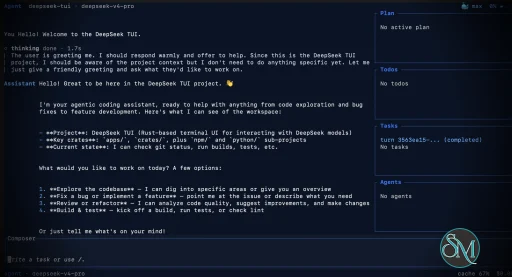
DeepSeek TUI is an open source terminal based coding agent designed for DeepSeek AI models. Unlike a simple chatbot, it can interact with your local workspace, execute shell commands, manage git operations, and assist with software development tasks directly from the command line.
The project is written in Rust and focuses on speed, low resource usage, and keyboard driven workflows. It is especially appealing for developers who spend most of their time in the terminal.
DeepSeek TUI is gaining attention among developers who prefer terminal based workflows and want direct access to AI powered coding tools without relying on heavy IDE integrations. Built around DeepSeek models, it transforms the terminal into an interactive coding assistant capable of editing files, running commands, and managing development workflows.
Download DeepSeek TUI v0.9.7 - Software Mirrors |
|---|
Download DeepSeek TUI v0.9.7 Windows 64bit Download DeepSeek TUI v0.9.7 Windows 64bit Download DeepSeek TUI v0.9.7 Windows 64bit Download DeepSeek TUI v0.9.7 Windows 64bit Download DeepSeek TUI v0.9.7 Windows 64bit Download DeepSeek TUI v0.9.7 Windows 64bit Download DeepSeek TUI v0.9.7 Windows 64bit Download DeepSeek TUI v0.9.7 Windows 64bit Download DeepSeek TUI v0.9.7 Windows 64bit Download DeepSeek TUI v0.9.7 Windows 64bit |
Download DeepSeek TUI v0.9.7 macOS arm64 Download DeepSeek TUI v0.9.7 macOS arm64 Download DeepSeek TUI v0.9.7 macOS arm64 Download DeepSeek TUI v0.9.7 macOS arm64 |
Download DeepSeek TUI v0.9.7 macOS x64 Download DeepSeek TUI v0.9.7 macOS x64 Download DeepSeek TUI v0.9.7 macOS x64 Download DeepSeek TUI v0.9.7 macOS x64 |
Download DeepSeek TUI v0.9.7 macOS arm64 Download DeepSeek TUI v0.9.7 macOS arm64 Download DeepSeek TUI v0.9.7 macOS arm64 Download DeepSeek TUI v0.9.7 macOS arm64 |
Download DeepSeek TUI v0.9.7 Linux x64 Download DeepSeek TUI v0.9.7 Linux x64 Download DeepSeek TUI v0.9.7 Linux x64 Download DeepSeek TUI v0.9.7 Linux x64 |
Download DeepSeek TUI v0.9.7 Linux arm64 Download DeepSeek TUI v0.9.7 Linux arm64 Download DeepSeek TUI v0.9.7 Linux arm64 Download DeepSeek TUI v0.9.7 Linux arm64 |
DeepSeek TUI v0.9.7 Release Notes:Codewhale is the public product from Shannon Labs. The
command, npm package, and release-asset names remain lowercase technical identifiers. The legacy npm package
receives no further releases. Users coming from v0.8.x legacy
InstallRecommended — npm (one command, both entrypoints)codewhale and codew command assets
from this Release. Both contain the same compiled runtime.
Docker / GHCRcodewhale and codew. The
latest tag is also updated on release.
Cargo (Linux / macOS)codewhale. Cargo cannot create a second command
alias from one binary target; users who want the shorter spelling can add a
codew symlink to that installed executable. The npm, Homebrew, archive,
shell-installer, and container channels install both command names directly.
Manual download — platform archives (recommended)Each archive below contains the same runtime under thecodewhale and
codew command names, plus an install script:
codewhale.exe and codew.exe under
%LOCALAPPDATA%\Programs\CodeWhale\bin and adds that directory to the
current-user PATH.
codewhale-windows-arm64.zip
codewhale- and
codew- assets. The seven codewhale-tui- filenames
attached to v0.9.5 are byte-identical compatibility copies used only to let
already-installed v0.9.4 clients discover and cross this single-binary
transition; current installers do not expose a third runtime. The legacy npm
package deepseek-tui is deprecated and is not republished. For migration
from v0.8.x legacy binary names, see docs/REBRAND.md.
Verify (recommended)Download the checksum manifests from this Release and verify:What's in v0.9.7Codewhale v0.9.7 keeps the catalog ordinary. Grok 4.6 lands as a normal catalog row instead of a provider-shaped pile of special cases, OrcaRouter joins as a named provider, and a panic-safety advisory inlru is cleared by lifting the
pin that caused it rather than living around it.
Added
grok-4.5 still explicitly selectable. Its 500K context, text/image input,
tool and structured-output support, low/medium/high/xhigh reasoning
efforts (default high), and server-side web search all come from the
Models.dev-shaped catalog rather than model-specific code. reasoning_effort
reaches the wire only on the exact first-party https://api.x.ai/v1 route,
and the usage-aware 200K-token pricing boundary is scoped to direct xAI so
aggregator routes reusing the model slug cannot inherit xAI billing.
https://api.orcarouter.ai/v1, deepseek/deepseek-v4-pro default,
orcarouter/auto routing, CLI --provider selector, and TUI picker entries
(#5321).
Changed
reasoning_options list from the catalog instead of collapsing every route to
the historic Low/Medium ladder. Any catalog row that publishes an effort list
keeps its own vocabulary.
deepseek-v4-pro. No aliases are remapped and no
deepseek-v4-pro[1m] selector is sent.
Fixed
load_session_snapshot and recovery is explicit
via recover_session_for_resume, so an embedding host inspecting a durable
session while a tool is still running no longer gets a spurious crash repair
(#5320).
Security
ratatui-core
=0.1.0 pin that transitively forced lru ^0.16 is lifted, so
ColorCompatBackend now answers get_cursor_position() from tracked cursor
state — the upstream-recommended workaround for the startup CPR race
(ratatui/ratatui#2483, ratatui/ratatui#2640) that the pin originally worked
around. ratatui itself stays pinned at =0.30.0, so the API surface is
unchanged.
Known issues
exec_persistent_service::failed_exec_kills_pending_service_and_exits_nonzero
is a confirmed flake under parallel load ("service pid file never appeared").
It passes in isolation and is unrelated to any v0.9.7 change.
Contributors
|
Key Features of DeepSeek TUI
Terminal Native Workflow
DeepSeek TUI operates entirely within the terminal, allowing developers to work without switching between browser windows or external interfaces.AI Assisted Coding
The assistant can read and edit files, generate code, explain logic, and help automate development tasks.Shell Command Execution
It supports running terminal commands directly through the interface, streamlining development workflows.Git Integration
Developers can manage repositories, review changes, and handle version control related tasks from inside the tool.Multiple Work Modes
DeepSeek TUI includes modes like Plan, Agent, and YOLO, offering different levels of automation and approval control.Large Context Handling
The tool is built around DeepSeek V4 capabilities, including support for extremely large context windows that help with understanding bigger codebases.
User Experience
DeepSeek TUI is designed for developers comfortable with terminal environments. The interface is keyboard focused and efficient, though beginners may need time to adapt.
The workflow feels closer to tools like Claude Code or Codex style assistants rather than traditional chat applications. Community feedback on Reddit and GitHub discussions highlights its speed and practical coding workflow.
Performance and Compatibility
Because it is written in Rust, DeepSeek TUI is lightweight and responsive. It supports Linux, macOS, and Windows, with installation available through npm, Cargo, or direct binaries.
Performance depends heavily on the connected DeepSeek models and API configuration, but the local interface itself remains fast and efficient.
Pros
Fast terminal native workflow
AI powered coding and automation
Lightweight Rust based architecture
Supports file editing and shell execution
Open source and actively developed
Cons
Requires familiarity with terminal workflows
Depends on external AI APIs
Advanced automation modes may feel risky for inexperienced users
DeepSeek TUI is ideal for developers, DevOps engineers, and terminal focused power users who want AI assistance integrated directly into their command line workflow. It is especially attractive for users seeking a lightweight alternative to browser based AI coding tools.
DeepSeek TUI combines AI coding assistance with the efficiency of terminal workflows. Its fast performance, flexible automation, and developer focused design make it one of the most interesting open source AI terminal tools currently gaining traction.
Developer:
Hunter Bown
Operating System:
Windows / macOS / Linux
Date Added:
2026-08-13T16:06:52.021Z
Categories:
Post a Comment/Report Broken Link: