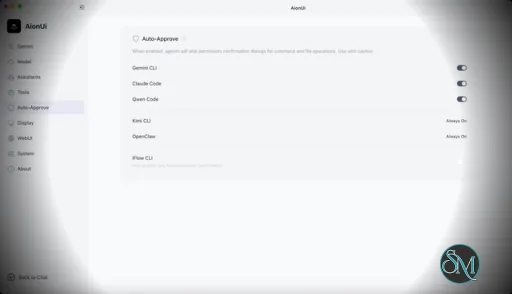
AionUi is a cross platform desktop application that transforms command line AI agents into an intuitive graphical interface. It detects locally installed AI CLI tools and presents them in a structured environment where users can manage conversations, sessions, and files more efficiently.
The software is open source, allowing users to customize and extend its functionality according to their workflow requirements.
Download AionUI v2.1.47-final - Software Mirrors |
|---|
Download AionUI v2.1.47-final
for Windows 64bit (exe) | 290.47 MB Download AionUI v2.1.47-final
for Windows ARM64 (exe) | 451.68 MB | Download AionUI v2.1.47-final
for macOS Intel (zip) | 464.34 MB Download AionUI v2.1.47-final
for macOS Intel (dmg) | 459.2 MB Download AionUI v2.1.47-final
for macOS ARM64 (zip) | 453.12 MB Download AionUI v2.1.47-final
for macOS ARM64 (dmg) | 448.24 MB | Download AionUI v2.1.47-final
for Linux ARM64 (deb) | 345.74 MB Download AionUI v2.1.47-final
for Linux 64bit (deb) | 370.64 MB |
This is the final AionUi build distributed through GitHub Releases. From here on, installers and updates come from the official website. See A note on distribution at the bottom for what this means for you, your data, and the open-source repo.
Highlights
In-App Browser, Controllable by the Agent
- Web pages now open as tabs in the preview panel, and you share one persistent session with the agent — sign in by hand once, and the agent carries that session into whatever it does next.
- The agent reaches the browser through a new built-in MCP server (
aionui-browser), so it can navigate, click, and pull data on its own.
- On safety: the obvious way to let an agent drive Chromium is
--remote-debugging-port, but that switch is application-wide with no per-target ACL — it would expose every WebContents, including the main window and its preload bridge, to any local process with no authentication. Instead this ships a single-target CDP bridge that exposes only the browser view. Nothing is written to config or the database; the bridge's port and access token travel down the process-inheritance chain, so multiple app instances never cross wires.
Conversation Forking
- A branch arrow on the message hover row forks the conversation at that message into a new one and drops you into it — useful for exploring a different path without disturbing the original.
- Where the entry appears follows what the backend can actually do: Codex can fork at any turn, Claude and ACP agents fork at the latest message only (so the copied history matches what the forked session really remembers), and agents without a fork surface don't show the entry at all.
Agent-Driven Conversation Naming
- Agents that support it now propose conversation titles automatically. A name you set yourself is never overwritten — only default and derived names stay replaceable.
Fixes & Improvements
- The message anchor rail introduced in v2.1.46 now stays clear of message text and covers the full conversation history.
- Database rebuild is gated behind a second confirmation, so a misclick can't wipe your local data.
- GPU-process crash noise is suppressed, and the app now tells you when hardware acceleration has been auto-disabled. The underlying crashes come from end-of-life GPUs with very old drivers rather than a code regression, and the misleading crash reports made that hard to see.
- The workspace toggle stays in the title bar where it belongs.
- Team run state handles omitted slot work instead of getting confused by it.
- Preview file I/O migrated to ChatFileRef
/content endpoints; PDFs now load via a stream URL, and Office files resolve through ChatFileRef.
Engine updates (AionCore v0.1.57 → v0.1.58)
- Conversation forking and agent-driven session naming are backed end-to-end here — the backend half of both features above.
- Claude session cost now stays cumulative across process respawns instead of resetting.
- Progress cards settle correctly through session teardown and resume. Previously, if the idle reaper removed a task mid-flight while the underlying work kept running, the stored row stayed
running — leaving a View Steps spinner turning for hours over a task that had already succeeded.
- Resumed conversations keep the thought-level picker.
- The managed Node version probe now retries transient failures instead of giving up on the first miss.
A note on distribution
AionUi and its commercial counterpart share a package name but use different signatures, and operating systems refuse overwrite installs across signatures. In-app updating simply cannot carry you across, so this build ships in "discontinued mode": startup auto-checks are silenced, and the manual update check opens a migration letter pointing to the official website instead.
When you do move over:
- Your conversations and files stay local. The agent runs on your own machine; content is never uploaded to our servers.
- Your local data carries over as-is. After the first sign-in, the new version inherits your existing conversations, settings, and API keys in place — no reconfiguration. This is a one-time migration: once it completes, the new version owns that data and this build is no longer its entry point.
- No paywall attached. However you use it now is how you'll keep using it; what's free today stays free.
- The open-source repo keeps updating. Core features stay in sync, and the open-source spirit doesn't change.
The new version requires sign-in (Google today, more methods on the way). The reason is the same one behind this change: once an installer is out the door we can't reach it again, so fixes never arrive and new skills and assistants can't sync — and the things many of you have asked for, like multiple accounts, data sync, and safer mobile collaboration, all need a proper service layer underneath.
What's next, still open source: team board (a global view of multi-agent collaboration), conversation archive, data sync across devices, and broader organizational collaboration.
It's still your choice. If AionUi is part of your daily workflow, we'd suggest moving to the new version — new capabilities land there first. If you prefer local DIY, keep pulling this repo and building it yourself. And if you'd rather not upgrade yet, this version keeps working; it just won't receive updates.
Thanks for coming this far with AionUi.
What's Changed
- feat(preview): migrate content I/O to ChatFileRef /content endpoints by @tcp404 in #3825
- feat(preview): pdf via stream URL + office ChatFileRef + drop fs/resolve by @tcp404 in #3837
- fix(desktop): silence GPU-process crash noise and surface HW-accel auto-disable by @piorpua in #3838
- fix(renderer): gate database rebuild behind a second confirmation by @piorpua in #3840
- feat(conversation): tag derived titles with name_source for agent auto-naming by @kaizhou-lab in #3839
- docs(readme): add Kimi campaign track_id to API platform links by @IceyLiu in #3846
- fix(renderer): keep workspace toggle in titlebar by @tcp404 in #3845
- fix(team): handle omitted slot work in run state by @tcp404 in #3847
- feat(conversation): message-level fork entry with capability-gated visibility by @kaizhou-lab in #3843
- feat(update): discontinue in-app updates and guide migration to the official website by @kaizhou-lab in #3730
- fix(conversation): keep the anchor rail clear of text and cover full history by @IceyLiu in #3848
- feat(preview): add agent-controllable in-app browser over a single-target CDP bridge by @IceyLiu in #3826
- chore: bump version to 2.1.47 by @kaizhou-lab in #3852
Full Changelog: v2.1.46...v2.1.47-final |
Key Features
Multi Agent Support
AionUi allows users to run multiple AI sessions simultaneously. Each session maintains its own context, enabling parallel workflows without cross interference.
Modern Chat Interface
The application provides a clean and organized chat environment. Users can scroll through conversation history, manage session tabs, and interact with AI responses in a visually structured format.
Smart File Management
AionUi includes drag and drop support, file previews, and structured file browsing. This improves productivity when working with code, documents, or AI generated content.
Multi Model Compatibility
The software supports various AI models through local or API based configurations. Users can switch between models depending on task requirements.
Session Control and Workflow Tools
Users can manage sessions independently, review outputs, and maintain organized AI workflows. This structure helps reduce clutter when working on complex tasks.
Cross Platform Availability
AionUi runs on major operating systems, ensuring accessibility for developers working in different environments.
Ease of Use
The interface is designed to simplify complex AI workflows. While some familiarity with AI tools is helpful, the graphical layout significantly reduces the learning curve compared to pure command line usage.
Navigation is intuitive, and core features are accessible without excessive configuration.
Performance and Compatibility
AionUi operates efficiently as a desktop application. Performance depends partly on the underlying AI services or APIs being used, but the interface itself remains responsive during normal use.
Compatibility with standard AI command line tools ensures flexibility for technical users.
Final Verdict
AionUi is a powerful desktop interface for managing AI command line tools in a structured and visual way. Its ability to handle multiple sessions, integrate different models, and organize workflows makes it a valuable productivity solution for advanced users.
For professionals seeking greater control and efficiency in AI driven projects, AionUi delivers a practical and modern solution.
AionUi is a free and open source desktop application that provides a modern graphical interface for command line AI tools. It is designed to simplify AI workflows by replacing terminal based interaction with a visual environment that supports multiple AI models, parallel sessions, and productivity focused features. AionUi is suitable for developers, researchers, and advanced users who want a unified way to manage AI driven tasks.
Post a Comment/Report Broken Link: