OpenWork is an open source AI workspace designed to make AI agents more accessible for both developers and non-technical users. Built on top of OpenCode, it provides a desktop interface for running AI-powered workflows locally or remotely, complete with task planning, permissions, live execution, reusable templates, and plugin support. Rather than being just another AI chat application, OpenWork focuses on helping users build repeatable AI workflows and collaborate with intelligent agents in a structured environment.
Many AI coding assistants are heavily focused on command-line users, exposing terminal output, file diffs, and tool logs that can overwhelm less technical users. OpenWork takes a different approach by presenting AI workflows through an intuitive desktop interface while retaining the flexibility of OpenCode underneath.
The platform follows a local-first philosophy. Users can run everything on their own computer, connect to an existing OpenCode server, or use remote workers when needed. This makes OpenWork suitable for personal projects, development teams, and organizations that prefer to keep their AI workflows under their own control.
Key Features of OpenWork
Local-First AI Workspace
OpenWork can run AI agents directly on your computer without requiring a hosted service. Users can also connect to remote OpenCode servers when larger workloads or shared environments are needed.
AI Workflow Management
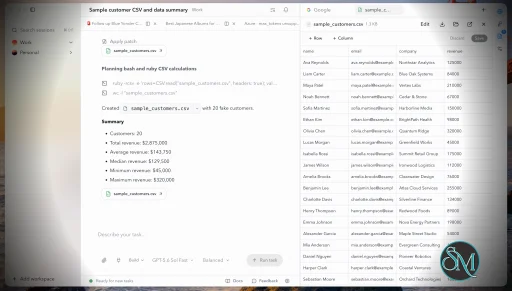
Instead of presenting a simple chat interface, OpenWork organizes AI interactions into sessions with execution plans, task timelines, permission requests, and progress tracking. This makes long-running or complex workflows much easier to follow.
Powered by OpenCode
Because OpenWork is built on OpenCode, it inherits support for AI providers, plugins, tools, and agent capabilities available through the OpenCode ecosystem. Users are not locked into a single AI model or provider.
Skills and Plugin Support
OpenWork includes a Skills Manager that allows users to install, manage, and reuse AI skills and OpenCode plugins. This makes it easy to extend the platform with custom capabilities for development, automation, or business workflows.
Permission Management
Sensitive operations require user approval through a clear permission interface. Users can allow an action once, always allow it, or deny the request, providing greater visibility into what AI agents are attempting to do.
Templates
Frequently used prompts and workflows can be saved as templates, allowing repetitive tasks to be executed consistently with minimal effort.
Local and Remote Operation
OpenWork supports both local execution and remote workers. This flexibility makes it suitable for individual users while also supporting collaborative environments and distributed infrastructure.
Open Source
The desktop application is released as open source under the MIT License, with active development and frequent releases introducing new features, bug fixes, and improvements.
Performance and User Experience
OpenWork delivers a polished desktop experience that feels more approachable than many AI developer tools. The interface presents AI actions through execution plans, progress indicators, and permission dialogs rather than exposing raw command output.
One of its biggest strengths is flexibility. Advanced users can leverage the full OpenCode ecosystem, while less technical users can interact with AI agents through a clean graphical interface.
The project is under rapid development, with frequent releases adding new capabilities and improving stability. Users should expect occasional interface changes as the platform continues to evolve.
Pros
Free and open source desktop application.
Local-first architecture.
Powered by the OpenCode ecosystem.
Modern desktop interface.
AI workflow planning and execution tracking.
Plugin and skills management.
Flexible local and remote deployment.
Permission controls for sensitive actions.
Active development with frequent updates.
Cons
Still evolving rapidly.
Some advanced workflows require familiarity with OpenCode.
Best suited for users already interested in AI automation.
Enterprise features are separate from the core desktop application.
Who Should Use OpenWork?
OpenWork is an excellent choice for software developers, AI enthusiasts, automation engineers, technical teams, and organizations that want a flexible AI workspace without depending entirely on cloud-based services.
It is especially useful for users who want to create repeatable AI workflows, extend agent capabilities through plugins, and maintain control over where their AI agents run.
Final Verdict
OpenWork is one of the most promising open source AI workspaces available today. Rather than functioning as a simple chatbot, it provides a complete environment for managing AI agents, workflows, permissions, and reusable automation.
Its local-first philosophy, extensible architecture, and polished desktop interface make it an attractive alternative to proprietary AI productivity tools. Although the project is still maturing, its rapid development and strong feature set already make it a compelling choice for developers and teams looking to build AI-assisted workflows.
Developer:
Different AI
Operating System:
Windows / macOS / Linux
Date Added:
2026-07-30T14:20:23.000Z
Categories:
Post a Comment/Report Broken Link: