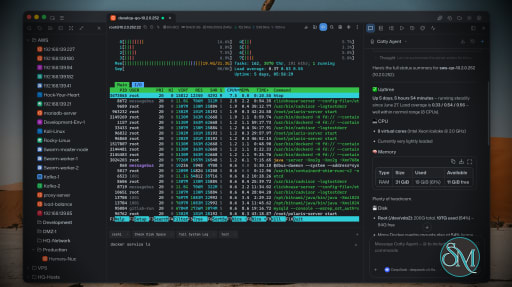
Netcatty is an open source SSH client and remote server management application designed for developers, DevOps engineers, and system administrators. Rather than being a simple terminal emulator, it combines SSH, SFTP, port forwarding, terminal management, and workspace organization into a single desktop application. Available for Windows, macOS, and Linux, Netcatty aims to streamline remote server administration with a modern interface and powerful productivity features.
Managing multiple remote servers often means juggling several terminal windows, file transfer tools, and SSH configurations. Netcatty brings these tasks together into one application with organized workspaces, split terminals, and integrated file management.
Unlike traditional SSH clients that focus solely on terminal access, Netcatty provides a complete remote administration environment with support for SSH, Telnet, Mosh, serial connections, SFTP, jump hosts, proxy servers, and port forwarding.
Key Features of Netcatty
Modern SSH Workspace
Netcatty organizes servers into a built-in Vault, allowing users to manage large numbers of hosts using grid, list, or tree views with fast search capabilities. This makes navigating complex infrastructures much easier than maintaining separate configuration files.
Split Terminal Support
Multiple terminal sessions can be displayed simultaneously using horizontal and vertical split layouts. This is especially useful when monitoring several servers or comparing outputs side by side.
Built-In SFTP Client
The integrated SFTP browser supports drag-and-drop file transfers, remote file editing, and directory management without requiring a separate application.
Multiple Connection Protocols
In addition to SSH, Netcatty supports Telnet, Mosh, and serial connections. It also includes support for jump hosts, proxy servers, and legacy SSH algorithms for compatibility with older systems.
Port Forwarding
The application supports local, remote, and dynamic port forwarding with reusable configurations and automatic startup, making it suitable for development, database access, and secure tunneling.
Secure Authentication
Netcatty supports password authentication, SSH keys, certificates, and SSH agent forwarding, providing flexibility for both personal and enterprise environments.
Cloud Configuration Sync
Users can synchronize their configuration across multiple devices using supported cloud storage providers such as GitHub, Google Drive, OneDrive, or Amazon S3.
AI Assistant
Recent versions include an integrated AI assistant that helps automate terminal workflows and assists with remote administration tasks directly within the application.
Download Netcatty v1.1.75 - Software Mirrors |
|---|
Netcatty v1.1.75 for WindowsNetcatty-1.1.75-portable-win-arm64.exe | 130.7 MB Netcatty-1.1.75-portable-win-x64.exe | 130.71 MB Netcatty-1.1.75-portable-win.exe | 261.05 MB Netcatty-1.1.75-win-arm64.exe | 130.93 MB Netcatty-1.1.75-win-x64.exe | 130.94 MB Netcatty-1.1.75-win-x64.zip | 180.3 MB Netcatty-1.1.75-win.exe | 261.28 MB |
Netcatty v1.1.75 for macOSNetcatty-1.1.75-mac-arm64.dmg | 150.07 MB Netcatty-1.1.75-mac-arm64.zip | 150.17 MB Netcatty-1.1.75-mac-x64.dmg | 155.21 MB Netcatty-1.1.75-mac-x64.zip | 155.36 MB |
Netcatty v1.1.75 for LinuxNetcatty-1.1.75-linux-aarch64.pacman | 104.97 MB Netcatty-1.1.75-linux-aarch64.rpm | 153.63 MB Netcatty-1.1.75-linux-amd64.deb | 156.63 MB Netcatty-1.1.75-linux-arm64.AppImage | 157.1 MB Netcatty-1.1.75-linux-arm64.deb | 153.69 MB Netcatty-1.1.75-linux-x64.pacman | 111.73 MB Netcatty-1.1.75-linux-x86_64.AppImage | 159.16 MB Netcatty-1.1.75-linux-x86_64.rpm | 156.6 MB |
Netcatty v1.1.75 Release Notes: ✨ Release Highlights
Netcatty v1.1.75 focuses on making the desktop shell feel faster under multi-tab workloads, hardening SFTP transfer lifecycle, and expanding agent/plugin integration. Cursor-line highlighting, workspace clone/split with cwd inheritance, and several host-management UX improvements land alongside a large reliability pass.
⚡ Faster multi-tab shell
- TerminalLayer, top-tab switching, App shell domains, and AI side-panel UI are isolated so history, CWD, title, and theme churn no longer force full-pane re-renders.
- Hidden AI panels defer heavy UI while streaming, keeping the active terminal responsive.
- Host pickers and large vault lists are virtualized for big inventories.
🛡️ SFTP transfer reliability
- Pause, resume, and hard reconnect reuse the same transfer runtime with safer progress epochs and sparse-settle budgets.
- Upload content digests ignore ctime-only drift that previously false-flagged identical files.
- Large folder uploads, maximized editor save after reconnect, and POSIX double-slash paths are more predictable.
🖥️ Terminal session UX
- Optional cursor-line highlight keeps the active row readable without wiping keyword colors or selection (opt-in).
- Clone or split tabs inherit the current working directory; multi-pane workspaces can be copied with per-pane CWD.
- Host-tree toolbar is customizable; local-terminal and quick-connect icons are cleaner; Network Device Mode gets a session-header tip.
- Mosh/ET now enforce vault host-key verification; xterm WebGL atlas fixes come from upstream with a lower default scrollback.
🤖 Agents, plugins, and automation
- CodeBuddy integrates the full Tencent AI agent SDK surface (permissions, hooks, MCP, settings).
- Plugin connection, authentication, and importer providers land for host-owned auth challenges and safe vault imports.
- Terminal scripts side-panel UX is refined; Windows gains Explorer “Open in Terminal”.
✨ Smaller polish
- Searchable font pickers, Windows portaled UI font inheritance, CJK label line-height fixes, snippets as centered modals, large vault import/group management, Gist large-vault raw download proxy, system theme in quick controls, and assorted editor/AI/CI fixes.
Download based on your OS:
- Windows:

- macOS:
 
Code signing policy
Netcatty is applying to the SignPath Foundation open-source program. Once
approved, covered Windows release artifacts will use Free code signing provided by SignPath.io, certificate by SignPath Foundation.
See the
Code signing policy
and Privacy policy.
What's Changed- fix(ci): restore Cursor issue automation by @binaricat in https://github.com/binaricat/Netcatty/pull/2515
- fix(ci): correct Cursor sandbox command parsing by @binaricat in https://github.com/binaricat/Netcatty/pull/2523
- fix(sftp): prevent large folder upload renderer stalls by @binaricat in https://github.com/binaricat/Netcatty/pull/2517
- fix(ci): restore Cursor automation authentication by @binaricat in https://github.com/binaricat/Netcatty/pull/2527
- feat(plugins): add connection, authentication, and importer providers by @ryan-wong-coder in https://github.com/binaricat/Netcatty/pull/2413
- fix: preserve SFTP editor saves after maximize by @binaricat in https://github.com/binaricat/Netcatty/pull/2533
- fix(ci): prevent lint-and-test hangs by @binaricat in https://github.com/binaricat/Netcatty/pull/2532
- feat(scripts): improve terminal scripts side panel UX by @binaricat in https://github.com/binaricat/Netcatty/pull/2525
- fix(ssh): enforce vault host keys for Mosh and ET by @binaricat in https://github.com/binaricat/Netcatty/pull/2529
- feat: add system theme to quick controls by @binaricat in https://github.com/binaricat/Netcatty/pull/2538
- fix: open OSC 8 terminal links after confirmation by @binaricat in https://github.com/binaricat/Netcatty/pull/2535
- fix(terminal): prevent false coding CLI tab icons by @binaricat in https://github.com/binaricat/Netcatty/pull/2536
- feat(settings): add searchable font pickers by @binaricat in https://github.com/binaricat/Netcatty/pull/2537
- docs: add privacy and code signing policies by @binaricat in https://github.com/binaricat/Netcatty/pull/2543
- fix(ci): accept fenced Cursor research status by @binaricat in https://github.com/binaricat/Netcatty/pull/2539
- feat(windows): add Explorer open-in-terminal menu by @binaricat in https://github.com/binaricat/Netcatty/pull/2542
- fix(ci): update star history via PR on protected main by @binaricat in https://github.com/binaricat/Netcatty/pull/2547
- fix(ci): use GITHUB_TOKEN for star history PRs by @binaricat in https://github.com/binaricat/Netcatty/pull/2548
- chore: update star history charts by @binaricat in https://github.com/binaricat/Netcatty/pull/2549
- fix(ci): proxy GitHub screenshots before Cursor research by @binaricat in https://github.com/binaricat/Netcatty/pull/2551
- fix(terminal): keep Enter reconnect working after disconnect by @binaricat in https://github.com/binaricat/Netcatty/pull/2550
- [Feature] Optimize large Vault imports and group management by @binaricat in https://github.com/binaricat/Netcatty/pull/2540
- feat(snippets): open quick add/edit as a centered modal by @binaricat in https://github.com/binaricat/Netcatty/pull/2552
- chore: switch .gitignore to allowlist layout by @binaricat in https://github.com/binaricat/Netcatty/pull/2554
- fix(ai): use writable temp workspace for Cursor CLI MCP by @itzhang89 in https://github.com/binaricat/Netcatty/pull/2558
- perf(vault): virtualize host pickers for large inventories by @binaricat in https://github.com/binaricat/Netcatty/pull/2553
- fix(ai): pass cursorAuthMode into list-models for CLI login by @netcatty-bot in https://github.com/binaricat/Netcatty/pull/2563
- fix(ai): route auto-detected network devices to raw PTY exec (#2367) by @tces1 in https://github.com/binaricat/Netcatty/pull/2564
- fix(terminal): suppress autocomplete on alternate screen (#2530) by @binaricat in https://github.com/binaricat/Netcatty/pull/2565
- feat(terminal): suggest Network Device Mode via a session-header tip by @tces1 in https://github.com/binaricat/Netcatty/pull/2566
- feat(ssh): unify transport leases and converge transfer keep-alive by @binaricat in https://github.com/binaricat/Netcatty/pull/2555
- fix(settings): allow toggling individual keyword highlight rules by @netcatty-bot in https://github.com/binaricat/Netcatty/pull/2574
- fix(sftp): accept panel completed while directory walk still in flight by @netcatty-bot in https://github.com/binaricat/Netcatty/pull/2569
- fix(terminal): speed up dense keyword highlighting by @binaricat in https://github.com/binaricat/Netcatty/pull/2581
- fix(terminal): release hidden ended sessions by @binaricat in https://github.com/binaricat/Netcatty/pull/2582
- fix(ai): prevent stuck OpenCode questions by @binaricat in https://github.com/binaricat/Netcatty/pull/2586
- fix(sftp): restore editor tab saves after maximize by @tces1 in https://github.com/binaricat/Netcatty/pull/2580
- fix(ci): launch Electron perf test without sandbox by @binaricat in https://github.com/binaricat/Netcatty/pull/2588
- Improve settings controls and virtualize host lists by @binaricat in https://github.com/binaricat/Netcatty/pull/2596
- fix(editor): soften Monaco find-match highlight for readability by @netcatty-bot in https://github.com/binaricat/Netcatty/pull/2593
- fix(editor): lighten matching bracket highlight by @netcatty-bot in https://github.com/binaricat/Netcatty/pull/2592
- fix(host-details): keep identity suggestions open on username focus by @netcatty-bot in https://github.com/binaricat/Netcatty/pull/2590
- feat(terminal): add autocomplete history suggestion scope setting by @netcatty-bot in https://github.com/binaricat/Netcatty/pull/2597
- feat(terminal): expose session names to automation scripts by @yintian710 in https://github.com/binaricat/Netcatty/pull/2594
- fix(linux): always set chrome-sandbox SUID bit in deb/rpm postinst by @chenqin231 in https://github.com/binaricat/Netcatty/pull/2608
- feat(terminal): clone/split inherit cwd + one-click local terminal icon by @chenqin231 in https://github.com/binaricat/Netcatty/pull/2584
- feat(ui): expose toolbar icon CSS hooks by @binaricat in https://github.com/binaricat/Netcatty/pull/2613
- fix(ci): harden Cursor automation routing by @binaricat in https://github.com/binaricat/Netcatty/pull/2598
- fix(sftp): accept WSL UNC paths in the path bar by @netcatty-bot in https://github.com/binaricat/Netcatty/pull/2606
- feat(codebuddy): integrate @tencent-ai/agent-sdk 0.3.222 full features by @lengyuqu in https://github.com/binaricat/Netcatty/pull/2393
- fix: auto-dismiss completed script overlays by @binaricat in https://github.com/binaricat/Netcatty/pull/2615
- fix(snippets): restore Monaco paste in script editor by @netcatty-bot in https://github.com/binaricat/Netcatty/pull/2611
- fix(ui): use Terminal icon for new local terminal button by @binaricat in https://github.com/binaricat/Netcatty/pull/2617
- chore(xterm): upstream webgl atlas fixes + default scrollback 3000 by @binaricat in https://github.com/binaricat/Netcatty/pull/2619
- perf(ai): defer heavy side-panel UI while hidden and streaming by @binaricat in https://github.com/binaricat/Netcatty/pull/2620
- fix(known-hosts): add toggle to disable system known_hosts auto-import by @netcatty-bot in https://github.com/binaricat/Netcatty/pull/2623
- perf(terminal): cut TerminalLayer re-renders from history, cwd, and title churn by @binaricat in https://github.com/binaricat/Netcatty/pull/2621
- perf(app): isolate App shell domains, TopTabs titles, AI contexts, Vault history by @binaricat in https://github.com/binaricat/Netcatty/pull/2626
- fix(terminal): keep local shell button on host tree toolbar by @netcatty-bot in https://github.com/binaricat/Netcatty/pull/2627
- perf(app): land shell domain isolation + fix themeRuntime domain thrash by @binaricat in https://github.com/binaricat/Netcatty/pull/2628
- perf(app): cut remaining top-tab switch jank by @binaricat in https://github.com/binaricat/Netcatty/pull/2630
- fix(ui): use borderless quick-connect tab icon by @binaricat in https://github.com/binaricat/Netcatty/pull/2632
- fix(sftp): repair pause/resume soft-control and hard reconnect reuse by @binaricat in https://github.com/binaricat/Netcatty/pull/2633
- fix(sftp): ignore ctime drift when upload content is digest-verified by @binaricat in https://github.com/binaricat/Netcatty/pull/2635
- fix(ui): remove top-tabs local terminal fallback button by @binaricat in https://github.com/binaricat/Netcatty/pull/2641
- fix(vault): hide inactive host focus selection by @binaricat in https://github.com/binaricat/Netcatty/pull/2642
- fix(sync): load large GitHub Gist vaults via raw_url by @netcatty-bot in https://github.com/binaricat/Netcatty/pull/2644
- feat(terminal): highlight the current cursor line by @netcatty-bot in https://github.com/binaricat/Netcatty/pull/2640
- fix(ui): apply interface font to portaled panels on Windows by @netcatty-bot in https://github.com/binaricat/Netcatty/pull/2648
- fix(ui): stop CJK labels clipping under tight line-height by @binaricat in https://github.com/binaricat/Netcatty/pull/2650
New Contributors- @yintian710 made their first contribution in https://github.com/binaricat/Netcatty/pull/2594
- @chenqin231 made their first contribution in https://github.com/binaricat/Netcatty/pull/2608
Full Changelog: https://github.com/binaricat/Netcatty/compare/v1.1.73...v1.1.75
|
Performance and User Experience
Netcatty delivers a polished desktop experience with a clean interface and responsive terminal performance. Workspace restoration allows users to resume previous sessions after restarting the application, reducing setup time for daily work.
Although the application is built with Electron, performance is generally smooth on modern hardware. Memory usage is higher than lightweight native SSH clients, but the added functionality justifies the additional resource consumption for most professional users.
The project is actively maintained, with frequent updates introducing new features, performance improvements, and bug fixes.
Pros
Free and open source.
Modern interface with workspace management.
SSH, SFTP, Telnet, Mosh, and serial support.
Split terminal layouts.
Built-in SFTP browser.
Flexible port forwarding.
Secure authentication options.
Cross-platform support.
Active development.
Cons
Electron-based application uses more memory than native SSH clients.
Advanced features may be unnecessary for users who only need basic SSH access.
Some enterprise users may prefer highly specialized commercial SSH management tools.
Who Should Use Netcatty?
Netcatty is an excellent choice for developers, DevOps engineers, cloud engineers, system administrators, security professionals, and IT consultants who regularly manage multiple remote servers.
It is particularly valuable for users looking to replace separate SSH clients, SFTP applications, and terminal windows with a unified workspace.
Final Verdict
Netcatty is far more than a traditional SSH client. By combining terminal management, secure file transfers, workspace organization, port forwarding, and modern productivity features into one application, it offers an impressive environment for remote server administration.
Its clean interface, broad protocol support, and active development make it one of the most compelling open source SSH workspaces currently available. For professionals managing remote infrastructure on a daily basis, Netcatty is well worth considering.








Post a Comment/Report Broken Link: