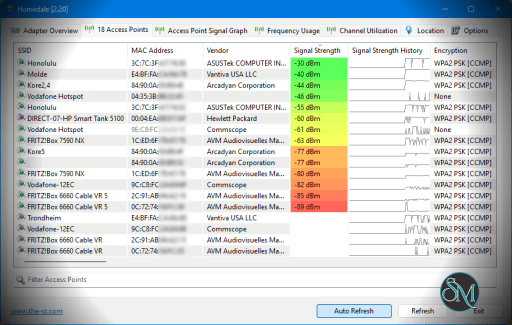
Homedale is a small Windows utility that displays detailed information about nearby wireless networks. It shows signal strength over time, network channels, encryption types, and MAC addresses.
Because it is portable, it can run without installation, making it ideal for IT technicians and troubleshooting scenarios.
Key Features
Real-Time Signal Strength Monitoring
Homedale displays signal strength in both numerical and graphical formats. You can view:
Live signal levels
Historical signal graphs
Network stability over time
This helps identify weak coverage areas or interference problems.
Channel and Encryption Information
The software shows:
Channel numbers
SSID and BSSID
Encryption type
Signal quality
This is useful when optimizing router channel selection to reduce interference.
Network Logging
Homedale can record signal strength over time, which is helpful when diagnosing intermittent connectivity issues or evaluating WiFi performance in different rooms.
Portable and Lightweight
The program does not require installation. You can run it directly from a USB drive, which makes it practical for field work.
It uses minimal system resources and runs smoothly even on older systems.
Performance and Usability
Homedale launches quickly and provides information instantly. The interface is straightforward and technical, with a focus on data rather than visual polish.
While it lacks advanced enterprise-level analysis tools, it delivers exactly what most home users and small IT environments need.
Pros and Cons
Pros
Free and lightweight
Portable version available
Clear signal strength graphs
Useful channel and encryption data
Low system resource usage
Cons
Windows only
Interface feels basic
No advanced heatmap or enterprise reporting tools
Who Should Use Homedale
Homedale is ideal for:
Home users diagnosing WiFi coverage issues
IT technicians performing quick signal checks
Users optimizing router channel selection
Anyone needing a portable WiFi monitoring tool
If you want a simple and reliable wireless monitoring utility without unnecessary complexity, Homedale is a strong choice.
Final Verdict
Homedale delivers accurate WiFi monitoring and signal analysis in a compact, portable package. It may not offer enterprise-level features, but it excels at everyday wireless troubleshooting tasks.
Homedale is a portable and lightweight Windows application designed to monitor WiFi networks, analyze signal strength, and troubleshoot wireless connectivity issues. It is especially useful for users who want a simple way to evaluate wireless coverage without installing complex enterprise tools.
Post a Comment/Report Broken Link: