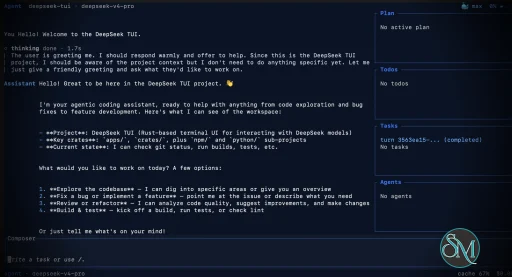
DeepSeek TUI is an open source terminal based coding agent designed for DeepSeek AI models. Unlike a simple chatbot, it can interact with your local workspace, execute shell commands, manage git operations, and assist with software development tasks directly from the command line.
The project is written in Rust and focuses on speed, low resource usage, and keyboard driven workflows. It is especially appealing for developers who spend most of their time in the terminal.
DeepSeek TUI is gaining attention among developers who prefer terminal based workflows and want direct access to AI powered coding tools without relying on heavy IDE integrations. Built around DeepSeek models, it transforms the terminal into an interactive coding assistant capable of editing files, running commands, and managing development workflows.
Download DeepSeek TUI v0.9.3 - Software Mirrors |
|---|
Download DeepSeek TUI v0.9.3 Windows 64bit Download DeepSeek TUI v0.9.3 Windows 64bit Download DeepSeek TUI v0.9.3 Windows 64bit Download DeepSeek TUI v0.9.3 Windows 64bit Download DeepSeek TUI v0.9.3 Windows 64bit Download DeepSeek TUI v0.9.3 Windows 64bit Download DeepSeek TUI v0.9.3 Windows 64bit Download DeepSeek TUI v0.9.3 Windows 64bit Download DeepSeek TUI v0.9.3 Windows 64bit Download DeepSeek TUI v0.9.3 Windows 64bit |
Download DeepSeek TUI v0.9.3 macOS arm64 Download DeepSeek TUI v0.9.3 macOS arm64 Download DeepSeek TUI v0.9.3 macOS arm64 Download DeepSeek TUI v0.9.3 macOS arm64 |
Download DeepSeek TUI v0.9.3 macOS x64 Download DeepSeek TUI v0.9.3 macOS x64 Download DeepSeek TUI v0.9.3 macOS x64 Download DeepSeek TUI v0.9.3 macOS x64 |
Download DeepSeek TUI v0.9.3 macOS arm64 Download DeepSeek TUI v0.9.3 macOS arm64 Download DeepSeek TUI v0.9.3 macOS arm64 Download DeepSeek TUI v0.9.3 macOS arm64 |
Download DeepSeek TUI v0.9.3 Linux x64 Download DeepSeek TUI v0.9.3 Linux x64 Download DeepSeek TUI v0.9.3 Linux x64 Download DeepSeek TUI v0.9.3 Linux x64 |
Download DeepSeek TUI v0.9.3 Linux arm64 Download DeepSeek TUI v0.9.3 Linux arm64 Download DeepSeek TUI v0.9.3 Linux arm64 Download DeepSeek TUI v0.9.3 Linux arm64 |
DeepSeek TUI v0.9.3 Release Notes:Codewhale is the public product from Shannon Labs. The
command, npm package, and release-asset names remain lowercase technical identifiers. The legacy npm package
receives no further releases. Users coming from v0.8.x legacy
InstallRecommended — npm (one command, all three entrypoints)codewhale, codew, and codewhale-tui
binaries from this Release and places them in the same directory.
Docker / GHCRcodewhale dispatcher, codew shim, and codewhale-tui runtime. The latest tag is also updated on release.
Cargo (Linux / macOS)codewhale-cli produces the codewhale dispatcher and codew shim, while codewhale-tui produces the interactive runtime that the dispatcher delegates to. Installing only one crate will fail at runtime with a MISSING_COMPANION_BINARY error.
Manual download — platform archives (recommended)Each archive below contains thecodewhale dispatcher, codew shim, and codewhale-tui runtime, plus an install script:
codewhale-windows-arm64.zip
codewhale-, codew-, and codewhale-tui-) — the npm wrapper and the in-app codewhale update download the matched runtime binaries, whereas the .tar.gz / .zip archives above are the recommended manual download and additionally bundle an install script. The legacy npm package deepseek-tui is deprecated and is not republished. For migration from v0.8.x legacy binary names, see docs/REBRAND.md.
Verify (recommended)Download the checksum manifests from this Release and verify:What's in v0.9.3This is the Codewhale v0.9.3 source candidate. It is not a published release until the matching tag, packages, checksums, and release assets exist. DeepSeek V4 Flash is now a first-class Codewhale route, and the agent-facing tool surface has been reduced to the canonical action tools that current models actually need. This release also hardens credential, authorization, durability, compaction, and macOS File Provider boundaries while deleting stale runtime and dependency surface.Added
apply_patch, and model-aware wire-format
selection. Exact current Flash IDs use Responses; future direct
deepseek-vN-* model IDs inherit that route conservatively, while custom
DeepSeek-compatible endpoints retain Chat Completions unless configured
otherwise.
Changed
apply_patch remains available as the one direct custom
edit tool supported by DeepSeek Responses. The bundled stop-ship workflow,
Fleet fixtures, shell shortcut, and engine tests use the same canonical
vocabulary.
doctor is offline by default, distinguishes credential source from
availability, and reports one consistent path snapshot.
Fixed
Removed
write_file, list_dir, grep_files, file_search, and the duplicate
Work/RLM registrations. Historical transcript and policy semantics remain
readable, but new model turns receive only the canonical action surface.
Contributors
Bash workspace fix from PR #4673
and issue #4674.
See CHANGELOG.md for full notes and docs/CHANGELOG_ARCHIVE.md for older releases. |
Key Features of DeepSeek TUI
Terminal Native Workflow
DeepSeek TUI operates entirely within the terminal, allowing developers to work without switching between browser windows or external interfaces.AI Assisted Coding
The assistant can read and edit files, generate code, explain logic, and help automate development tasks.Shell Command Execution
It supports running terminal commands directly through the interface, streamlining development workflows.Git Integration
Developers can manage repositories, review changes, and handle version control related tasks from inside the tool.Multiple Work Modes
DeepSeek TUI includes modes like Plan, Agent, and YOLO, offering different levels of automation and approval control.Large Context Handling
The tool is built around DeepSeek V4 capabilities, including support for extremely large context windows that help with understanding bigger codebases.
User Experience
DeepSeek TUI is designed for developers comfortable with terminal environments. The interface is keyboard focused and efficient, though beginners may need time to adapt.
The workflow feels closer to tools like Claude Code or Codex style assistants rather than traditional chat applications. Community feedback on Reddit and GitHub discussions highlights its speed and practical coding workflow.
Performance and Compatibility
Because it is written in Rust, DeepSeek TUI is lightweight and responsive. It supports Linux, macOS, and Windows, with installation available through npm, Cargo, or direct binaries.
Performance depends heavily on the connected DeepSeek models and API configuration, but the local interface itself remains fast and efficient.
Pros
Fast terminal native workflow
AI powered coding and automation
Lightweight Rust based architecture
Supports file editing and shell execution
Open source and actively developed
Cons
Requires familiarity with terminal workflows
Depends on external AI APIs
Advanced automation modes may feel risky for inexperienced users
DeepSeek TUI is ideal for developers, DevOps engineers, and terminal focused power users who want AI assistance integrated directly into their command line workflow. It is especially attractive for users seeking a lightweight alternative to browser based AI coding tools.
DeepSeek TUI combines AI coding assistance with the efficiency of terminal workflows. Its fast performance, flexible automation, and developer focused design make it one of the most interesting open source AI terminal tools currently gaining traction.
Developer:
Hunter Bown
Operating System:
Windows / macOS / Linux
Date Added:
2026-07-31T16:02:23.794Z
Categories:
Post a Comment/Report Broken Link: