AstrBot Desktop is the official desktop edition of AstrBot, an open source AI agent platform that brings conversational AI, plugins, knowledge bases, and automation into a single local application. Instead of requiring command-line installation or Docker, AstrBot Desktop packages the WebUI, backend runtime, and desktop interface into one installer for Windows, macOS, and Linux. It is designed for users who want to start using AstrBot with minimal setup.
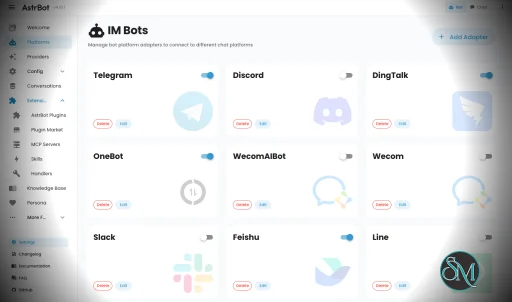
AstrBot Desktop provides a ready-to-use environment for running AstrBot locally. Everything needed to get started is included, allowing users to install the application and immediately access the ChatUI, plugin marketplace, and knowledge base features without manually configuring Python or server components.
Unlike the standard AstrBot deployment, which is better suited for servers and production environments, the desktop edition focuses on personal use and local development. It stores all configuration files, plugins, and user data in a dedicated local directory, making backups and migrations straightforward.
Key Features of AstrBot Desktop
Simple Local Installation
AstrBot Desktop bundles the backend runtime and WebUI into a single application. Users can install it like any other desktop program without preparing a separate development environment.
Integrated ChatUI
The application includes the full AstrBot ChatUI, allowing users to interact with AI models through a modern web interface while running everything locally.
Plugin Marketplace
AstrBot Desktop supports the same plugin ecosystem as the main AstrBot platform, giving users access to a large collection of community-developed extensions that expand the assistant's capabilities.
Knowledge Base Support
Users can build local knowledge bases that the AI can reference during conversations, making it useful for documentation, personal notes, and business information.
Stable and Nightly Releases
The project offers both stable releases for everyday use and nightly builds for users who want to test the latest features and fixes.
Local Data Storage
Configuration files, plugins, logs, and knowledge base data are stored in a dedicated .astrbot directory within the user's home folder, making migration and backup much easier.
Cross-Platform Support
AstrBot Desktop is available for Windows, macOS, and Linux, providing a consistent experience across all major desktop operating systems.
Open Source
Released under the AGPL-3.0 license, AstrBot Desktop is fully open source, allowing developers to inspect the code, contribute improvements, and customize the application.
Download AstrBot Desktop v4.26.7 - Software Mirrors |
|---|
AstrBot Desktop v4.26.7 for WindowsAstrBot_4.26.7_windows_amd64_portable.zip | 165.82 MB AstrBot_4.26.7_windows_amd64_setup.exe | 130.96 MB |
AstrBot Desktop v4.26.7 for macOS |
AstrBot Desktop v4.26.7 for Linuxastrbot-desktop-4.26.7-1.aarch64.rpm | 166.61 MB astrbot-desktop-4.26.7-1.x86_64.rpm | 188.51 MB |
AstrBot Desktop v4.26.7 Release Notes:Automated desktop package release.
|
Performance and User Experience
AstrBot Desktop delivers a polished installation experience compared to manually deploying the full AstrBot framework. The interface is clean, startup is straightforward, and updates can usually be installed directly from within the application.
For users interested primarily in local AI conversations, plugins, and knowledge base management, the desktop edition provides nearly everything needed without the complexity of Docker or command-line deployment. Developers who later outgrow the desktop version can migrate their data to a source or server deployment with minimal effort.
Some advanced plugin features may require external tools such as Node.js or uv, depending on the plugin being used.
Pros
Free and open source.
Extremely easy to install.
Includes ChatUI and backend runtime.
Supports the full AstrBot plugin ecosystem.
Local knowledge base support.
Stable and nightly release channels.
Cross-platform compatibility.
Easy migration to server deployments.
Cons
Intended for desktop use rather than production servers.
Some plugins require additional system dependencies.
Advanced users may eventually prefer Docker or source deployments.
Documentation for some advanced topics is still evolving.
Who Should Use AstrBot Desktop?
AstrBot Desktop is an excellent choice for developers, AI enthusiasts, students, and professionals who want to explore the AstrBot ecosystem without dealing with server configuration.
It is especially suitable for users who want a local AI assistant with plugin support, knowledge base capabilities, and an easy installation process. Organizations planning long-running deployments should instead consider the standard AstrBot server or Docker installation.
Final Verdict
AstrBot Desktop makes one of the most feature-rich open source AI agent platforms accessible to everyday users. By packaging the runtime, WebUI, and desktop interface into a single application, it removes much of the complexity traditionally associated with self-hosting AI assistants.
For anyone looking to experiment with AstrBot locally or build an AI-powered personal assistant without spending time on deployment, AstrBot Desktop is an outstanding choice.
Developer:
AstrBot Team
Operating System:
Windows / macOS / Linux
Date Added:
2026-07-19T15:19:02.223Z
Categories:
Post a Comment/Report Broken Link: