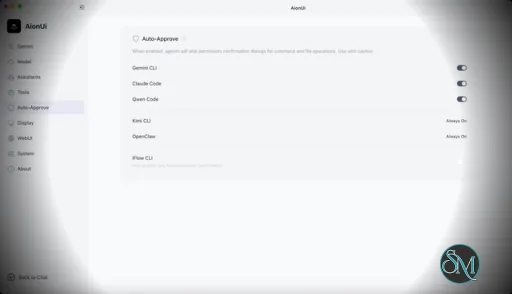
AionUi is a cross platform desktop application that transforms command line AI agents into an intuitive graphical interface. It detects locally installed AI CLI tools and presents them in a structured environment where users can manage conversations, sessions, and files more efficiently.
The software is open source, allowing users to customize and extend its functionality according to their workflow requirements.
Download AionUI v2.1.36 - Software Mirrors |
|---|
Download AionUI v2.1.36
for Windows 64bit (exe) | 290.34 MB Download AionUI v2.1.36
for Windows ARM64 (exe) | 457.49 MB | Download AionUI v2.1.36
for macOS Intel (zip) | 470.62 MB Download AionUI v2.1.36
for macOS Intel (dmg) | 461.13 MB Download AionUI v2.1.36
for macOS ARM64 (zip) | 459.44 MB Download AionUI v2.1.36
for macOS ARM64 (dmg) | 450.14 MB | Download AionUI v2.1.36
for Linux ARM64 (deb) | 401.1 MB Download AionUI v2.1.36
for Linux 64bit (deb) | 428.15 MB |
Highlights
Scheduled tasks: visual schedule builder and queue protection
- You no longer need to know Cron syntax to create a custom schedule. A visual builder covers interval, daily, weekly, and monthly rules, with a live preview of the generated expression — and the advanced Cron editor is still there for complex cases.
- A new queue-protection toggle keeps scheduled runs from piling up: if a previous run is still going, the next one waits instead of stacking.
Skills management grows up
- Every skill now has its own detail page showing its info and which assistants use it — and you can attach or detach assistants right there. The skills list shows used-by avatar stacks at a glance.
- Batch manage mode lets you select and delete multiple custom skills in one action, with select-all over the filtered list.
Find things faster in long lists
- The Skills and MCP submenus in the "+" menu, and the default Model/Skills/MCP selects in the assistant editor, now have inline search — the same pattern as the model selector. No more scrolling through long lists.
Smoother drag-to-reorder
- Team member tabs and pinned conversations now use the same polished drag interaction as assistant sorting: hover reveals a drag handle, dragging is axis-locked and animated.
Under the hood
- Removed two legacy dependencies (aioncli-core and the office-ai platform), slimming the install and reducing update surface.
Engine updates (AionCore v0.1.47 → v0.1.48)
This release also picks up two AionCore versions:
- Aion CLI can now see images: attach a screenshot or picture and it goes straight to the model inline, with attachments routed by each model's actual image capability.
- Added Pi as a new built-in coding agent (ACP), joining Claude Code, Codex, and Gemini.
- CLI detection now honors your login shell PATH, so tools installed via nvm/homebrew/cargo are found reliably, and built-in CLIs are validated before being offered.
- Team collaboration gained a fallback transport for CLI backends, keeping teamwork going when the primary channel is unavailable.
- Assistant rule files are stored canonically, and legacy settings sync no longer overwrites toggles you changed by hand.
- Scheduled executions are deduplicated and protected at the engine level (the backend half of this release's queue protection).
- Removed the legacy Bun runtime, simplifying the runtime stack.
What's Changed
- feat(cron): add queue protection and visual schedules by @JAVA-LW in https://github.com/iOfficeAI/AionUi/pull/3552
- chore(deps): remove aioncli-core dependency by @kaizhou-lab in https://github.com/iOfficeAI/AionUi/pull/3594
- chore(deps): remove office-ai platform dependency by @kaizhou-lab in https://github.com/iOfficeAI/AionUi/pull/3595
- feat(skills): add batch delete for custom skills by @IceyLiu in https://github.com/iOfficeAI/AionUi/pull/3600
- style(skills): soften batch-mode selected card state by @IceyLiu in https://github.com/iOfficeAI/AionUi/pull/3603
- feat(skills): skill detail page with assistant attachment by @IceyLiu in https://github.com/iOfficeAI/AionUi/pull/3604
- feat(ui): add search to skills/MCP submenus and assistant default selects by @IceyLiu in https://github.com/iOfficeAI/AionUi/pull/3605
- feat(ui): standardize drag-to-reorder UX for team tabs and pinned conversations by @IceyLiu in https://github.com/iOfficeAI/AionUi/pull/3606
- chore: bump version to 2.1.36 by @piorpua in https://github.com/iOfficeAI/AionUi/pull/3610
Full Changelog: https://github.com/iOfficeAI/AionUi/compare/v2.1.35...v2.1.36 |
Key Features
Multi Agent Support
AionUi allows users to run multiple AI sessions simultaneously. Each session maintains its own context, enabling parallel workflows without cross interference.
Modern Chat Interface
The application provides a clean and organized chat environment. Users can scroll through conversation history, manage session tabs, and interact with AI responses in a visually structured format.
Smart File Management
AionUi includes drag and drop support, file previews, and structured file browsing. This improves productivity when working with code, documents, or AI generated content.
Multi Model Compatibility
The software supports various AI models through local or API based configurations. Users can switch between models depending on task requirements.
Session Control and Workflow Tools
Users can manage sessions independently, review outputs, and maintain organized AI workflows. This structure helps reduce clutter when working on complex tasks.
Cross Platform Availability
AionUi runs on major operating systems, ensuring accessibility for developers working in different environments.
Ease of Use
The interface is designed to simplify complex AI workflows. While some familiarity with AI tools is helpful, the graphical layout significantly reduces the learning curve compared to pure command line usage.
Navigation is intuitive, and core features are accessible without excessive configuration.
Performance and Compatibility
AionUi operates efficiently as a desktop application. Performance depends partly on the underlying AI services or APIs being used, but the interface itself remains responsive during normal use.
Compatibility with standard AI command line tools ensures flexibility for technical users.
Final Verdict
AionUi is a powerful desktop interface for managing AI command line tools in a structured and visual way. Its ability to handle multiple sessions, integrate different models, and organize workflows makes it a valuable productivity solution for advanced users.
For professionals seeking greater control and efficiency in AI driven projects, AionUi delivers a practical and modern solution.
AionUi is a free and open source desktop application that provides a modern graphical interface for command line AI tools. It is designed to simplify AI workflows by replacing terminal based interaction with a visual environment that supports multiple AI models, parallel sessions, and productivity focused features. AionUi is suitable for developers, researchers, and advanced users who want a unified way to manage AI driven tasks.
Post a Comment/Report Broken Link: