Subtitle Edit is a subtitle creation and synchronization tool that supports more than 200 subtitle formats. It allows users to adjust timing, fix synchronization issues, translate subtitles, and convert between different subtitle standards.
It is especially popular among users who work with SRT, ASS, SSA, and VTT files.
Download Subtitle Edit 4.0.16 - Software Mirrors |
|---|
Download Subtitle Edit 4.0.16 |
Subtitle Edit 4.0.16 Release Notes:Change logFilesSubtitleEdit-4.0.16-Setup.zip Windows installer version, .NET 4.8, 64/32-bit (will run 64 bit on 64-bit OS - so do use 64-bit codecs/VLC on 64-bit OS!) Thx to XhmikosR for creating the Windows installer :) Thx to LeonCheung for gfx :) SHA256 Checksum: 7bee41044d1300fbeb33c527592a769cbd0d1922eafee254e93dcec52ae45f5aSubtitleEdit-4.0.16-Setup.exe SHA256 Checksum: 633e8b6f33ac04ddbaaccf487d0632341c5b3dd0823368b07e8212260eab8714SE4016.zip Portable version, .NET 4.8, 64/32-bit (will run 64 bit on 64-bit OS - so do use 64-bit codecs/VLC on 64-bit OS!) This version is for Linux users too: https://www.nikse.dk/SubtitleEdit/Help#linux SHA256 Checksum: f59328d651a250538474573f54ee7b15be7afc58749edd668779c7f39037e150SE4016FI.zip Portable version of SE with Finnish dictionaries, .NET 4.8, 64/32-bit (will run 64 bit on 64-bit OS - so do use 64-bit codecs/VLC on 64-bit OS!) Spell check component: http://voikko.sourceforge.net/ Thx to vm for Finnish language file :) Thx to SimplyTheBOSS for testing + OCR helper files :) SHA256 Checksum: 57a808af03f75e9f05e2298bd74f8456357c878353b96e9f111a00ecf68bafca |
Key Features
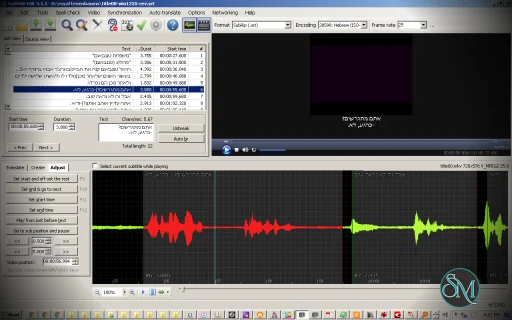
Subtitle Edit includes waveform visualization that helps users align subtitles accurately with audio. This feature is extremely useful when correcting timing issues.
The software supports automatic subtitle synchronization using audio analysis. It also provides spell checking tools and translation assistance for multilingual projects.
An integrated video preview player allows real time testing while editing subtitles. Subtitle conversion between formats is simple and fast.
OCR functionality enables extraction of subtitles from DVD and Blu ray sources, making it suitable for professional workflows.
Ease of Use
The interface is functional and designed for productivity. While the feature set is advanced, basic subtitle editing tasks are straightforward.
Keyboard shortcuts and batch tools improve workflow efficiency for experienced users.
Performance and Compatibility
Subtitle Edit runs efficiently on Windows systems and supports a wide range of subtitle formats. It works smoothly with most common video formats.
Performance remains stable even with long subtitle files or complex synchronization tasks.
Pros and Cons
Advantages include free and open source licensing, extensive format support, powerful synchronization tools, OCR capabilities, and translation features.
Limitations include a technical interface that may appear complex for beginners and the primary focus on Windows platforms.
Final Verdict
Subtitle Edit is a powerful and reliable subtitle editing solution. Its synchronization accuracy, format compatibility, and professional tools make it a top choice for anyone working with subtitles.
For users seeking a feature rich and free subtitle editor, Subtitle Edit stands out as an excellent option.
Subtitle Edit is a free and open source subtitle editing software designed for creating, editing, synchronizing, and converting subtitle files. It is widely used by video editors, translators, and content creators who need precise subtitle control and format flexibility.
The software offers advanced editing tools while remaining accessible for beginners, making it one of the most trusted subtitle utilities available.
Developer:
Nikolaj Olsson
Operating System:
Windows
Date Added:
2026-06-02T17:18:28.937Z
Categories:
Post a Comment/Report Broken Link: