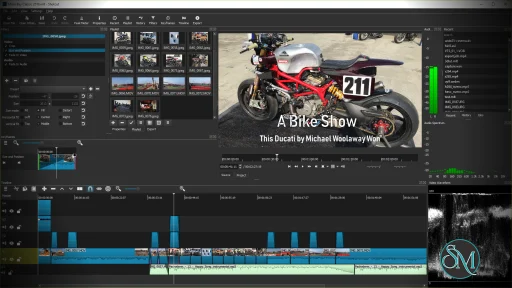
Shotcut is a cross platform video editor that allows users to edit videos without converting files beforehand. It is built on the FFmpeg framework, which gives it strong format compatibility and reliable performance.
Because it is open source, Shotcut is continuously improved by the community.
Download Shotcut 26.6.1 - Software Mirrors | ||
|---|---|---|
Download Shotcut 26.6.1 | Download Shotcut 26.6.1 | |
Shotcut 26.6.1 Release Notes:
This appears if Shotcut crashes within 30 seconds upon startup, which restarts in a safe mode without external (OpenFX, VST2) plugins.
incompatible with newly added Settings > Player > Use Old Video Output (necessary for Snapdragon X ARM/Windows and possibly other setups).
This offers SDR, which follows the colorspace, HLG HDR, and PQ HDR.
| ||
Key Features of Shotcut
Shotcut provides essential and advanced editing tools in a simple package.
Main features include:
Native timeline editing without import conversion
Support for 4K and high resolution video
Wide format support for video and audio files
Advanced video and audio filters
Keyframe animation support
Audio waveform and scopes
Multi track timeline
Hardware encoding support
These features make Shotcut suitable for many types of video projects.
Supported Platforms and Formats
Shotcut is available on:
Windows
macOS
Linux
It supports common and professional formats such as MP4, MKV, MOV, AVI, WebM, MP3, AAC, FLAC, and more.
Performance and Editing Experience
Shotcut performs well on modern systems and can handle high resolution footage, including 4K. Proxy editing and preview scaling help improve performance on lower end hardware.
The interface is clean but may feel different from traditional editors, which can require some adjustment for new users.
Ease of Use
Shotcut is beginner friendly once the basics are understood, but it has a learning curve. Some workflows are less guided compared to commercial editors, which may confuse first time users.
However, the software offers strong control for users who take time to learn it.
Is Shotcut Safe to Use
Yes, Shotcut is safe to use when downloaded from the official website. It contains no ads, no watermarks, and no hidden restrictions.
As open source software, it is transparent and trusted by the community.
Pros and Cons of Shotcut
Pros:
Completely free and open source
No watermark or time limits
Cross platform support
Strong format compatibility
Suitable for 4K editing
Cons:
Interface may feel unconventional
Limited built in effects compared to premium editors
Occasional performance drops on very large projects
Despite these limitations, Shotcut remains a strong free option.
Common Use Cases
Shotcut is commonly used for:
YouTube and social media videos
Basic to intermediate video editing
Educational and personal projects
Simple color correction and effects
Cross platform editing workflows
It is ideal for users who want control without cost.
Final Verdict
Shotcut is a solid free video editor that delivers reliable performance and useful features without forcing users into subscriptions or watermarks. While it may not replace high end professional editors, it is more than capable for most everyday video editing needs.
For users looking for a free, open source, and cross platform video editor, Shotcut is a smart choice. Shotcut is a free and open source video editing software designed for users who want powerful editing tools without paying for a subscription. It is suitable for beginners, content creators, and hobbyists who need a reliable editor for everyday video projects.
Shotcut supports a wide range of formats and runs smoothly on multiple operating systems.
Developer:
Meltytech, LLC
Operating System:
Windows / macOS / Linux
Date Added:
2026-06-02T04:02:50.371Z
Categories:
Post a Comment/Report Broken Link: