Plannotator is an open-source platform designed to review and validate plans and code generated by AI coding agents.
The platform provides a centralized interface where developers can:
Review AI-generated plans
Annotate proposed actions
Approve or reject tasks
Inspect code changes
Provide structured feedback
Improve agent outputs
Maintain human oversight
Rather than replacing developers, Plannotator aims to keep humans involved in critical decision-making during AI-assisted development.
As AI coding agents become increasingly capable, developers face a growing challenge: ensuring that AI-generated plans and code changes align with project requirements before they are executed. Plannotator addresses this problem by acting as a review layer between developers and AI coding agents.
Instead of generating code itself, Plannotator focuses on making AI-driven development more transparent and controllable. It allows teams to review, annotate, approve, reject, and refine agent-generated plans and code changes before they affect a project.
Download Plannotator v0.21.3 - Software Mirrors |
|---|
Plannotator v0.21.3 for Windowsplannotator-paste-win32-arm64.exe | 106.86 MB plannotator-paste-win32-x64.exe | 110.08 MB |
Plannotator v0.21.3 for macOSplannotator-darwin-arm64 | 108.25 MB plannotator-darwin-x64 | 112.69 MB |
Plannotator v0.21.3 for Linuxplannotator-linux-arm64 | 143.8 MB plannotator-linux-x64 | 144.33 MB |
Plannotator v0.21.3 Release Notes:Follow @plannotator on X for updatesMissed recent releases?
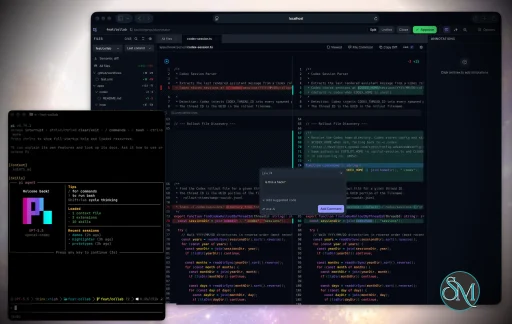
What's New in v0.21.3A follow-up to the code-review work in v0.21.2. The headline is file-scoped comments in code review with a reworked comment experience, and the rest of the release is fixes and polish: a new contributor fixed clipboard and keyboard handling in the VS Code extension, the CLI now prints help for its subcommands, Codex Ask AI moved onto a more reliable transport, and the Ask AI sidebar got a few rough edges sanded down. Eight changes land in total, including a first contribution from @rushelex.File Comments in Code ReviewUntil now a code-review comment always attached to a line range. This release adds file-scoped comments — a comment that belongs to a whole file rather than any single line. In the single-file view it renders as a full-text banner directly below the file path; in the all-files view it sits in the file header for expanded files. Guided reviews that produce file-level findings now anchor them where they belong instead of forcing them onto a line. The comment experience was also unified. Clicking a comment — whether the inline card in the diff, the sidebar entry, or the file banner — replays its stored line range as a controlled highlight, and clicking it again clears the highlight. Scrolling the viewport to a comment is reserved for the sidebar and findings list, so clicking a comment inside the diff highlights it without yanking the page around. The inline, sidebar, and file-banner cards now share a single identity row (badges, author, timestamp), a single action row (edit, copy, delete), and a consistent file-name chip, replacing three separately built layouts that had drifted apart. PR #973, by @backnotprop.VS Code Clipboard and Keyboard HandlingThe VS Code extension renders Plannotator inside a webview, and two long-standing problems made that webview feel second-class. Copy and paste didn't work — clipboard content never crossed the webview boundary — and standard VS Code keybindings like Cmd+P stopped responding while a Plannotator tab was focused. This release bridges the clipboard so copy, cut, and paste work inside the webview, and forwards keystrokes to VS Code so its keybindings resolve as expected. PR #970 closing #864 and #969, by @rushelex — who both reported the bugs and contributed the fix.Codex Ask AI on the App-Server TransportCodex Ask AI no longer drivescodex exec through the @openai/codex-sdk package. It now runs a long-lived codex app-server process over JSON-RPC, which respects the user's and enterprise-managed approval policy and supports interactive Allow/Deny approvals surfaced as cards in the UI. The provider id stays codex-sdk so existing saved preferences keep working. A startup edge case is also fixed: if the app-server process spawned but stalled on its initialize handshake, it was left running and every later question hung until an idle timer reaped it. The process is now killed on a failed handshake, so the next question starts cleanly.
PR #971, by @backnotprop.
CLI Subcommand HelpRunningplannotator review --help (and the same for other subcommands) launched the review UI instead of printing help text. The CLI now resolves --help and -h for each subcommand before dispatching, so the help flag prints usage and exits without starting a server.
PR #974 closing #964, reported by @rrei.
Clickable Ask AI Announcement CardsThe first time Ask AI appears, an announcement dialog presents the available providers as cards. Those cards were missing their click handler, so selecting a provider from the announcement did nothing. They are clickable now and select the provider as expected. PR #975 closing #972, reported by @Duo-Huang.Ask AI Sidebar PolishTwo smaller fixes in the code-review Ask AI sidebar. The per-file chat groups used to start collapsed, so every file you had asked about had to be opened by hand; they now default to expanded, while manual collapse still works and persists. And clicking a sidebar comment that no longer matches the active PR or diff scope — for example after switching PRs in place — used to do nothing at all; it now clears the current selection so the click gives visible feedback instead of appearing broken.Additional Changes
Install / UpdatemacOS / Linux:/plugin in Claude Code, find plannotator, and click "Update now".
OpenCode: Clear cache and restart:
opencode.json:
What's Changed
New Contributors
Contributors@rushelex landed their first contribution, and a complete one: they reported that the VS Code extension couldn't paste from the clipboard (#864) and that VS Code keybindings stopped working while a Plannotator tab was focused (#969), then fixed both in #970. Thanks also to the people who reported the bugs this release fixes:
|
Key Features of Plannotator
Plan Review System
One of Plannotator's core capabilities is reviewing plans generated by AI agents before execution.
Developers can examine:
Proposed tasks
Implementation strategies
Agent reasoning
Planned file modifications
Workflow sequences
This visibility helps reduce unintended changes and costly mistakes.
Annotation Tools
The platform allows users to add comments, notes, and guidance directly to AI-generated plans.
These annotations can be used to:
Clarify requirements
Correct misunderstandings
Provide context
Guide future agent actions
AI Code Review
Plannotator extends the review process beyond planning by supporting inspection of generated code.
Developers can:
Review modifications
Analyze diffs
Leave comments
Request revisions
Validate implementation details
This workflow resembles modern pull-request review systems.
Human-in-the-Loop Workflows
A major design goal is ensuring that AI actions remain subject to human approval.
Organizations can establish review processes where important actions require validation before execution.
Open Source Foundation
Plannotator is open source, allowing teams to inspect, modify, and self-host the platform according to their needs.
This transparency is particularly valuable for organizations adopting AI-assisted software development.
User Experience
The interface is designed around review workflows rather than direct code generation.
Instead of interacting with a chatbot, users primarily:
Receive agent-generated plans
Review proposed actions
Add feedback
Approve or reject changes
Monitor execution results
The workflow feels familiar to developers accustomed to pull requests, code reviews, and project planning tools.
Productivity Benefits
As AI coding tools become more autonomous, review processes become increasingly important.
Plannotator helps organizations:
Reduce risky AI actions
Improve code quality
Increase accountability
Preserve architectural consistency
Encourage collaboration between developers and AI agents
For teams adopting AI-driven development, these safeguards can be as valuable as the coding agents themselves.
Collaboration Features
The platform supports collaborative review workflows where multiple team members can participate in evaluating AI-generated outputs.
This allows:
Peer review
Team approval processes
Shared annotations
Collective decision-making
Such features are especially useful for larger engineering teams.
Performance
Because Plannotator focuses on workflow management and review rather than model inference, performance largely depends on the connected AI agents and integrations.
The platform itself is lightweight and primarily serves as an orchestration and review layer.
Open Source Advantages
Being open source provides several benefits:
Transparent development
Self-hosting capabilities
Custom integrations
Community contributions
Vendor independence
Organizations concerned about compliance, security, or proprietary workflows may find these advantages particularly appealing.
Limitations
Plannotator is designed as a companion tool rather than a complete AI development platform.
Common limitations include:
Requires external AI coding agents
Best suited for teams already using AI-assisted development
Smaller ecosystem than mature developer platforms
Additional review steps may slow rapid prototyping
Some users may prefer fully autonomous workflows
The software delivers the most value in environments where oversight and quality control are priorities.
Pros
Improves transparency of AI-generated plans
Supports structured review workflows
Human-in-the-loop design
Useful annotation system
Open source
Self-hosting support
Familiar review experience for developers
Helps reduce AI-generated mistakes
Cons
Not a standalone coding agent
Requires integration with AI development tools
Smaller community than established developer platforms
Adds review overhead to workflows
Best suited for teams rather than casual users
Who Should Use Plannotator?
Plannotator is ideal for:
Software development teams
Engineering managers
AI-assisted development workflows
Organizations adopting coding agents
Open-source projects
Teams prioritizing code quality and governance
It is particularly valuable for environments where AI-generated code requires oversight before reaching production systems.
Plannotator fills an increasingly important role in the AI development ecosystem by providing visibility and control over AI-generated plans and code changes. Its focus on human oversight, structured reviews, and collaborative workflows makes it a useful companion for modern coding agents. While it is not a replacement for AI coding tools themselves, it offers a practical solution for teams seeking greater confidence and accountability in AI-assisted software development.
Developer:
backnotprop
Operating System:
Windows / macOS / Linux
Date Added:
2026-06-28T23:01:49.693Z
Categories:
Post a Comment/Report Broken Link: