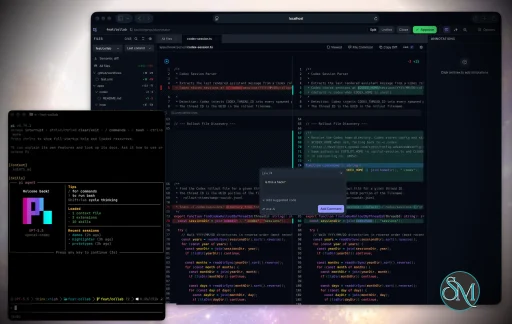
Plannotator is an open-source platform designed to review and validate plans and code generated by AI coding agents.
The platform provides a centralized interface where developers can:
Review AI-generated plans
Annotate proposed actions
Approve or reject tasks
Inspect code changes
Provide structured feedback
Improve agent outputs
Maintain human oversight
Rather than replacing developers, Plannotator aims to keep humans involved in critical decision-making during AI-assisted development.
As AI coding agents become increasingly capable, developers face a growing challenge: ensuring that AI-generated plans and code changes align with project requirements before they are executed. Plannotator addresses this problem by acting as a review layer between developers and AI coding agents.
Instead of generating code itself, Plannotator focuses on making AI-driven development more transparent and controllable. It allows teams to review, annotate, approve, reject, and refine agent-generated plans and code changes before they affect a project.
Download Plannotator v0.21.0 - Software Mirrors |
|---|
Plannotator v0.21.0 for Windowsplannotator-paste-win32-arm64.exe | 106.86 MB plannotator-paste-win32-x64.exe | 110.08 MB |
Plannotator v0.21.0 for macOSplannotator-darwin-arm64 | 108.17 MB plannotator-darwin-x64 | 112.61 MB |
Plannotator v0.21.0 for Linuxplannotator-linux-arm64 | 143.72 MB plannotator-linux-x64 | 144.25 MB |
Plannotator v0.21.0 Release Notes:Follow @plannotator on X for updatesMissed recent releases?
What's New in v0.21.0This is a large release for the annotate experience. Seventeen pull requests landed since v0.20.3, five of them from external contributors, including first contributions from four new community members. The headline is a set of features that turn annotate mode into a place where you can read, edit, run an agent, and jump into your own tools without leaving the document. Alongside that, several reliability fixes harden the paths that remote and CI users depend on.Edit Documents Directly in Annotate ModeUntil now, annotation was a one-way conversation: you highlighted text, wrote a comment, and the agent received your notes. If you wanted to change a sentence yourself, you described the change instead of making it. This release adds a real markdown editor to annotate and plan mode. You can switch a document into edit mode, change the text directly, and the difference between the original and your edits is captured as a clean diff that travels to the agent alongside your annotations. The edit controls were reworked so the state is always legible: a clear Edits label, Save emphasis when there are unsaved changes, and a Save/Cancel pair where Cancel discards your changes after a confirmation rather than silently keeping them. Saved source-file edits now survive a refresh. When you edit a file in annotate-folder mode and save it, the right-side Edits card is persisted in the annotation draft and restored after a reload. Restored edits are validated against the file's current contents on disk, so stale context is dropped rather than resurfaced, and the edit context is never sent to the agent if it no longer matches the file. PR #890, #928, #936 by @backnotprop.A Live File Tree for Annotated FoldersWhen you annotate a folder, the file tree on the left is now live. It uses a server-side file watcher rather than polling, so the tree updates as files change on disk. Git status drives per-file badges and folder totals, showing which files are modified, added, or deleted, with line counts for changes. Direct source-file edits made inside Plannotator show their save state in the tree as well: clean, dirty, saving, saved, or conflict. Two follow-up rounds hardened this. Nested ignored folders likenode_modules and dist are now pruned by path segment so the watcher never walks into them, watcher teardown is identity-safe so reconnects can't orphan old watchers, and git status reads run asynchronously with timeouts and request coalescing so a slow repository can't block the server. A startup-latency fix ensures the tree's first snapshot renders before the live watcher subscribes, so the tree no longer sits on a loading state while the watcher sets up.
PR #931, #933, #935 by @backnotprop.
An Agent Terminal Inside Annotate ModeAnnotate mode now includes an optional agent terminal panel. You can run a coding agent in a real terminal next to the document you're annotating, so the back-and-forth happens in one place instead of a separate window. The terminal is backed by a PTY hosted in a small Node sidecar, since the compiled Plannotator runtime can't load native terminal bindings directly. On a normal install the runtime is provisioned automatically, and where it isn't available the panel disables itself cleanly rather than failing the session. Requires Node.js 20 or newer on your PATH. PR #941 by @backnotprop.Open Files in Your Editor, Terminal, or File ManagerA new "open in" control lets you launch the file you're looking at directly in an external application: VS Code, Cursor, Zed, Ghostty, iTerm2, Warp, Sublime Text, Xcode, Android Studio, or reveal it in Finder or Explorer. Only applications you actually have installed appear in the menu, the last one you used becomes the default, and copy-path and copy-diff actions are always available. The control hides itself in remote sessions where opening a local app wouldn't make sense. This release also includes a pass on the code-review UI. The semantic diff moved from a separate docked panel into an inline accordion in the all-files view, file headers and the file tree were reworked, and the diff-freshness check was tidied. PR #942 by @backnotprop.HTML Files Render as HTMLAnnotating an.html file now renders the page as HTML by default instead of converting it to markdown. For most HTML — rendered reports, exported documents, generated pages — this is what you actually want to look at. If you need the old behavior, pass --markdown to convert the page to text with Turndown. The serving path for raw HTML and its assets was also hardened against symlink escapes.
This is a behavior change for anyone who ran plannotator annotate file.html expecting a markdown view. The conversion is one flag away.
PR #924, #927 by @backnotprop.
Additional Changes
Install / UpdatemacOS / Linux:/plugin in Claude Code, find plannotator, and click "Update now".
OpenCode: Clear cache and restart:
opencode.json:
What's Changed
New Contributors
ContributorsThanks to the five external contributors in this release. @titosemi fixed a bug that several people had run into: the "Save to Obsidian" button silently failing from annotate sessions, because the annotate server was missing the/api/save-notes endpoint. @masterpavan reported and fixed Ask AI's failure on Amazon Bedrock and Google Vertex, where bare model aliases were being rejected with a 400. @jrpat hardened the release binaries so they no longer autoload a bunfig.toml from the caller's directory, closing a path where a stray config could crash a compiled binary. @hl662 fixed a light-mode contrast bug that made code hover previews hard to read. @yonihorn, back for a fourth contribution, added a config-file switch to disable URL sharing.
Thanks also to the community members whose reports shaped this release:
|
Key Features of Plannotator
Plan Review System
One of Plannotator's core capabilities is reviewing plans generated by AI agents before execution.
Developers can examine:
Proposed tasks
Implementation strategies
Agent reasoning
Planned file modifications
Workflow sequences
This visibility helps reduce unintended changes and costly mistakes.
Annotation Tools
The platform allows users to add comments, notes, and guidance directly to AI-generated plans.
These annotations can be used to:
Clarify requirements
Correct misunderstandings
Provide context
Guide future agent actions
AI Code Review
Plannotator extends the review process beyond planning by supporting inspection of generated code.
Developers can:
Review modifications
Analyze diffs
Leave comments
Request revisions
Validate implementation details
This workflow resembles modern pull-request review systems.
Human-in-the-Loop Workflows
A major design goal is ensuring that AI actions remain subject to human approval.
Organizations can establish review processes where important actions require validation before execution.
Open Source Foundation
Plannotator is open source, allowing teams to inspect, modify, and self-host the platform according to their needs.
This transparency is particularly valuable for organizations adopting AI-assisted software development.
User Experience
The interface is designed around review workflows rather than direct code generation.
Instead of interacting with a chatbot, users primarily:
Receive agent-generated plans
Review proposed actions
Add feedback
Approve or reject changes
Monitor execution results
The workflow feels familiar to developers accustomed to pull requests, code reviews, and project planning tools.
Productivity Benefits
As AI coding tools become more autonomous, review processes become increasingly important.
Plannotator helps organizations:
Reduce risky AI actions
Improve code quality
Increase accountability
Preserve architectural consistency
Encourage collaboration between developers and AI agents
For teams adopting AI-driven development, these safeguards can be as valuable as the coding agents themselves.
Collaboration Features
The platform supports collaborative review workflows where multiple team members can participate in evaluating AI-generated outputs.
This allows:
Peer review
Team approval processes
Shared annotations
Collective decision-making
Such features are especially useful for larger engineering teams.
Performance
Because Plannotator focuses on workflow management and review rather than model inference, performance largely depends on the connected AI agents and integrations.
The platform itself is lightweight and primarily serves as an orchestration and review layer.
Open Source Advantages
Being open source provides several benefits:
Transparent development
Self-hosting capabilities
Custom integrations
Community contributions
Vendor independence
Organizations concerned about compliance, security, or proprietary workflows may find these advantages particularly appealing.
Limitations
Plannotator is designed as a companion tool rather than a complete AI development platform.
Common limitations include:
Requires external AI coding agents
Best suited for teams already using AI-assisted development
Smaller ecosystem than mature developer platforms
Additional review steps may slow rapid prototyping
Some users may prefer fully autonomous workflows
The software delivers the most value in environments where oversight and quality control are priorities.
Pros
Improves transparency of AI-generated plans
Supports structured review workflows
Human-in-the-loop design
Useful annotation system
Open source
Self-hosting support
Familiar review experience for developers
Helps reduce AI-generated mistakes
Cons
Not a standalone coding agent
Requires integration with AI development tools
Smaller community than established developer platforms
Adds review overhead to workflows
Best suited for teams rather than casual users
Who Should Use Plannotator?
Plannotator is ideal for:
Software development teams
Engineering managers
AI-assisted development workflows
Organizations adopting coding agents
Open-source projects
Teams prioritizing code quality and governance
It is particularly valuable for environments where AI-generated code requires oversight before reaching production systems.
Plannotator fills an increasingly important role in the AI development ecosystem by providing visibility and control over AI-generated plans and code changes. Its focus on human oversight, structured reviews, and collaborative workflows makes it a useful companion for modern coding agents. While it is not a replacement for AI coding tools themselves, it offers a practical solution for teams seeking greater confidence and accountability in AI-assisted software development.
Developer:
backnotprop
Operating System:
Windows / macOS / Linux
Date Added:
2026-06-19T23:01:51.564Z
Categories:
Post a Comment/Report Broken Link: