PhotoDemon is an open-source photo editing application that focuses on portability, speed, and flexibility. Unlike many modern editors, it does not require installation. You can run it directly from a folder or USB drive, making it ideal for users who want a clean, no-install workflow.
Despite its lightweight design, PhotoDemon includes a wide range of editing tools that rival larger software.
Key Features of PhotoDemon
1. Non-Destructive Editing
PhotoDemon supports advanced editing workflows with layers and undo history. This allows you to experiment freely without permanently altering your original image.
2. Extensive Format Support
It can open and save many formats including JPG, PNG, GIF, BMP, TIFF, and even PSD files. This makes it suitable for both casual users and professionals working across different tools.
3. Built-In Effects and Filters
The software includes dozens of effects such as blur, sharpen, distort, color correction, and artistic filters. All are optimized for fast processing.
4. Batch Processing
You can edit multiple images at once, which is extremely useful for resizing, converting formats, or applying consistent effects to a group of files.
5. Portable and Lightweight
One of PhotoDemon’s biggest advantages is its size and portability. It runs smoothly even on older hardware and does not clutter your system.
6. Macro Recording
Users can record actions and replay them later, helping automate repetitive tasks.
Performance and Speed
PhotoDemon is designed for efficiency. It launches quickly and processes edits faster than many larger editors. Even when applying filters or working with multiple layers, performance remains smooth on modest systems.
This makes it a great option for low-spec PCs or users who prefer minimal resource usage.
User Interface and Experience
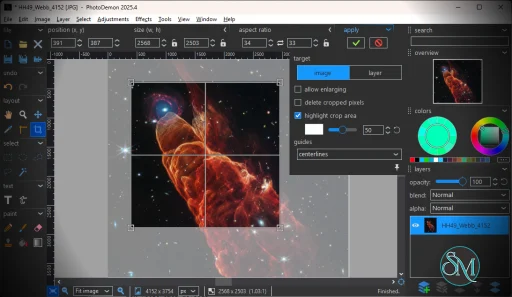
The interface is clean and functional, though slightly dated compared to modern design trends. Tools are logically organized, and most users can learn the basics quickly.
While beginners may need a short adjustment period, experienced users will appreciate the straightforward layout and quick access to features.
Pros and Cons
Pros
Completely free and open source
No installation required
Fast performance on low-end systems
Strong feature set including layers and batch processing
Supports many file formats
Cons
Interface feels slightly outdated
Windows only, no native macOS or Linux version
Lacks some advanced AI-powered tools found in newer editors
Who Should Use PhotoDemon
PhotoDemon is perfect for:
Users who need a lightweight alternative to heavy editors
People working on older or low-performance computers
Anyone who prefers portable software without installation
Users looking for a free yet capable image editor
It may not fully replace high-end tools like Adobe Photoshop for advanced design work, but it covers most everyday editing needs with ease.
Final Verdict
PhotoDemon proves that powerful photo editing does not require expensive software or high system resources. It combines portability, speed, and functionality into a compact tool that is easy to use and highly effective.
PhotoDemon is an excellent choice for users who want a reliable, no-cost photo editor that performs well without unnecessary complexity.
If you are looking for a fast, portable, and completely free image editor, PhotoDemon is one of the most underrated tools available today. Designed for Windows users who want strong editing features without heavy system requirements, PhotoDemon delivers a surprisingly professional experience in a compact package.
Developer:
tannerhelland
Operating System:
Windows
Date Added:
2026-06-01T18:02:15.430Z
Categories:
Post a Comment/Report Broken Link: