OpenToonz V1.8

OpenToonz is a free and open source 2D animation application designed for frame by frame animation, digital drawing, compositing, and effects production.

The software is based on the proprietary Toonz system that was later open sourced with support from DWANGO and collaboration from Japanese animation studios including Studio Ghibli.

OpenToonz is available for Windows, Linux, and macOS.

OpenToonz is one of the most capable free animation programs available today. Originally derived from software used by professional animation studios including Studio Ghibli, it offers advanced 2D animation tools that rival many commercial applications. While the interface and workflow can feel complex, the sheer depth of features makes it an impressive option for serious animators and creative enthusiasts.

Key Features of OpenToonz

  • Professional 2D Animation Tools
    OpenToonz supports traditional frame by frame animation workflows, digital ink and paint systems, onion skinning, motion tracking, and compositing.

  • Vector and Raster Drawing Support
    Artists can work with both vector and bitmap based drawing tools depending on the project requirements.

  • Advanced Effects System
    The software includes a node based effects system for compositing, lighting, distortions, blurs, particles, and camera effects.

  • Xsheet and Timeline Workflow
    Animators can choose between traditional animation xsheet workflows or modern timeline based editing.

  • Scanning and Cleanup Tools
    OpenToonz includes features for scanning hand drawn artwork and automatically cleaning line art for digital animation workflows.

  • Plugin and Scripting Support
    The application supports scripting and customization through plugins and automation tools.

Download OpenToonz V1.8 - Software Mirrors

Download OpenToonz V1.8 for Windows
OpenToonzSetup.exe | 57.02 MB

Download OpenToonz V1.8 for macOS
OpenToonz.pkg | 105.38 MB

OpenToonz V1.8 Release Notes:

Release Notes

Features / Enhancements

Drawing / Animation Tools

  • Assistant Tool improvements by @blackwarthog in #4852, #5039, #5066, #5071, #5100, #5125
  • Brush & Paintbrush Tools enhancements by @Abel032 in #5838, #5890, #5988, #5989, #6075, #6079, #6224
  • Brush Tool (Stroke Replication) feature by @blackwarthog in #5069
  • Brushes enhancements and refactoring by @andeon in #5295, #5733
  • Fill Tool improvements and features by @Abel032 in #5828, #5979, #6088, #6090, #6105, #6111, #6113, #6154, #6158, #6164, #6181, #6193, #6196, #6221, #6252
  • Finger Tool options and improvements by @Abel032 in #5902, #6224
  • Geometric Tool enhancements by @Abel032 in #5762, #5838, #5999
  • Tape Tool enhancements by @Abel032 in #6090, #6874
  • Screentones feature by @andeon in #4911
  • Straight Line (Angle Snap): Prevent CTRL activating draw straight line angle snap by @konero in #4885
  • Color Model Viewer & Style options by @Abel032 in #5773, #6081

Xsheet / Timeline

  • Xsheet cell and column options by Contrail Co., Ltd. / @shun-iwasawa in #4874, #4937
  • Enhance xsheet selection by @Abel032 in #5795, #5906
  • Cell dragging and visibility switching enhancements by @Abel032 in #6095, #6131
  • Xsheet and Column enhancements by @JParks123 in #6384, #6409
  • Tune column selection by @blackwarthog in #5108
  • Sub-Xsheet Navigation Bar by @manongjohn in #5235
  • Restore the function to select cell ranges by clicking the sidebar by @shun-iwasawa in #6083

Effects / Rendering

  • Replace fx fixed sized buttons with minimum size hint by @flurick in #4932
  • Clapperboard for non-movie render by @shun-iwasawa in #6043
  • New Fx: Smoother Fx Iwa by @shun-iwasawa in #6150
  • add naru lazy brush fx by @Appule in #6040
  • feat: add draggable cage controls to corner pin fx by @andeon in #6188

File Browser / I/O / Scene Management

  • Export and Level Conversion improvements by @Abel032 in #5659, #5719, #5796, #5953, #5954, #6098
  • Assets Import, XDTS integration, and Image Sequence Renaming improvements by @Abel032 in #5768, #6084, #6085, #6086, #6103
  • XDTS I/O and symbol unification by @shun-iwasawa in #5685, #6911
  • Camera Capture: Save default image adjust parameters by @shun-iwasawa in #4823
  • New OCA Import feature + Export fixes by @manongjohn in #5315
  • Change Name of Projects Node in file browser to Dirname (DirPath) by @Abel032 in #5734
  • Add SVN config combo preference by @Abel032 in #5808
  • Display file paths in Scene Cast by @JParks123 in #6379

User Interface / UX

  • Custom Panel Editor, Viewer commands, and UI customization improvements by @Ahl76 in #6594, #6596, #6597, #6722
  • UI text fields, notifications, and palette updates by @Abel032 in #5756, #5767, #5809, #5818, #5859
  • Preferences page and window adjustments by @Abel032 in #6015, #6202, #6241, #6245, #6295
  • Viewer UI and guide enhancements by @JParks123 in #6336, #6380, #6417, #6602
  • Icon improvements and refactoring by @konero in #4983, #5794, #5873
  • Xsheet color enhancements by @konero in #5356, #5379
  • Navigation shortcuts and options by @konero in #5761, #5786
  • Command bar and Rooms layout adjustments by @konero in #5848, #5852
  • Studio Palette Tweaks by @shun-iwasawa in #4863
  • Unify preview and camstand visibility toggles option by Contrail Co., Ltd. by @shun-iwasawa in #4843
  • Add View Check indicators to Viewer by @manongjohn in #5860
  • Rephrase Save Default Settings menu command by @pravdomil in #5870
  • feat: Add support for custom display labels in menu commands by @andeon in #5877
  • Allow multiple key stroke shortcuts by @manongjohn in #5444
  • Viewer Navigation Tools by @shun-iwasawa in #6199
  • Add labels to the experimental panels by @shun-iwasawa in #6909
  • Replace deprecated QLayout::setMargin() with setContentsMargins() by @andeon in #6320
  • Improve Transparency Check by @andeon in #6329
  • Add Windows Toonz Thumbnail Provider by @Abel032 in #6293

Localization

  • Chinese translation and documentation updates by @Abel032 in #5844, #6889
  • Japanese translation for v1.8 by @shun-iwasawa in #6885
  • Spanish translation for v1.8 by gab3d by @shun-iwasawa in #6908

Installation / Build / Refactoring

  • CI, Workflows, and Build Environment updates (GitHub Actions, AppVeyor, OpenCV/Boost bumps, and CMake changes) by @andeon, @xavier2k6, @RodneyBaker, @shun-iwasawa, @janimatic, @Abel032, and @KrishnaBishowkarma in #4935, #4989, #5419, #5427, #5441, #5516, #5519, #5523, #5535, #5539, #5541, #5617, #5656, #5671, #5716, #5745, #5819, #5904, #5908, #5909, #5915, #5917, #5918, #5919, #5921, #5923, #5924, #5931, #5935, #5940, #5960, #6039, #6110, #6117, #6128, #6129, #6143, #6153, #6178, #6292, #6321, #6328, #6607
  • Code Modernization and Refactoring (Qt/C++ modernization, memory management, icon refactoring, and resource cleanups) by @andeon, @konero, @otakuto, @shun-iwasawa, @Abel032, and @ideasman42 in #4988, #5001, #5048, #5050, #5077, #5284, #5317, #5579, #5665, #5777, #5790, #5799, #5801, #5825, #5830, #5832, #5833, #5835, #5845, #5849, #5891, #5898, #5900, #5905, #5946, #5955, #5966, #6084, #6140, #6162, #6176, #6187, #6204, #6218, #6225, #6237, #6243, #6255, #6310, #6317, #6320, #6381, #6445, #6521, #6589, #6600, #6601, #6609, #6613, #6616, #6622, #6625, #6871
  • Documentation, Translation Infrastructure, and Chores by @andeon, @konero, @shun-iwasawa, @gelatinbomb, @maddin200, @Astr01d, @RodneyBaker, @simstim-star, @AndrewHazelden, and @Abel032 in #4916, #5040, #5083, #5320, #5517, #5639, #5727, #5778, #5844, #6034, #6149, #6262, #6263, #6290, #6714, #6866, #6912
.. And tons of bug fixes! Full Changelog: https://github.com/opentoonz/opentoonz/compare/v1.7.1...v1.8.0

User Experience

OpenToonz is extremely feature rich, but the experience can feel intimidating for beginners.

The interface reflects its professional animation origins and includes many specialized panels, terminology, and workflows that casual users may initially struggle to understand.

However, experienced animators often appreciate the depth and flexibility once the workflow becomes familiar.

Compared to beginner friendly animation software, OpenToonz demands patience and learning time, but rewards users with advanced production capabilities rarely found in free software.

Performance and Stability

Performance has improved significantly over the years, though OpenToonz can still feel inconsistent depending on project complexity and hardware configuration.

Large scenes with heavy effects or high resolution assets may occasionally introduce lag or crashes compared to commercial animation suites optimized for large studio pipelines.

Community feedback often praises the software’s power while also mentioning stability quirks and workflow rough edges.

Open Source and Community Development

One of OpenToonz’s biggest strengths is its open source ecosystem. Artists and developers continue improving the software through plugins, custom builds, bug fixes, and workflow enhancements.

The availability of professional grade animation tools without subscription costs makes it especially attractive for students, indie creators, and small studios.

Pros

  • Completely free and open source

  • Professional grade 2D animation tools

  • Used as the foundation for studio animation workflows

  • Advanced effects and compositing system

  • Supports both raster and vector workflows

  • Strong community and plugin ecosystem

Cons

  • Steep learning curve

  • Interface can feel outdated and overwhelming

  • Occasional stability and performance issues

  • Less beginner friendly than simpler animation apps

OpenToonz is ideal for aspiring animators, indie studios, animation students, and professional artists who want advanced 2D animation capabilities without expensive licensing costs.

Users willing to invest time into learning the workflow will benefit the most from its powerful feature set.

OpenToonz delivers remarkably advanced animation capabilities for a free open source application. While the learning curve and occasional rough edges may discourage beginners, its professional heritage and powerful production tools make it one of the strongest 2D animation platforms available outside expensive commercial ecosystems.
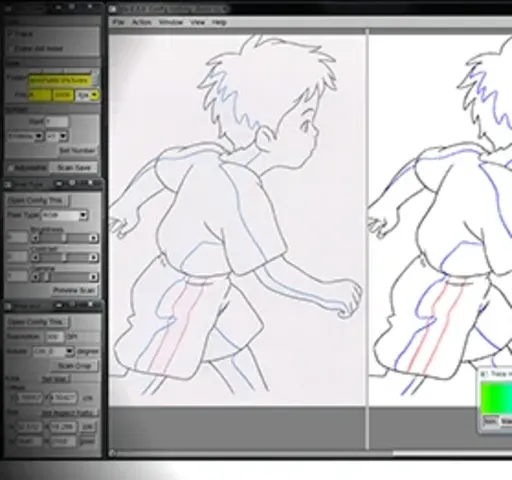
OpenToonz V1.8
Free
Software Informations:
Developer:

Operating System:
Windows / macOS
Date Added:
2026-06-19T15:01:45.057Z
Categories:

Post a Comment/Report Broken Link: