OpenNext Cloudflare refers to the @opennextjs/cloudflare adapter, which transforms a Next.js application into a format that can run on Cloudflare Workers.
Instead of rewriting your app, it takes the build output and converts it into a Worker-compatible package.
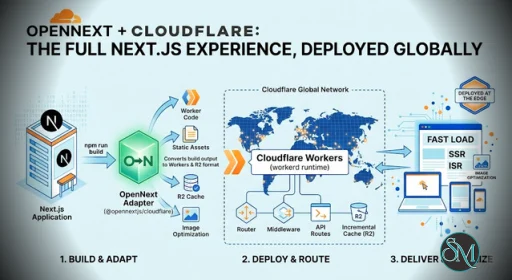
In simple terms:
Next.js builds your app
OpenNext transforms it
Cloudflare Workers runs it globally at the edge
Get Started
New apps
To create a new Next.js app, pre-configured to run on Cloudflare using @opennextjs/cloudflare, run:
npm create cloudflare@latest -- my-next-app --framework=next --platform=workersExisting Next.js apps
The easiest way to convert an existing Next.js app is to use the migrate command:
npx @opennextjs/cloudflare migrateThis command automates all the setup steps below. If R2 is enabled on your account, it also creates an R2 bucket for caching. See the CLI documentation for more details.
OpenNext Cloudflare 1.20.0 Release Notes |
|---|
Minor Changes
rclone Upload: Install the optional rclone.js peer dependency and pass --rclone to opt in to rclone based batch uploads.
-- - R2_ACCESS_KEY_ID
-- - R2_SECRET_ACCESS_KEY
-- - CF_ACCOUNT_ID
2. Explicit Opt-in: The existing worker-based population path remains the default. rclone is only loaded when --rclone is used for a remote cache.
3. Clear Errors: The CLI reports missing credentials or a missing rclone.js installation when the option is used.
Usage:
Install rclone.js, then add the secrets in a .env/.dev.vars file in your project root:
Patch Changes
BucketCachePurge.alarm() passed its tag bindings to SqlStorage.exec as a
single array. exec(query, ...bindings) is variadic over its bindings, so for a
multi-tag DELETE ... WHERE tag IN (?, ?, …) the binding count (1) disagreed
with the placeholder count (N) and exec threw "Wrong number of parameter
bindings" on every flush. On-demand revalidateTag purges therefore never
reached the Cloudflare cache, and with bypassTagCacheOnCacheHit enabled pages
served stale until the ISR TTL expired.
Spread the bindings, normalise the INSERT to the same variadic form, and
tighten the drain loop's guard from while (tags.length >= 0) (which never
exits via the condition) to while (tags.length > 0).
|
How It Works
The process is straightforward but powerful:
You build your Next.js app normally
OpenNext processes the build output
The adapter converts it into a Worker bundle
You deploy it using Wrangler to Cloudflare
This transformation step is the key innovation, enabling Next.js apps to run outside their native ecosystem.
Key Features of OpenNEXT Cloudflare
1. Full Next.js Feature Support
OpenNext Cloudflare supports most major Next.js features:
Server-side rendering (SSR)
Static site generation (SSG)
Incremental static regeneration (ISR)
API routes and middleware
App Router and React Server Components
This makes it suitable for real production apps, not just simple sites.
2. Node.js Runtime on Cloudflare Workers
Unlike older approaches, OpenNext uses a Node-compatible runtime inside Workers. This allows broader compatibility with existing Next.js apps.
This is a major advantage over edge-only solutions that restrict APIs.
3. Global Edge Deployment
By using Cloudflare Workers, your app runs close to users worldwide, improving latency and performance.
This is especially useful for:
SaaS apps
APIs
Global websites
4. Advanced Caching with R2
OpenNext integrates with Cloudflare R2 for caching features like ISR, helping reduce rebuild costs and improve response times.
5. Multi-Worker Architecture (Advanced)
You can split your app into multiple Workers for better performance and scalability, although this requires advanced configuration.
Performance and Real-World Behavior
OpenNext Cloudflare delivers strong global performance thanks to edge execution. However, performance depends heavily on caching configuration.
For example:
Static assets are served efficiently from CDN
Dynamic routes use Workers for SSR
Improper caching can increase CPU usage
This means optimization is critical for best results.
Developer Experience
Setting up OpenNext Cloudflare is more complex than traditional deployment.
Typical setup includes:
Installing
@opennextjs/cloudflareConfiguring Wrangler
Managing cache and storage
Adjusting runtime settings
There is also a key limitation:
Edge runtime is not fully supported yet, requiring Node runtime instead
This adds some constraints depending on your app architecture.
Pros and Cons
Pros
Deploy Next.js on Cloudflare Workers
Avoid vendor lock-in from platforms like Vercel
Supports most Next.js features
Global edge performance
Open source and flexible
Cons
Setup complexity is high
Requires understanding of Cloudflare ecosystem
Some features still evolving
Windows support is limited
Caching and ISR require careful tuning
OpenNext Cloudflare vs Vercel
While Vercel offers the easiest Next.js deployment, OpenNext Cloudflare provides:
More infrastructure control
Multi-cloud flexibility
Potential cost optimization at scale
However, Vercel still wins in simplicity and developer experience.
Who Should Use OpenNext Cloudflare
This setup is ideal for:
Advanced developers and DevOps teams
Companies avoiding vendor lock-in
Projects needing global edge performance
Teams already using Cloudflare ecosystem
It is not ideal for beginners or small projects that need quick deployment.
Final Verdict
OpenNext Cloudflare is a powerful solution that unlocks true portability for Next.js applications on edge infrastructure. It brings together flexibility, performance, and control, but at the cost of complexity.
If you want full control over deployment and global performance, OpenNext Cloudflare is one of the most compelling options available today.
If you want to run Next.js apps on Cloudflare instead of being tied to a single platform, OpenNext Cloudflare is one of the most important solutions today. It combines the flexibility of OpenNext with the global edge infrastructure of Cloudflare.
Developer:
OpenNext community
Operating System:
Framework
Date Added:
2026-06-25T17:36:53.911Z
Categories:
Post a Comment/Report Broken Link: