OpenClaw Windows Hub is a community-maintained resource centered around deploying and using OpenClaw on Windows systems.
OpenClaw itself is an open source, self-hosted AI agent framework capable of connecting to messaging platforms, automating tasks, managing files, interacting with APIs, and executing actions using large language models such as GPT, Claude, Gemini, or local models.
The Windows Hub ecosystem focuses on:
Installation guidance
Windows compatibility information
Skill libraries
Configuration tutorials
Troubleshooting resources
Community documentation
Deployment best practices
OpenClaw Windows Hub is a community-driven resource focused on helping Windows users install, configure, and manage the rapidly growing OpenClaw ecosystem. As OpenClaw continues to attract massive attention among AI enthusiasts, developers, and automation-focused users, Windows Hub aims to simplify the onboarding process for one of the most complex self-hosted AI agent platforms currently available.
Rather than being an AI agent itself, Windows Hub serves as an information and support portal that helps users navigate installation guides, skills, integrations, and deployment options for OpenClaw on Windows environments.
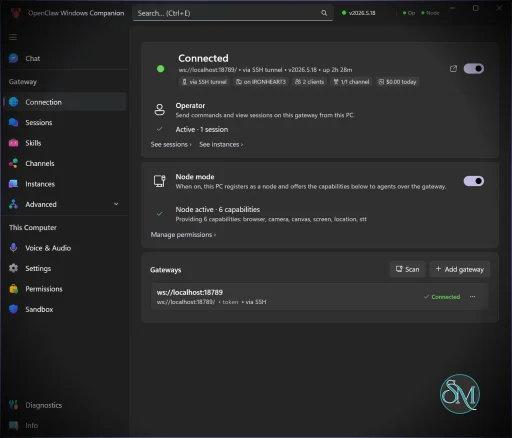
Download OpenClaw Windows Hub v0.6.3 - Software Mirrors |
|---|
OpenClawTray-0.6.3-win-x64.zip | 221.65 MB OpenClawTray-0.6.3-win-arm64.zip | 211.83 MB |
OpenClaw Windows Hub v0.6.3 Release Notes:OpenClaw Windows Hub v0.6.3Downloads
Features
Requirements
Quick Start
What's Changed
|
Key Features of OpenClaw Windows Hub
Windows-Focused Documentation
One of the biggest challenges for OpenClaw newcomers is deployment complexity. Windows Hub provides installation instructions specifically tailored for Windows users, often including guidance around WSL (Windows Subsystem for Linux), Docker, and local deployments.
OpenClaw Skill Discovery
The platform helps users discover skills and integrations that extend OpenClaw's capabilities across messaging services, productivity platforms, automation workflows, and external APIs.
Community Knowledge Base
Users can access troubleshooting information, deployment tips, and community-generated resources that address common setup issues.
AI Agent Learning Resources
The site acts as an educational hub for understanding how agentic AI differs from traditional chatbots and how OpenClaw's architecture functions.
User Experience
Windows Hub is considerably easier to navigate than OpenClaw itself.
The portal organizes information into practical categories and attempts to lower the barrier to entry for newcomers. Installation guides, FAQs, and walkthroughs are generally easier to follow than piecing together information from scattered community discussions.
However, the platform cannot fully eliminate the inherent complexity of OpenClaw.
Even with detailed guides, users still need to understand:
API keys
AI models
permissions
security implications
local infrastructure
agent configuration
For experienced developers, this is manageable. For beginners, the learning curve remains substantial.
Windows Compatibility
Windows remains a mixed experience for OpenClaw deployments.
Community feedback frequently recommends using WSL rather than native Windows environments for smoother operation and better compatibility with Linux-oriented tooling. Some users report successful Windows installations, while others encounter dependency and resource management challenges.
Windows Hub helps bridge some of these gaps by providing Windows-specific instructions and troubleshooting guidance.
Security Considerations
Security is one of the most important topics surrounding OpenClaw.
Because OpenClaw can access files, execute commands, interact with external services, and maintain persistent memory, users must be extremely cautious about permissions and skill installations. Multiple security researchers and industry publications have highlighted risks involving malicious skills, credential exposure, prompt injection attacks, and excessive system access.
Windows Hub provides useful guidance, but users should still:
Review permissions carefully
Install skills only from trusted sources
Use strong authentication
Keep deployments updated
Consider isolated environments for testing
Community Reception
Community sentiment around OpenClaw is highly polarized.
Supporters view it as one of the most exciting developments in personal AI automation, capable of handling real-world tasks rather than simply generating text. Critics point to setup complexity, maintenance overhead, security concerns, and unrealistic expectations created by viral demonstrations.
Windows Hub helps newcomers cut through some of this confusion by aggregating resources and practical guidance.
Pros
Helpful onboarding resource for Windows users
Centralized OpenClaw documentation
Simplifies installation guidance
Useful troubleshooting information
Community-driven knowledge base
Supports learning and experimentation
Cons
Cannot eliminate OpenClaw's underlying complexity
Documentation quality may vary by contributor
Security considerations remain significant
Beginners may still find deployment challenging
Some OpenClaw features work better in Linux environments
Who Should Use OpenClaw Windows Hub?
OpenClaw Windows Hub is best suited for:
Windows users interested in OpenClaw
AI automation enthusiasts
Developers exploring agentic AI
Self-hosting communities
Advanced productivity users
Experimenters building AI workflows
Users seeking a simple chatbot experience will likely find OpenClaw and its surrounding ecosystem unnecessarily complex.
OpenClaw Windows Hub serves an important role within the rapidly expanding OpenClaw ecosystem by making deployment and learning resources more accessible to Windows users. While it cannot solve every challenge associated with running a powerful self-hosted AI agent, it significantly reduces the friction involved in getting started. For users willing to invest time in learning agentic AI workflows, Windows Hub is a valuable companion resource.
Post a Comment/Report Broken Link: