Nero Video is a Windows video editing application that enables users to create, edit, enhance, and export videos for personal, educational, and social media use.
The software supports a wide range of video formats and includes tools for:
Timeline-based editing
Video trimming and cutting
Visual effects
Transitions
Titles and text overlays
Slideshow creation
Audio editing
Screen recording
Disc authoring
It is primarily targeted at home users, content creators, educators, and hobbyists who need more capabilities than a basic editor without the complexity of professional production software.
Nero Video is a consumer-focused video editing application designed to make video creation accessible to beginners while still offering enough features for enthusiasts. As part of the broader Nero multimedia ecosystem, the software combines traditional video editing tools with effects, transitions, screen recording capabilities, slideshow creation, and AI-assisted enhancements.
While it does not directly compete with high-end professional editors, Nero Video aims to provide a balance between ease of use and creative flexibility for everyday video projects.
Key Features of Nero Video
Multi-Track Timeline Editing
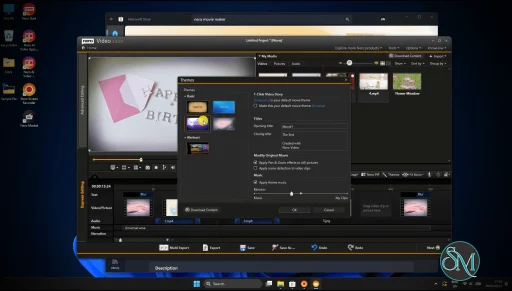
Nero Video provides a traditional timeline interface that allows users to combine multiple video, audio, image, and text layers into a single project.
This approach offers significantly more flexibility than simple drag-and-drop editors.
Effects and Transitions
The software includes a large collection of built-in transitions, filters, animations, and visual effects that can be applied to videos with minimal effort.
Slideshow Creator
Users can quickly transform photo collections into animated slideshows complete with music, transitions, and visual themes.
This remains one of Nero Video's most popular features for family videos and presentations.
Screen Recording
The software includes screen capture capabilities that allow users to record desktop activity for tutorials, demonstrations, and educational content.
AI-Assisted Enhancements
Recent versions integrate AI-powered features designed to improve video quality, sharpen footage, and simplify certain editing tasks.
These additions help modernize the platform and align it with current editing trends.
4K and 8K Support
Nero Video supports modern high-resolution workflows, including 4K and selected 8K projects depending on hardware capabilities.
User Experience
Nero Video is designed with accessibility in mind.
The interface is organized into guided workflows that help users navigate common editing tasks without requiring extensive prior experience.
Beginners can start with templates and automated tools, while more experienced users can work directly within the timeline editor.
Compared to professional software, the learning curve is relatively gentle.
At the same time, the interface provides enough depth to support more complex projects than many entry-level editors.
Editing Performance
Performance is generally strong for consumer-level projects.
Basic editing, effects processing, transitions, and exporting run smoothly on modern systems. Hardware acceleration helps improve responsiveness when working with high-resolution footage.
The software performs particularly well for:
Family videos
YouTube content
Educational projects
Travel videos
Slideshows
Social media content
However, very large projects with extensive effects and high-resolution assets may require more powerful hardware.
Video Quality and Export Options
Nero Video supports a broad range of export formats suitable for:
Computers
Smartphones
Tablets
Smart TVs
Social media platforms
Output quality is generally good, with flexible settings for balancing file size and visual fidelity.
Users can also create video discs directly through Nero's integrated authoring capabilities, which remains a distinguishing feature compared to many modern editors.
Integration with the Nero Ecosystem
One advantage of Nero Video is its integration with other Nero products.
Users can easily move between:
Media organization tools
Disc burning utilities
AI enhancement software
Backup applications
This creates a more unified workflow for users already invested in the Nero ecosystem.
Limitations
While Nero Video is capable, it is not designed for professional film production or advanced visual effects work.
Professionals working with:
Advanced color grading
Complex compositing
High-end motion graphics
Professional audio post-production
may find dedicated professional editing suites more suitable.
The software also includes a large number of features that can occasionally make the interface feel busy compared to minimalist editors.
Pros
Beginner-friendly workflow
Multi-track timeline editing
Good selection of effects and transitions
Slideshow creation tools
Screen recording included
AI-assisted enhancement features
Disc authoring support
Broad format compatibility
Cons
Not intended for professional filmmaking
Interface can feel crowded at times
Some advanced editing tools are limited
Large software footprint compared to lightweight editors
Best experience often comes within the broader Nero ecosystem
Nero Video is ideal for:
Home users
Hobbyist creators
Educators
Students
Family video editors
YouTube beginners
Social media content creators
It is particularly attractive for users who want more power than basic free editors without moving to professional-grade production software.
Nero Video delivers a well-rounded video editing experience that successfully balances usability and functionality. Its combination of timeline editing, slideshow tools, screen recording, AI-powered enhancements, and integration with the wider Nero ecosystem makes it a practical choice for consumer video production. While professionals may require more specialized tools, Nero Video remains a capable and approachable solution for everyday video editing needs.
Developer:
Nero AG and Subsidiaries
Operating System:
Windows
Date Added:
2026-06-03T04:50:40.000Z
Categories:
Post a Comment/Report Broken Link: