Nero TuneItUp PRO is a Windows maintenance and optimization application that helps users clean temporary files, manage startup programs, monitor system health, and optimize performance through automated maintenance routines.
The software is intended for home users who want a simpler way to perform routine system maintenance without navigating multiple Windows settings and utilities.
Nero TuneItUp PRO is a Windows optimization utility designed to help users maintain system performance through automated cleanup, startup management, privacy protection, and maintenance features. As part of the broader Nero software ecosystem, TuneItUp PRO focuses on improving system responsiveness and reducing unnecessary clutter that can accumulate over time.
While modern versions of Windows already include many built-in maintenance tools, Nero TuneItUp PRO aims to simplify system optimization by bringing multiple maintenance functions into a single interface.
Key Features of Nero TuneItUp PRO
Automatic System Cleanup
Nero TuneItUp PRO scans for temporary files, cached data, outdated logs, and other unnecessary files that can consume storage space over time.
The cleanup process is largely automated, making it accessible to less technical users.
Startup Optimization
The software allows users to review and manage programs that launch during Windows startup.
Disabling unnecessary startup applications can improve boot times and reduce background resource usage.
Browser Cleanup
TuneItUp PRO includes tools for removing browser cache files, cookies, temporary internet files, and browsing traces from supported browsers.
Privacy Protection
The application offers privacy-focused cleanup options designed to remove usage traces and temporary records generated during daily computer use.
System Monitoring
Users can monitor key system information, including storage usage, hardware status, and maintenance recommendations.
Real-Time Optimization
The PRO edition includes automated monitoring and optimization features that can run in the background to help maintain system performance.
User Experience
Nero TuneItUp PRO is clearly designed for simplicity.
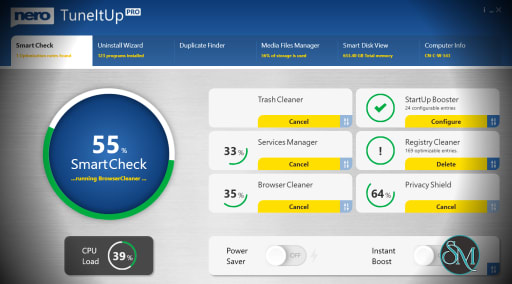
The interface presents maintenance tasks through a dashboard-driven approach, making common optimization tasks easy to access. Most functions can be launched with a few clicks, and the software provides clear explanations for many optimization options.
Unlike some advanced system utilities, TuneItUp PRO avoids overwhelming users with technical terminology.
This makes it particularly suitable for users who want basic maintenance without manually adjusting system settings.
Performance and Effectiveness
The software performs well at handling routine maintenance tasks such as:
temporary file cleanup
startup management
browser cleanup
storage optimization
privacy trace removal
Users with older systems may notice improved responsiveness after removing unnecessary startup applications and accumulated junk files.
However, expectations should remain realistic. Modern versions of Windows already include sophisticated memory management, storage optimization, and maintenance systems. No optimization software can dramatically increase hardware performance beyond the limitations of the underlying system.
The biggest benefits typically come from reducing clutter and simplifying maintenance rather than delivering major performance gains.
Safety and Reliability
Nero TuneItUp PRO generally takes a conservative approach to optimization.
Unlike some aggressive optimization utilities that heavily modify the registry or system services, TuneItUp PRO focuses primarily on maintenance and cleanup tasks.
This reduces the risk of system instability while still providing useful optimization features.
As with any system utility, creating restore points before major changes remains a sensible precaution.
Resource Usage
The software is relatively lightweight during routine operation.
Background monitoring features consume some system resources, but the impact is typically minor on modern hardware.
Scheduled maintenance tasks can help automate cleanup without requiring regular manual intervention.
Pros
Easy to use interface
Automated maintenance features
Effective startup management tools
Useful privacy cleanup functions
Suitable for non-technical users
Low learning curve
Integrates well within the Nero ecosystem
Cons
Performance gains may be modest on modern systems
Some features overlap with built-in Windows tools
Advanced users may prefer manual optimization
Real-time monitoring adds some background resource usage
Premium software in a category with many free alternatives
Nero TuneItUp PRO is best suited for home users who want a straightforward solution for routine Windows maintenance and cleanup.
It is particularly useful for users who prefer automated maintenance, have older PCs, or already use other Nero software products.
Advanced users and system administrators may find that Windows' built-in tools and manual optimization techniques provide sufficient control.
Nero TuneItUp PRO offers a user-friendly approach to Windows maintenance and optimization. While modern Windows systems already handle many performance tasks efficiently, the software provides convenient cleanup, startup management, and privacy tools within a polished interface. For users seeking a simple all-in-one maintenance solution, it remains a practical option, though expectations regarding performance improvements should remain realistic.
Developer:
Nero AG and Subsidiaries
Operating System:
Windows
Date Added:
2026-06-02T02:43:31.000Z
Categories:
Post a Comment/Report Broken Link: