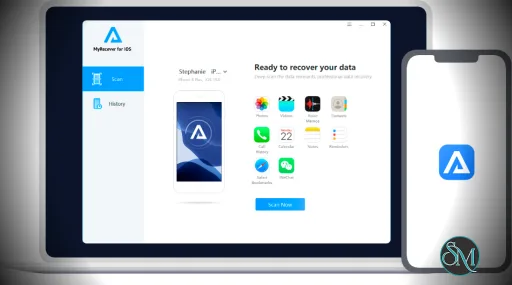
MyRecover for iOS is a data recovery tool developed by AOMEI that helps restore lost or deleted data from iPhone, iPad, and iPod devices. It works by connecting your device to a Windows computer and scanning for recoverable data.
If you have accidentally deleted important data from your iPhone or iPad, MyRecover for iOS offers a simple way to recover it without complicated steps. Designed for everyday users, it focuses on fast scanning and easy recovery across common data loss scenarios.
It supports iOS 10 and later, including modern versions, and works across a wide range of Apple devices.
Buy MyRecover with Discounts
MyRecover Professional (Monthly / 1 Computer) - 27.97 USD
MyRecover Professional (Yearly / 1 Computer) - 41.97 USD
MyRecover Professional (Lifetime Upgrades / 1 Computer) - 69.97 USD
MyRecover for iOS (Yearly / 1 PC) - 20.97 USD
MyRecover for iOS (Lifetime Upgrades / 1 PC) - 48.97 USD
Key Features of MyRecover for iOS
1. Recover Without Backup
One of the biggest advantages is the ability to recover data directly from the device even if no backup is available. This is useful when files are deleted unexpectedly.
2. Supports Multiple Data Types
You can recover various types of data, including:
Photos and videos
Contacts and call history
Notes and reminders
Safari bookmarks
App data such as WeChat messages
3. Fast and Deep Scanning
The software combines quick and deep scanning methods to find both recently deleted and older lost data. This improves recovery success rates and coverage.
4. Preview Before Recovery
You can preview scanned files before restoring them, allowing selective recovery instead of restoring everything.
5. Simple 3-Step Recovery Process
The workflow is straightforward:
Connect your iOS device
Scan for lost data
Select and recover files
This makes it accessible even for beginners.
6. Wide Device Compatibility
Supports:
iPhone
iPad
iPod Touch
Across many generations and iOS versions.
Performance and Real-World Use
MyRecover for iOS performs well for common scenarios such as:
Accidental deletion of photos or contacts
Recovering chat history
Restoring recently lost files
However, it is important to understand that iOS has strict security and encryption. This means recovery success depends on the situation and whether data has been overwritten or permanently removed.
User Experience
The interface is clean and beginner-friendly. The guided process makes recovery simple, even for users with no technical background.
Most actions are automated, so users do not need to configure advanced settings.
Pros and Cons
Pros
Easy to use with guided steps
Supports many iOS data types
Works without requiring backup
Preview and selective recovery
Compatible with many Apple devices
Cons
Requires connection to a Windows PC
Recovery success depends on iOS limitations
Not as powerful as forensic-level tools
Some features may require paid upgrade
Who Should Use MyRecover for iOS
This tool is ideal for:
Users who accidentally deleted files on iPhone
People without recent backups
Beginners needing simple recovery tools
Users recovering photos, contacts, or messages
It may not be suitable for advanced forensic recovery or cases involving fully erased devices.
Final Verdict
MyRecover for iOS is a practical and easy-to-use solution for recovering lost data from Apple devices. While limited by iOS security, it still provides a reliable option for everyday recovery needs.
If you need a simple way to recover data from your iPhone or iPad, MyRecover for iOS is a solid choice that balances usability and effectiveness.
Post a Comment/Report Broken Link: