MyRecover Free is a Windows data recovery tool designed to restore deleted or lost files from various storage devices such as HDDs, SSDs, USB drives, and SD cards.
It supports recovery from common scenarios like:
Accidental deletion
Emptied Recycle Bin
Formatted drives
System crashes or virus attacks
The free version allows recovery of up to 500 MB of data, making it suitable for light use or testing.
Buy MyRecover with Discounts
MyRecover Professional (Monthly / 1 Computer) - 27.97 USD
MyRecover Professional (Yearly / 1 Computer) - 41.97 USD
MyRecover Professional (Lifetime Upgrades / 1 Computer) - 69.97 USD
MyRecover for iOS (Yearly / 1 PC) - 20.97 USD
MyRecover for iOS (Lifetime Upgrades / 1 PC) - 48.97 USD
Key Features of MyRecover Windows Data Recovery - Free
1. Easy Data Recovery Workflow
MyRecover uses a simple 3-step process:
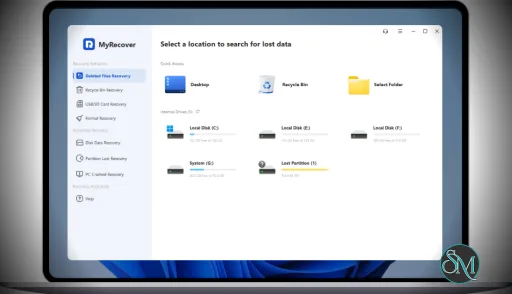
Select location
Scan files
Recover selected data
This makes it accessible even for non-technical users.
2. Wide File Type Support
It supports recovery of over 1000 file formats, including:
Documents (DOCX, PDF, XLSX)
Images (JPG, PNG, PSD)
Videos and audio
Archives and emails
3. Multiple Device Compatibility
You can recover data from:
Internal HDD and SSD
External drives
USB flash drives
SD cards and cameras
4. Quick Scan and Deep Scan
The software combines:
Quick scan for recently deleted files
Deep scan for more complex recovery
This improves the chances of recovering lost data effectively.
5. High Recovery Success Rate
MyRecover claims a high recovery success rate and is designed to handle hundreds of data loss scenarios efficiently.
Performance and Real-World Use
MyRecover performs well for:
Recently deleted files
Recovering from Recycle Bin
External storage recovery
However, like all recovery tools, success depends on whether the data has been overwritten. Once overwritten, recovery becomes unlikely.
Compared to competitors, it offers a balanced mix of speed and simplicity, though advanced users may prefer tools with deeper customization.
User Experience
The interface is clean and modern, designed for ease of use:
No technical setup required
Clear file preview and filtering
Fast navigation
This makes it ideal for beginners or users who need quick recovery without complex settings.
Pros and Cons
Pros
Free version available
Very easy to use
Supports many file formats
Works with multiple storage devices
Fast scanning process
Cons
Free version limited to 500 MB recovery
Advanced features require paid upgrade
Less powerful than high-end recovery tools for complex cases
Who Should Use MyRecover Free
MyRecover Free is ideal for:
Users recovering small amounts of data
Beginners needing a simple recovery tool
Quick recovery from USB or local drives
Testing before upgrading to paid versions
It may not be sufficient for large-scale or enterprise-level recovery tasks.
Final Verdict
MyRecover Free is a solid entry-level data recovery tool that focuses on simplicity and reliability. While the free version has limitations, it is more than enough for basic recovery needs.
If you need a lightweight and easy-to-use recovery tool for Windows, MyRecover Free is a practical and dependable choice.
If you are looking for a beginner-friendly tool to recover deleted files on Windows, MyRecover (also known as AOMEI MyRecover) is one of the easiest free solutions available. It focuses on simplicity, fast scanning, and broad compatibility with different storage devices.
Post a Comment/Report Broken Link: