Mullvad VPN APK for Android is the official Android application for the Mullvad VPN service, allowing users to encrypt internet traffic and route connections through secure VPN servers worldwide.
The app enables users to:
Protect internet traffic on mobile networks
Secure public Wi-Fi connections
Hide IP addresses
Improve online privacy
Choose server locations
Use WireGuard and OpenVPN protocols
Manage VPN connections with a simple interface
Unlike many VPN providers, Mullvad does not require users to register with an email address. Access is tied to a randomly generated account number instead.
Mullvad VPN for Android brings the company's strong privacy philosophy to smartphones and tablets. Rather than focusing on marketing-heavy features or aggressive streaming claims, the Android app emphasizes security, anonymity, transparency, and ease of use.
Like its desktop counterpart, the Android version follows a minimalist design while providing powerful privacy protections through modern VPN protocols and a strict approach to user data collection.
Key Features of Mullvad VPN APK for Android
Anonymous Account System
One of Mullvad's most distinctive features remains available on Android.
Users can create an account without providing:
Email addresses
Phone numbers
Names
Personal profiles
This significantly reduces the amount of personal information associated with the service.
WireGuard Support
The Android app primarily uses WireGuard, a modern VPN protocol known for:
High performance
Strong encryption
Fast connection times
Efficient battery usage
For most users, WireGuard delivers the best balance of speed and security.
OpenVPN Compatibility
The application also supports OpenVPN, providing additional flexibility for users operating on networks where WireGuard may be restricted.
VPN Kill Switch
Android users can enable VPN lockdown and always-on VPN functionality.
These features help prevent traffic leaks if the VPN connection unexpectedly disconnects.
Server Selection
Users can easily select servers from multiple countries through a straightforward location picker.
The process remains simple without overwhelming users with unnecessary settings.
Split Tunneling
Supported Android versions allow users to exclude specific applications from the VPN connection.
This can be useful when certain apps need direct internet access while the rest of the device remains protected.
User Experience
The Android application follows the same design philosophy as Mullvad's desktop software.
The interface focuses on:
Connection status
Server location
Account information
Security settings
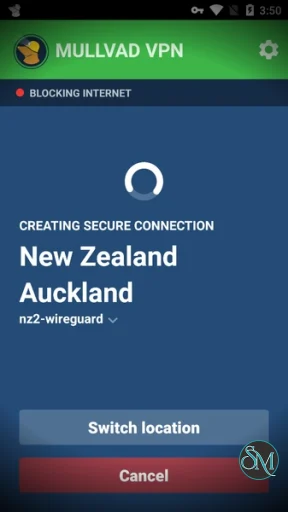
Most users can establish a secure VPN connection with a single tap.
The application avoids excessive menus and promotional content, resulting in a clean and distraction-free experience.
Performance
Performance is one of Mullvad's strongest areas on Android.
Using WireGuard, users typically benefit from:
Fast connection establishment
Low latency
Stable mobile performance
Efficient battery consumption
Consistent download speeds
Actual performance depends on factors such as network quality, server location, and mobile carrier conditions.
Security and Privacy
Privacy remains the primary reason many users choose Mullvad.
The Android app benefits from:
Minimal data collection
Strong encryption
Open-source codebase
Independent security audits
DNS leak protection
Anonymous account creation
Mullvad's approach to privacy is among the most respected in the VPN industry.
Open Source Transparency
The Android application is open source, allowing independent researchers and developers to inspect the code.
Benefits include:
Greater transparency
Public security review
Community trust
Verifiable implementation details
This openness helps distinguish Mullvad from many proprietary VPN competitors.
Everyday Usage
The Android app works well for common mobile activities such as:
Web browsing
Messaging
Video calls
Social media
Mobile banking
Public Wi-Fi usage
Remote work
The simple interface makes it suitable for both beginners and experienced privacy-focused users.
Limitations
Despite its strengths, Mullvad's Android app may not appeal to every user.
Common limitations include:
Limited focus on streaming optimization
Fewer marketing-oriented features
Smaller server network than some large VPN brands
Less emphasis on geo-unblocking services
Users primarily seeking entertainment-focused VPN features may prefer providers that specifically target streaming audiences.
Pros
Excellent privacy protections
Anonymous account creation
Fast WireGuard performance
Open-source application
Clean and simple interface
Strong security reputation
Reliable mobile performance
Minimal user data collection
Cons
Limited streaming-focused features
Fewer extras than some competitors
Advanced privacy features may exceed casual user needs
Less emphasis on content unblocking
Who Should Use Mullvad VPN for Android?
Mullvad VPN for Android is ideal for:
Privacy-conscious users
Journalists
Developers
Security professionals
Frequent travelers
Remote workers
Open-source enthusiasts
It is particularly well suited for users who prioritize privacy, transparency, and strong security practices over entertainment-focused VPN features.
Mullvad VPN APK for Android delivers one of the best privacy-focused VPN experiences available on mobile devices. Its anonymous account system, open-source development, strong WireGuard implementation, and commitment to transparency make it an outstanding choice for users who value privacy and security. While it may not be the most feature-packed VPN for streaming enthusiasts, it excels at protecting user data and maintaining online anonymity.
Post a Comment/Report Broken Link: