Kopia is a cross-platform backup and restore tool that creates encrypted snapshots of files and directories and stores them in local, network, or cloud repositories.
The software supports:
Incremental backups
End-to-end encryption
Data deduplication
Compression
Snapshot retention policies
Local and cloud storage
Command-line and graphical interfaces
Multi-machine repositories
Unlike traditional disk imaging tools, Kopia focuses on protecting selected files and folders through efficient snapshot-based backups.
Backup software often falls into two categories: simple tools with limited capabilities or enterprise platforms that are overly complex and expensive. Kopia successfully bridges that gap by offering powerful backup features, strong security, and flexible storage options within a free and open-source package.
Designed for both individual users and IT professionals, Kopia combines modern backup technologies such as deduplication, encryption, compression, and incremental snapshots while remaining accessible through both command-line and graphical interfaces.
Key Features of Kopia
Fast Incremental Backups
Kopia only uploads changed data after the initial backup.
This significantly reduces:
Backup duration
Storage usage
Network bandwidth consumption
Large files that are modified slightly can often be updated without re-uploading the entire file.
End-to-End Encryption
Security is one of Kopia's strongest features.
All data is encrypted on the client before being transmitted to storage providers, ensuring that backup destinations cannot access user data without the encryption credentials.
Global Deduplication
Kopia automatically identifies duplicate data and stores it only once.
Benefits include:
Lower storage costs
Faster backups
Reduced repository growth
Better efficiency across multiple devices
This feature becomes particularly valuable for large backup repositories.
Compression
The software compresses backup data before storage, further reducing storage requirements and improving transfer efficiency.
Flexible Storage Options
Kopia supports a wide variety of storage backends including:
Local disks
NAS devices
SFTP servers
WebDAV storage
Amazon S3
Backblaze B2
Google Cloud Storage
Azure Blob Storage
Rclone-supported providers
This flexibility allows users to build backup strategies that fit almost any environment.
Snapshot Policies
Users can define policies that control:
Backup schedules
Retention periods
Compression settings
Exclusion rules
Encryption behavior
The policy-based design simplifies long-term backup management.
User Experience
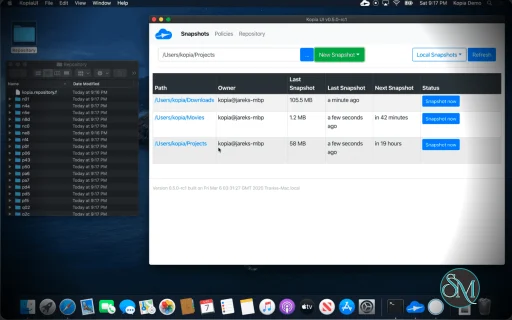
Kopia provides both a command-line interface and a graphical user interface.
The GUI makes the software approachable for home users, while the CLI offers extensive automation possibilities for advanced users and administrators.
The interface focuses on:
Backup jobs
Snapshots
Policies
Repository management
Restore operations
Although the GUI is functional, some users feel it prioritizes utility over visual polish. Community discussions frequently describe the interface as effective but not particularly modern.
Performance
Performance is one of Kopia's biggest strengths.
Its architecture combines:
Incremental snapshots
Deduplication
Compression
Content-addressable storage
This allows backups to remain efficient even as repositories grow over time. Many users report excellent performance when backing up large datasets, NAS environments, and self-hosted infrastructure.
Security
Kopia is built with security as a core principle.
Key protections include:
Client-side encryption
Password-protected repositories
Encrypted cloud backups
Error correction capabilities
Append-only repository options
These features help protect backups against accidental deletion, corruption, and unauthorized access.
Open Source Advantages
Being open source provides several benefits:
Full transparency
Community auditing
No licensing fees
Self-hosting flexibility
Vendor independence
The project has built a strong reputation among self-hosting and backup enthusiasts over the years.
Community Feedback
Kopia enjoys a positive reputation among homelab and self-hosting communities.
Common praise includes:
Reliable operation
Strong encryption
Efficient deduplication
Broad storage support
Excellent documentation
Some users specifically compare it favorably to alternatives such as Borg, Duplicacy, and other backup platforms.
Limitations
Despite its strengths, Kopia is not perfect.
Common criticisms include:
GUI could be more polished
Learning curve for advanced features
Not a full disk imaging solution
Some enterprise management capabilities remain limited
Advanced configuration often requires CLI usage
These drawbacks are generally minor compared to the platform's overall capabilities.
Pros
Completely free and open source
Strong end-to-end encryption
Fast incremental backups
Excellent deduplication system
Wide range of storage backends
Cross-platform support
CLI and GUI available
Flexible snapshot policies
Efficient storage utilization
Cons
Interface is functional rather than polished
Advanced features may require CLI knowledge
Not intended for full-system imaging
Enterprise management features are limited compared to commercial products
Who Should Use Kopia?
Kopia is ideal for:
Home users
Developers
System administrators
Self-hosting enthusiasts
Small businesses
NAS users
Homelab operators
It is particularly valuable for users seeking a modern backup solution that combines strong security, storage efficiency, and cloud flexibility without recurring subscription costs.
Kopia is one of the strongest open-source backup solutions available today. Its combination of end-to-end encryption, deduplication, incremental backups, flexible storage support, and cross-platform compatibility makes it suitable for everything from personal file protection to advanced self-hosted backup strategies. While the interface could be refined further, the underlying technology is excellent and continues to earn praise from both backup professionals and self-hosting communities.
Post a Comment/Report Broken Link: