Free Download Manager (FDM) is a free and open-source download manager available for Windows, macOS, Linux and Android. It enhances your download experience by accelerating file downloads, splitting large files into sections, and organizing downloads into categories.
FDM works with HTTP, HTTPS, FTP, and BitTorrent protocols, making it versatile for all kinds of file downloads.
Download Free Download Manager (FDM) - Software Mirrors |
|---|
Download FDM for Windows 64bit Download FDM for Windows 32bit Download FDM for macOS 10.12 to 11 Download FDM for Android APK 32bit |
Key Features of Free Download Manager
Download Acceleration
Free Download Manager speeds up downloads by splitting files into multiple sections and downloading them simultaneously. This often results in faster downloads compared with standard browser downloads.
Pause and Resume Downloads
FDM lets you pause and resume downloads at any time, even after a connection interruption or system shutdown. This is especially useful for large files or unstable internet connections.
Smart Scheduling
You can schedule downloads to start at specific times, which is helpful if you want to download files during off-peak hours or when internet usage is low.
Torrent Support
FDM includes built-in support for BitTorrent, allowing you to download and seed torrent files without needing a separate client.
Browser Integration
Free Download Manager integrates with popular browsers like Chrome, Firefox, and Edge. This makes it easy to capture download links automatically and manage them in FDM.
Media Preview
For video and audio downloads, FDM offers a media preview feature. You can preview partial downloads before the file is fully downloaded, helping you verify content early.
Download Organization
Files can be automatically sorted into categories such as Music, Videos, Documents, and Programs. This keeps your downloads organized and easy to locate.
Performance and Usability
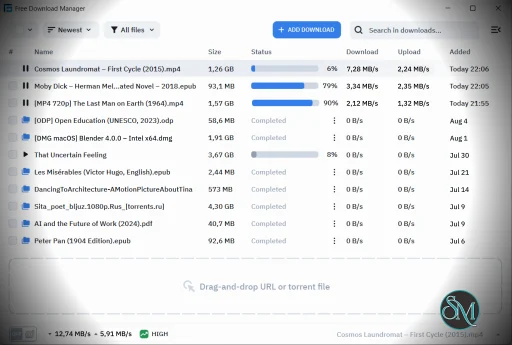
Free Download Manager is generally fast and efficient. The interface is clean and easy to navigate, with a sidebar for categories and options to view active, completed, or paused downloads. It works well on low-resource systems and stays responsive even during large concurrent downloads.
The application also supports drag-and-drop and link pasting, making it intuitive for new users.
Pros and Cons
Pros
Completely free and open source
Accelerates downloads and improves performance
Pause/resume across sessions
BitTorrent support integrated
Browser integration for easy link capture
Cons
BitTorrent client is basic compared to dedicated clients
Some features require manual configuration
Media preview may not always work on all formats
Final Verdict
Free Download Manager (FDM) continues to be one of the best free download managers available. With strong acceleration features, pause/resume capabilities, BitTorrent support, and an easy-to-use interface, it offers excellent value without cost.
If you want a fast, reliable, and free solution to manage all your downloads, Free Download Manager (FDM) is one of the most popular tools available today.
Free Download Manager combines speed acceleration, pause/resume features, scheduling, and organization, all without subscription fees.
For faster, smarter, and more organized downloading, Free Download Manager is a reliable solution.
Developer:
Free Download Manager.ORG.
Operating System:
Windows / macOS / Linux / Android
Date Added:
2026-06-02T15:01:54.742Z
Categories:
Post a Comment/Report Broken Link: