DeepSeek TUI v0.8.64

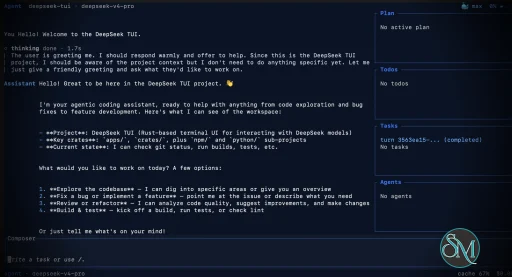
DeepSeek TUI is an open source terminal based coding agent designed for DeepSeek AI models. Unlike a simple chatbot, it can interact with your local workspace, execute shell commands, manage git operations, and assist with software development tasks directly from the command line.

The project is written in Rust and focuses on speed, low resource usage, and keyboard driven workflows. It is especially appealing for developers who spend most of their time in the terminal.

DeepSeek TUI is gaining attention among developers who prefer terminal based workflows and want direct access to AI powered coding tools without relying on heavy IDE integrations. Built around DeepSeek models, it transforms the terminal into an interactive coding assistant capable of editing files, running commands, and managing development workflows.

Download DeepSeek TUI v0.8.64 - Software Mirrors

Download DeepSeek TUI v0.8.64 Windows 64bit
codewhale-tui-windows-x64.exe | 48.18 MB

Download DeepSeek TUI v0.8.64 Windows 64bit
codewhale-windows-x64-portable.zip | 21.83 MB

Download DeepSeek TUI v0.8.64 Windows 64bit
codewhale-windows-x64.exe | 14.03 MB

Download DeepSeek TUI v0.8.64 Windows 64bit
codewhale-windows-x64.zip | 21.83 MB

Download DeepSeek TUI v0.8.64 macOS arm64
codewhale-macos-arm64 | 13.92 MB

Download DeepSeek TUI v0.8.64 macOS arm64
codewhale-macos-arm64.tar.gz | 23.26 MB

Download DeepSeek TUI v0.8.64 macOS arm64
codewhale-tui-macos-arm64 | 45.38 MB

Download DeepSeek TUI v0.8.64 macOS x64
codewhale-macos-x64 | 14.56 MB

Download DeepSeek TUI v0.8.64 macOS x64
codewhale-macos-x64.tar.gz | 24.34 MB

Download DeepSeek TUI v0.8.64 macOS x64
codewhale-tui-macos-x64 | 48.11 MB

Download DeepSeek TUI v0.8.64 macOS arm64
codewhale-macos-arm64 | 13.92 MB

Download DeepSeek TUI v0.8.64 macOS arm64
codewhale-macos-arm64.tar.gz | 23.26 MB

Download DeepSeek TUI v0.8.64 macOS arm64
codewhale-tui-macos-arm64 | 45.38 MB

Download DeepSeek TUI v0.8.64 Linux x64
codewhale-linux-x64 | 16.51 MB

Download DeepSeek TUI v0.8.64 Linux x64
codewhale-linux-x64.tar.gz | 25.99 MB

Download DeepSeek TUI v0.8.64 Linux x64
codewhale-tui-linux-x64 | 54.5 MB

Download DeepSeek TUI v0.8.64 Linux arm64
codewhale-linux-arm64 | 17.06 MB

Download DeepSeek TUI v0.8.64 Linux arm64
codewhale-linux-arm64.tar.gz | 25.65 MB

Download DeepSeek TUI v0.8.64 Linux arm64
codewhale-tui-linux-arm64 | 53.43 MB

DeepSeek TUI v0.8.64 Release Notes:

CodeWhale is the canonical project, command, npm package, and
release-asset name. The legacy npm package deepseek-tui is
deprecated and receives no further releases. Users coming from
v0.8.x legacy deepseek / deepseek-tui names should migrate
with docs/REBRAND.md.

Install

Recommended — npm (one command, both binaries)

bash
npm install -g codewhale
The wrapper downloads both binaries from this Release and places them in the same directory.

Docker / GHCR

bash
docker run --rm -it \
  -e DEEPSEEK_API_KEY="$DEEPSEEK_API_KEY" \
  -v ~/.deepseek:/home/codewhale/.deepseek \
  ghcr.io/hmbown/codewhale:v0.8.64
The image ships the codewhale dispatcher and codewhale-tui runtime. The latest tag is also updated on release.

Cargo (Linux / macOS)

bash
cargo install codewhale-cli codewhale-tui --locked
Both crates are required — codewhale-cli produces the codewhale dispatcher and codewhale-tui produces the interactive runtime that the dispatcher delegates to. Installing only one binary will fail at runtime with a MISSING_COMPANION_BINARY error.

Manual download — platform archives (recommended)

Each archive below contains both the codewhale dispatcher and codewhale-tui runtime, plus an install script:
  • Linux x64: codewhale-linux-x64.tar.gz | install.sh
  • Linux ARM64: codewhale-linux-arm64.tar.gz | install.sh
  • Linux RISC-V: codewhale-linux-riscv64.tar.gz | install.sh
  • macOS x64: codewhale-macos-x64.tar.gz | install.sh
  • macOS ARM: codewhale-macos-arm64.tar.gz | install.sh
  • Windows x64 (installer): CodeWhaleSetup.exe | NSIS setup
  • Windows x64: codewhale-windows-x64.zip | install.bat
  • Windows x64 (portable): codewhale-windows-x64-portable.zip | —
Unix (Linux / macOS):
bash
tar xzf codewhale-.tar.gz
cd codewhale-
./install.sh
Windows:
  • For the installer path, run CodeWhaleSetup.exe; it installs both binaries under %LOCALAPPDATA%\Programs\CodeWhale\bin and adds that directory to the current-user PATH.
  • Extract codewhale-windows-x64.zip
  • Run install.bat (copies to %USERPROFILE%\bin)
  • Add %USERPROFILE%\bin to your PATH
The portable Windows archive skips the install script — extract and run from any directory. The NSIS installer is currently unsigned and may trigger Windows SmartScreen until a signing certificate is wired into the release pipeline. Each platform also has bare, unarchived binaries attached below (codewhale- and codewhale-tui-) — these are what the npm wrapper and the in-app codewhale update download, whereas the .tar.gz / .zip archives above are the recommended manual download and additionally bundle an install script. The legacy npm package deepseek-tui is deprecated and is not republished. For migration from v0.8.x legacy binary names, see docs/REBRAND.md.

Verify (recommended)

Download the checksum manifests from this Release and verify:
bash

Linux — archive bundles

sha256sum -c codewhale-bundles-sha256.txt

Linux — individual binaries

sha256sum -c codewhale-artifacts-sha256.txt

macOS

shasum -a 256 -c codewhale-bundles-sha256.txt shasum -a 256 -c codewhale-artifacts-sha256.txt

What's in v0.8.64

Added

  • Seamless auto-compaction defaults. Known large-context routes now keep
automatic compaction on by default while carrying summaries forward through the stable prompt path, reducing surprise context loss without changing explicit opt-out behavior.
  • Runtime web automation readiness. Local app automation gains a
loopback-only dev-server readiness primitive so agents can wait for TCP and optional HTTP health checks before browser verification. Harvested from #3376 by @cyq1017.
  • Model and integration polish. /model pro and /model flash shortcuts
now resolve to the current DeepSeek V4 routes while preserving existing model IDs. Harvested from #3350 by @KUK4. The WeCom bridge landed with maintainer follow-up hardening for state permissions and chat-facing error reporting, from #3370 by @pkeging.

Fixed

  • Security and trust-boundary hardening. Project-local config can no longer
loosen user-owned shell or instruction-file policy, file edits now require a fresh read of the target file, git history inputs reject option-shaped or control-character revisions, interactive execution surfaces require approval, and local tool paths are narrowed through workspace/root validation.
  • Runtime and diagnostics redaction. Generated runtime/app-server tokens,
raw session lineage identifiers, provider registry drift values, review receipt internals, and webhook URLs are no longer echoed into human-facing logs or diagnostics.
  • Network and alert safety. Provider TLS verification bypass requests now
fail closed, fleet alert webhooks require HTTPS, fetch URL hostnames are resolved before requests, and runtime mobile auth no longer relies on token-bearing URLs.
  • Path-state hardening. Config sibling files, project MCP cwd values,
runtime thread store files, sub-agent state, project-local state roots, and app-server sidecar config paths now resolve through checked roots before reads/writes.
  • Release CI repair. Nightly cross-target builds install Rust targets
explicitly and retry transient cargo failures; auto-tag runs are serialized and treat an already-created remote tag as a no-op. Safe slices harvested from #3374 by @donglovejava.
  • Provider wait and sidebar regressions. Provider-wait footers suppress
noisy countdowns until useful while keeping timeout warnings visible, harvested from #3375 by @idling11. The pinned sidebar can render at a narrower 64-column boundary, harvested from #3371 by @donglovejava.
  • Delegated server cleanup. Delegated serve / app-server children gain
OS-level parent-death cleanup on supported platforms, completing the #3259 follow-up from #3378 and #3317 by @wuisabel-gif.
  • ACP and sandbox correctness. ACP sessions preserve multi-turn
conversation history across prompt turns, harvested from #3372 by @xulongzhe. Worktree Git metadata writes are allowed through sandbox policy without broad trust-mode escalation, from #3356 by @cyq1017 and the #3355 report by @linletian.

Changed

  • Community and dependency harvests. The release train carries focused
community-credit slices from #3379 by @greyfreedom, #3348 by @nightt5879, #3346 by @hongqitai, #3345/#3333 by @cyq1017, and Dependabot updates for windows, toml, tokio, lru, similar, and web tooling security locks.
  • Public release surface cleanup. Benchmark-specific materials were kept
out of the public release repo; benchmark source fragments belong in the separate codewhale-bench lane. Contributor credits for this release live in the changelog entry above — thank you to everyone whose reports, PRs, reviews, and reproductions shaped it. See CHANGELOG.md for full notes and docs/CHANGELOG_ARCHIVE.md for older releases.

Key Features of DeepSeek TUI

  • Terminal Native Workflow
    DeepSeek TUI operates entirely within the terminal, allowing developers to work without switching between browser windows or external interfaces.

  • AI Assisted Coding
    The assistant can read and edit files, generate code, explain logic, and help automate development tasks.

  • Shell Command Execution
    It supports running terminal commands directly through the interface, streamlining development workflows.

  • Git Integration
    Developers can manage repositories, review changes, and handle version control related tasks from inside the tool.

  • Multiple Work Modes
    DeepSeek TUI includes modes like Plan, Agent, and YOLO, offering different levels of automation and approval control.

  • Large Context Handling
    The tool is built around DeepSeek V4 capabilities, including support for extremely large context windows that help with understanding bigger codebases.

User Experience

DeepSeek TUI is designed for developers comfortable with terminal environments. The interface is keyboard focused and efficient, though beginners may need time to adapt.

The workflow feels closer to tools like Claude Code or Codex style assistants rather than traditional chat applications. Community feedback on Reddit and GitHub discussions highlights its speed and practical coding workflow.

Performance and Compatibility

Because it is written in Rust, DeepSeek TUI is lightweight and responsive. It supports Linux, macOS, and Windows, with installation available through npm, Cargo, or direct binaries.

Performance depends heavily on the connected DeepSeek models and API configuration, but the local interface itself remains fast and efficient.

Pros

  • Fast terminal native workflow

  • AI powered coding and automation

  • Lightweight Rust based architecture

  • Supports file editing and shell execution

  • Open source and actively developed

Cons

  • Requires familiarity with terminal workflows

  • Depends on external AI APIs

  • Advanced automation modes may feel risky for inexperienced users

DeepSeek TUI is ideal for developers, DevOps engineers, and terminal focused power users who want AI assistance integrated directly into their command line workflow. It is especially attractive for users seeking a lightweight alternative to browser based AI coding tools.

DeepSeek TUI combines AI coding assistance with the efficiency of terminal workflows. Its fast performance, flexible automation, and developer focused design make it one of the most interesting open source AI terminal tools currently gaining traction.
DeepSeek TUI v0.8.64
Free
Software Informations:
Developer:

Operating System:
Windows / macOS / Linux
Date Added:
2026-06-23T16:01:44.288Z
Categories:

Post a Comment/Report Broken Link: