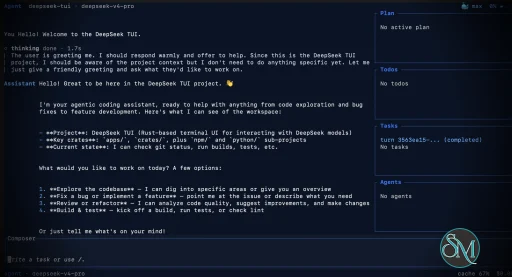
DeepSeek TUI is an open source terminal based coding agent designed for DeepSeek AI models. Unlike a simple chatbot, it can interact with your local workspace, execute shell commands, manage git operations, and assist with software development tasks directly from the command line.
The project is written in Rust and focuses on speed, low resource usage, and keyboard driven workflows. It is especially appealing for developers who spend most of their time in the terminal.
DeepSeek TUI is gaining attention among developers who prefer terminal based workflows and want direct access to AI powered coding tools without relying on heavy IDE integrations. Built around DeepSeek models, it transforms the terminal into an interactive coding assistant capable of editing files, running commands, and managing development workflows.
Download DeepSeek TUI v0.8.50 - Software Mirrors |
|---|
Download DeepSeek TUI v0.8.50 Windows 64bit Download DeepSeek TUI v0.8.50 Windows 64bit Download DeepSeek TUI v0.8.50 Windows 64bit Download DeepSeek TUI v0.8.50 Windows 64bit Download DeepSeek TUI v0.8.50 Windows 64bit Download DeepSeek TUI v0.8.50 Windows 64bit |
Download DeepSeek TUI v0.8.50 macOS arm64 Download DeepSeek TUI v0.8.50 macOS arm64 Download DeepSeek TUI v0.8.50 macOS arm64 Download DeepSeek TUI v0.8.50 macOS arm64 Download DeepSeek TUI v0.8.50 macOS arm64 |
Download DeepSeek TUI v0.8.50 macOS x64 Download DeepSeek TUI v0.8.50 macOS x64 Download DeepSeek TUI v0.8.50 macOS x64 Download DeepSeek TUI v0.8.50 macOS x64 Download DeepSeek TUI v0.8.50 macOS x64 |
Download DeepSeek TUI v0.8.50 macOS arm64 Download DeepSeek TUI v0.8.50 macOS arm64 Download DeepSeek TUI v0.8.50 macOS arm64 Download DeepSeek TUI v0.8.50 macOS arm64 Download DeepSeek TUI v0.8.50 macOS arm64 |
Download DeepSeek TUI v0.8.50 Linux x64 Download DeepSeek TUI v0.8.50 Linux x64 Download DeepSeek TUI v0.8.50 Linux x64 Download DeepSeek TUI v0.8.50 Linux x64 Download DeepSeek TUI v0.8.50 Linux x64 |
Download DeepSeek TUI v0.8.50 Linux arm64 Download DeepSeek TUI v0.8.50 Linux arm64 Download DeepSeek TUI v0.8.50 Linux arm64 Download DeepSeek TUI v0.8.50 Linux arm64 Download DeepSeek TUI v0.8.50 Linux arm64 |
DeepSeek TUI v0.8.50 Release Notes:This release renames the project to CodeWhale. The legacy
compatibility-only deprecation shims during v0.8.x; they print a one-line warning and forward to They will be removed in v0.9.0. The legacy npm package See
InstallRecommended — npm (one command, both binaries)Docker / GHCRcodewhale dispatcher and codewhale-tui runtime (plus the legacy deepseek / deepseek-tui shims during the transition). The latest tag is also updated on release.
Cargo (Linux / macOS)codewhale-cli produces the codewhale dispatcher and codewhale-tui produces the interactive runtime that the dispatcher delegates to. Installing only one binary will fail at runtime with a MISSING_COMPANION_BINARY error.
Manual download — platform archives (recommended)Each archive below contains both thecodewhale dispatcher and codewhale-tui runtime, plus an install script:
| Platform | Archive | Install script |
|---|---|---|
| Linux x64 | codewhale-linux-x64.tar.gz | install.sh |
| Linux ARM64 | codewhale-linux-arm64.tar.gz | install.sh |
| Linux RISC-V | codewhale-linux-riscv64.tar.gz | install.sh |
| macOS x64 | codewhale-macos-x64.tar.gz | install.sh |
| macOS ARM | codewhale-macos-arm64.tar.gz | install.sh |
| Windows x64 (installer) | CodeWhaleSetup.exe | NSIS setup |
| Windows x64 | codewhale-windows-x64.zip | install.bat |
| Windows x64 (portable) | codewhale-windows-x64-portable.zip | — |
Unix (Linux / macOS):
deepseek- and deepseek-tui- assets are compatibility-only deprecation shims for v0.8.x so that existing deepseek update invocations on v0.8.40 keep working; they forward to the canonical binaries. The legacy npm package deepseek-tui is deprecated and is not republished.
Verify (recommended)Download the checksum manifests from this Release and verify:deepseek-artifacts-sha256.txt is also attached for backward compatibility and contains the same hashes as the canonical manifest.
ChangelogSee CHANGELOG.md for the full notes for this release. |
Key Features of DeepSeek TUI
Terminal Native Workflow
DeepSeek TUI operates entirely within the terminal, allowing developers to work without switching between browser windows or external interfaces.AI Assisted Coding
The assistant can read and edit files, generate code, explain logic, and help automate development tasks.Shell Command Execution
It supports running terminal commands directly through the interface, streamlining development workflows.Git Integration
Developers can manage repositories, review changes, and handle version control related tasks from inside the tool.Multiple Work Modes
DeepSeek TUI includes modes like Plan, Agent, and YOLO, offering different levels of automation and approval control.Large Context Handling
The tool is built around DeepSeek V4 capabilities, including support for extremely large context windows that help with understanding bigger codebases.
User Experience
DeepSeek TUI is designed for developers comfortable with terminal environments. The interface is keyboard focused and efficient, though beginners may need time to adapt.
The workflow feels closer to tools like Claude Code or Codex style assistants rather than traditional chat applications. Community feedback on Reddit and GitHub discussions highlights its speed and practical coding workflow.
Performance and Compatibility
Because it is written in Rust, DeepSeek TUI is lightweight and responsive. It supports Linux, macOS, and Windows, with installation available through npm, Cargo, or direct binaries.
Performance depends heavily on the connected DeepSeek models and API configuration, but the local interface itself remains fast and efficient.
Pros
Fast terminal native workflow
AI powered coding and automation
Lightweight Rust based architecture
Supports file editing and shell execution
Open source and actively developed
Cons
Requires familiarity with terminal workflows
Depends on external AI APIs
Advanced automation modes may feel risky for inexperienced users
DeepSeek TUI is ideal for developers, DevOps engineers, and terminal focused power users who want AI assistance integrated directly into their command line workflow. It is especially attractive for users seeking a lightweight alternative to browser based AI coding tools.
DeepSeek TUI combines AI coding assistance with the efficiency of terminal workflows. Its fast performance, flexible automation, and developer focused design make it one of the most interesting open source AI terminal tools currently gaining traction.
Developer:
Hunter Bown
Operating System:
Windows / macOS / Linux
Date Added:
2026-06-02T16:01:57.629Z
Categories:
Post a Comment/Report Broken Link: