NTFS Permissions Auditor is a Windows utility designed to analyze, report, and audit NTFS file system permissions. It helps identify risky permissions, inconsistencies, and unintended access rights on files and folders across local drives or network shares.
Unlike manual examination using Windows Explorer’s security tabs (which can be slow and error-prone) this tool automates analysis and presents results in clear, actionable reports.
Key Features
Comprehensive Permission Scanning
NTFS Permissions Auditor scans folders and subfolders to gather permission data, including:
User access rights
Group memberships
Inherited vs explicit permissions
Effective rights for accounts
This provides a full picture of who can read, write, delete, or modify files.
Visual Permission Mapping
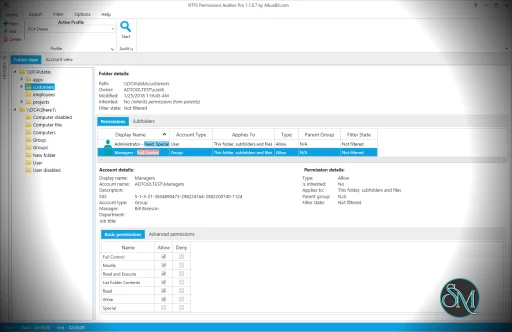
One of the helpful functions is its ability to display permission maps and hierarchies, showing how rights flow through nested folders and groups. This makes complex ACL structures easier to understand.
Report Generation and Export
The tool can export permission reports in multiple formats such as CSV, HTML, and XLSX. These reports are useful for audits, compliance documentation, and security reviews.
Group and User Filtering
You can filter results by user or group, making it easy to focus on specific accounts or sensitive folders.
Network Share Support
NTFS Permissions Auditor works not only on local drives but also on mapped and UNC network paths, making it useful for enterprise environments.
Performance and Ease of Use
The user interface is functional and focused on data presentation rather than aesthetics. Permission scans are typically fast, though very large file systems may take longer depending on system resources.
Results are displayed in expandable lists and tables, and filtering tools help narrow down specific permission issues quickly.
While the interface may feel technical to casual users, administrators and security professionals will appreciate the depth of detail provided.
Pros and Cons
Pros
Detailed and accurate permission scanning
Visual maps help simplify complex ACLs
Exportable reports for compliance needs
Works across local and network drives
Effective filtering based on users or groups
Cons
Designed for IT professionals; not ideal for casual users
Interface is utilitarian, not polished
Some advanced features may require training to master
Who Should Use NTFS Permissions Auditor?
This tool is especially useful for:
System administrators managing file servers
Security auditors performing permissions reviews
IT teams responsible for compliance and access control
Organizations with sensitive data and strict access policies
If you need to audit NTFS permissions effectively and generate clear reports, NTFS Permissions Auditor provides the necessary tools.
Final Verdict
NTFS Permissions Auditor is a strong and specialized utility for auditing file permissions on Windows systems. Its detailed analysis, reporting capabilities, and support for network paths make it valuable for administrators and security teams.
If you manage Windows file servers, network shares, or any environment where NTFS permissions matter, NTFS Permissions Auditor is a handy tool for auditing, reporting, and securing access rights. NTFS Permissions Auditor is built for administrators and auditors who need clear visibility into file and folder access controls.
For professionals who need reliable NTFS access review and reporting, NTFS Permissions Auditor is a practical choice.
Post a Comment/Report Broken Link: